Guides › Community and bots
Request a collection and claim its page
Get a Base or Robinhood Chain collection tracked by its contract, and, if you made it, claim its page by signing from the owner's wallet: Creator verified, your note and links.
Watch
What it is
FloorFeed tracks each network's busiest collections by itself. On Base and Robinhood Chain you can also ask for any collection by its contract: if FloorFeed can read it, it starts tracking it at once (its floor, sales, holders and its place in the feed).
If you made the collection, you can claim its FloorFeed page. You prove it by signing a free message with the wallet the contract names as its owner. A claimed page shows Creator verified with your own short note and links, and stays tracked for as long as it's yours. Signing sends no transaction and moves nothing.
Where to find it
Request a collection: floorfeed.io/request-collection, or Request a collection › under a Markets search that finds nothing.
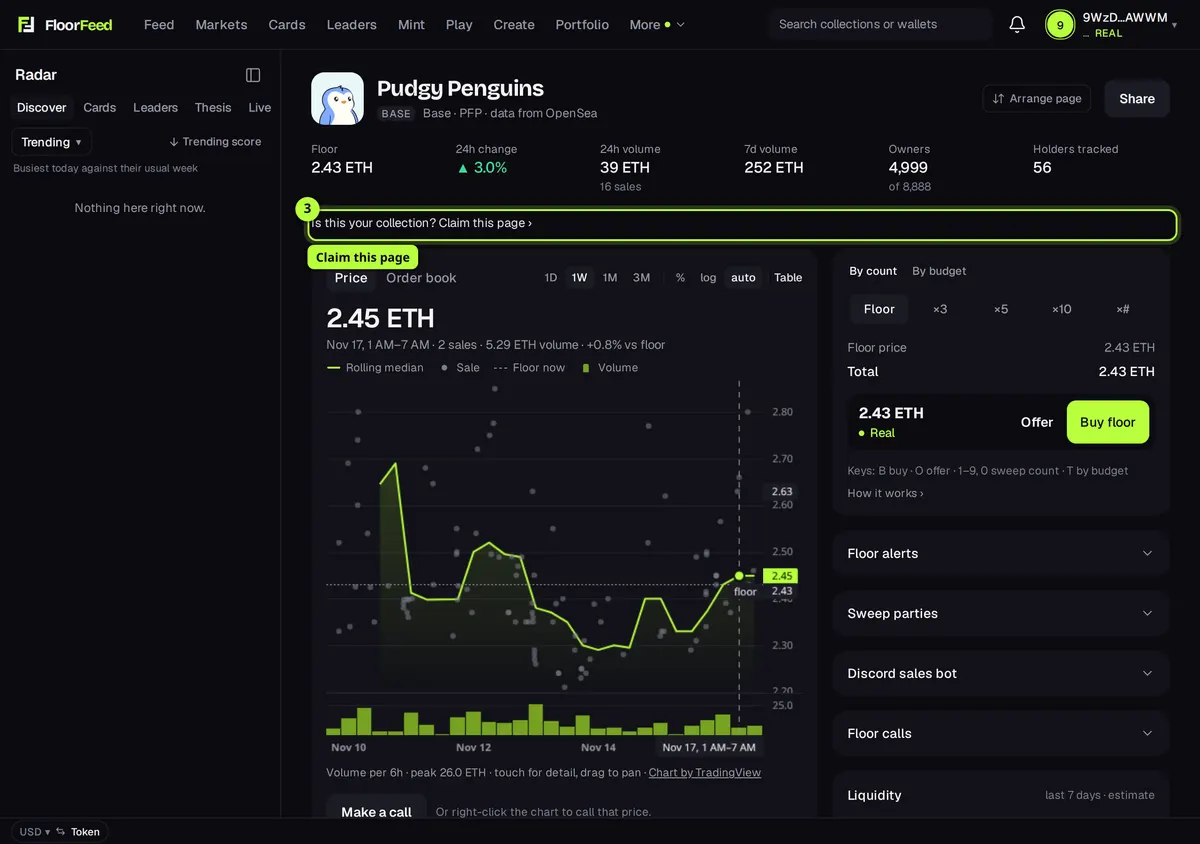
Claim this page: on the collection's own page, under its header: Is this your collection? Claim this page ›. It's only there on Base and Robinhood Chain collections that nobody has claimed yet.
Step by step
Pick the network and paste the contract
On Request a collection, pick Robinhood Chain or Base, then paste the collection's contract address (0x…) or its OpenSea link into Contract address or OpenSea link. A link to one of its NFTs works too.
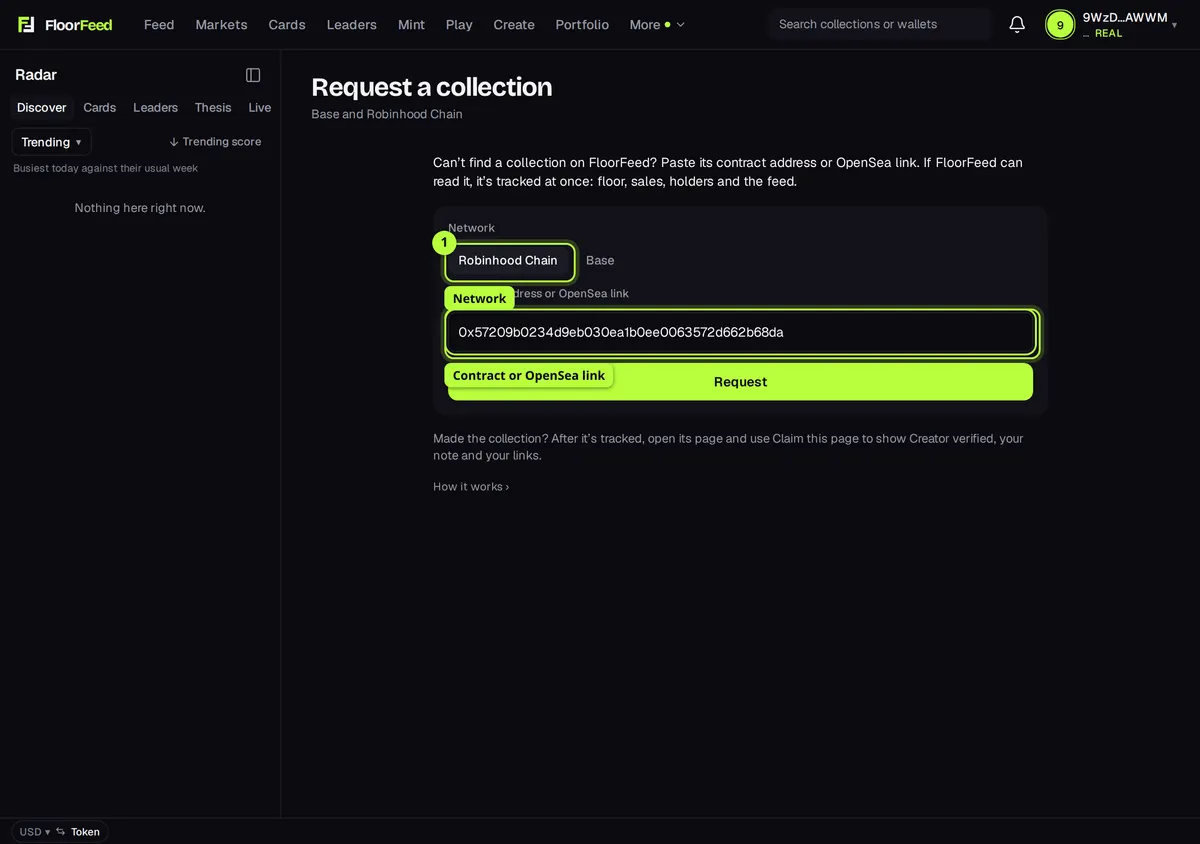
Press Request
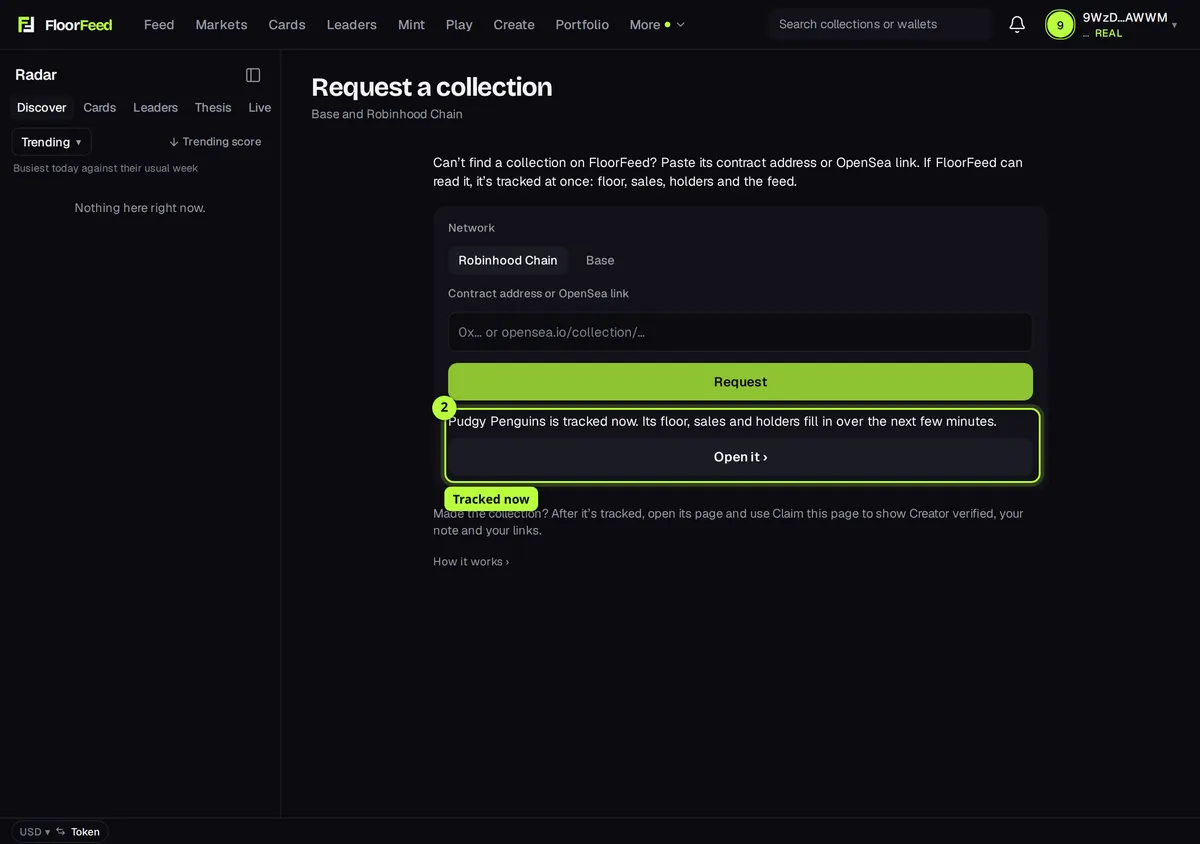
Press Request (sign in first: requests need an account). When FloorFeed can read it, the answer says it's tracked now: press Open it › for its page. Otherwise the answer says the team will look at it.
On your collection's page, press Claim this page
Open the collection's page. Under its header, press Is this your collection? Claim this page ›.
Connect the owner's wallet
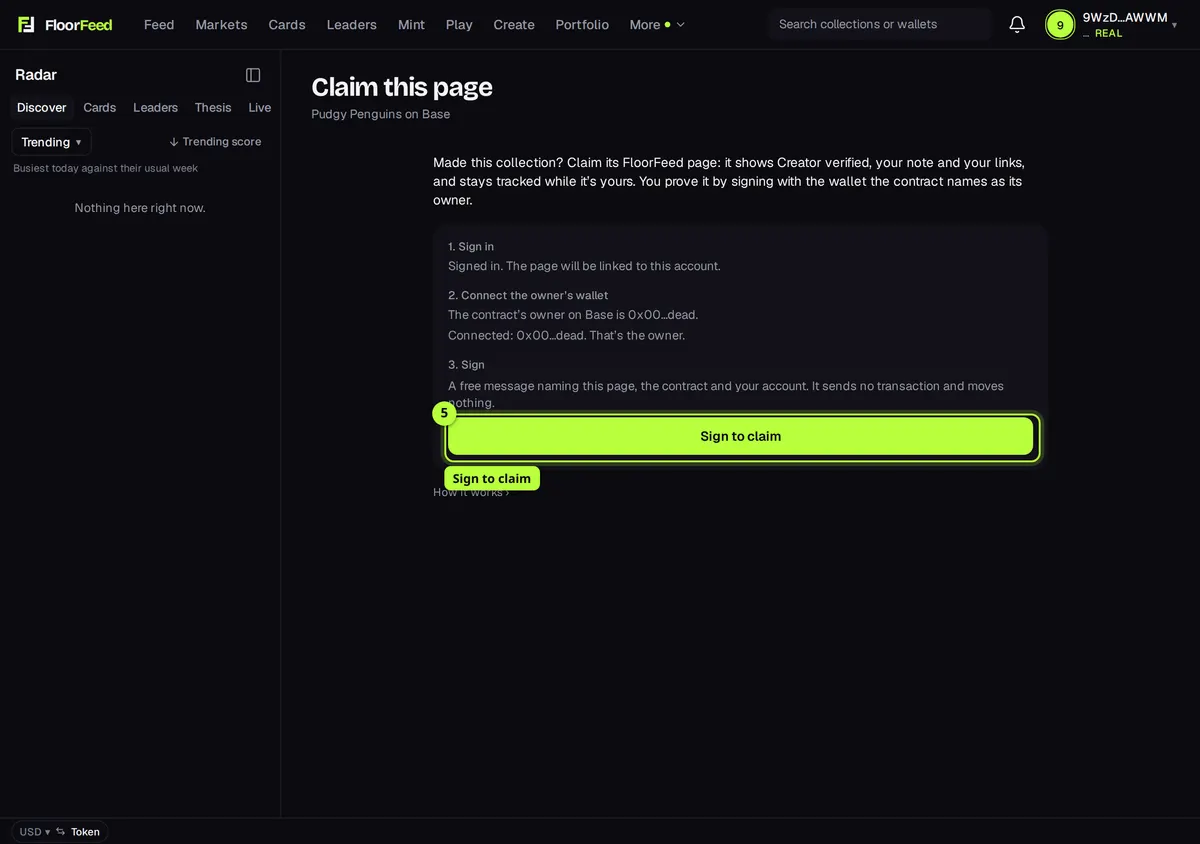
Claim this page says which wallet counts: The contract's owner on Base is 0x12…ab. Sign in, then connect that wallet (Connect MetaMask, or your wallet's name). If you connect another one it says That isn't the owner: switch accounts in your wallet.
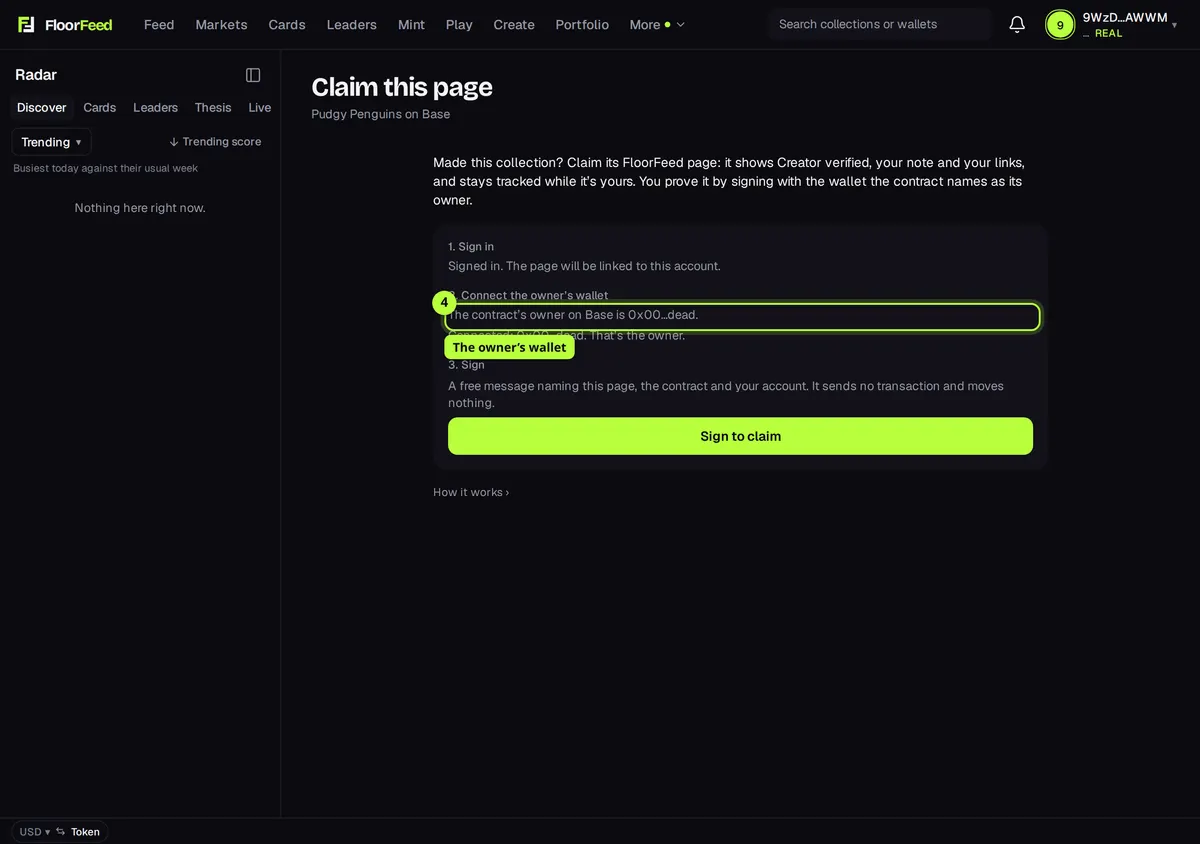
Press Sign to claim
Press Sign to claim and sign in your wallet. The message names the collection, the network, the contract, your wallet and your FloorFeed account, with a code that works once, for 10 minutes. Only sign it on floorfeed.io.
Add your note and links
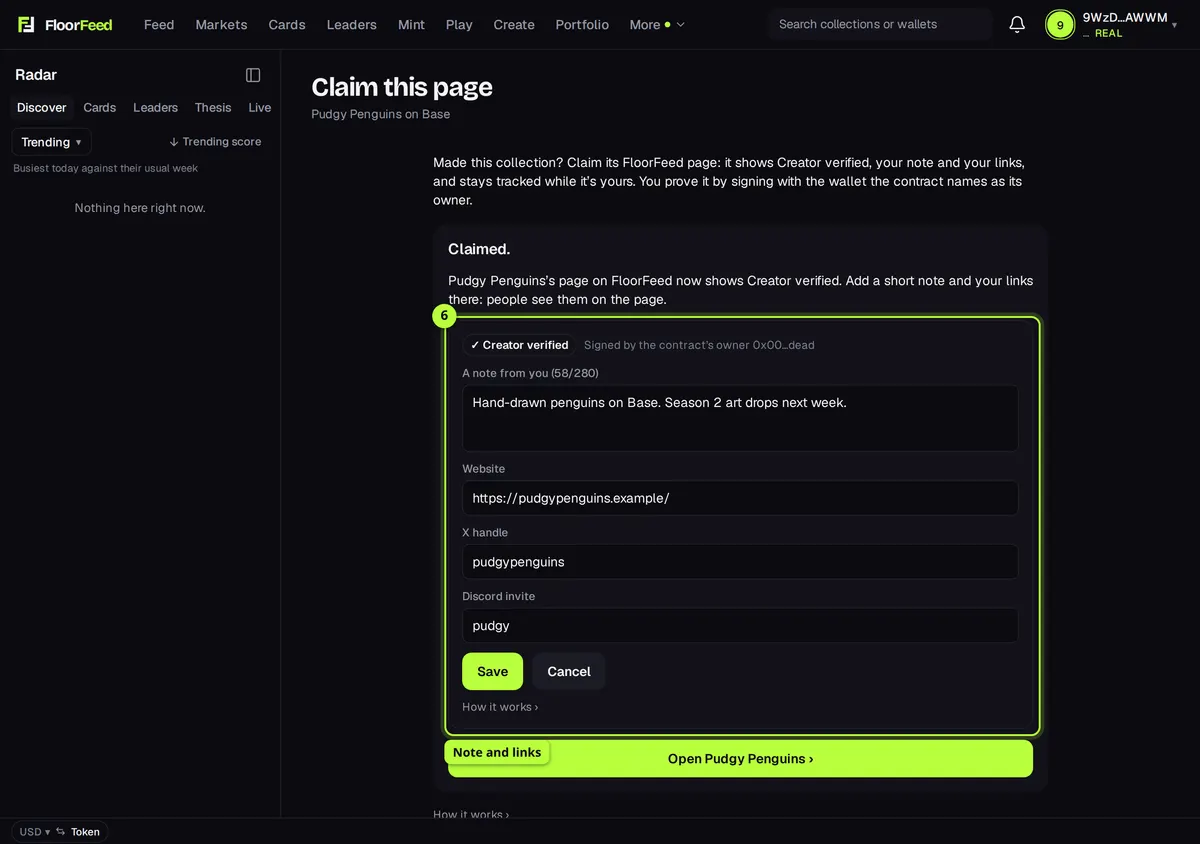
Claimed: the page shows Creator verified. Press Edit note and links to add a note (up to 280 characters), your website, your X handle and your Discord invite, then Save.
Options
- Network
- Robinhood Chain or Base. Other networks aren't open for requests or claims yet.
- Contract address or OpenSea link
- A 0x address, opensea.io/collection/<name>, a link to one of its NFTs on OpenSea, or the collection's OpenSea name.
- Owner or creator
- The wallet that counts is the contract's owner() (most NFT contracts have one). If the contract has none, or it was renounced to 0x0, it's the wallet that sent the transaction that created the contract.
- Note and links
- A note of up to 280 characters, a website (https), an X handle and a Discord invite (discord.gg/…). Nothing else, and no other kinds of link.
Fees and limits
- All networks
- Free. A request costs nothing, and claiming is a signed message, not a transaction: no gas.
- Base and Robinhood Chain only, for now.
- Five requests a day per account. FloorFeed reads collections through OpenSea, so it tracks one at once only when OpenSea lists the contract on that network and prices it in the network's coin; anything else waits for the team.
- A collection must be tracked before its page can be claimed, and FloorFeed must have read its contract (a few minutes after it's tracked).
- Smart wallets (a Safe, Coinbase Smart Wallet) can claim once the wallet is deployed on that network.
- A claim lapses when its wallet stops being the contract's owner (FloorFeed looks again at most once a day). FloorFeed can take a claim off a page; it then stays unclaimed until support looks at it again.
- FloorFeed checks who signed, not what the note says. Links on a claimed page leave FloorFeed.
Troubleshooting
- It says "That collection is on Ethereum, not Base."
- OpenSea lists it on another network. Pick the network it's on; only Base and Robinhood Chain take requests for now.
- It says the team will look at it.
- FloorFeed couldn't track it by itself: OpenSea doesn't list the contract yet, it's priced in another currency, or the day's automatic tracking is used up. Nothing more to do; the team sees the request.
- There's no Claim this page on my collection.
- It's only on Base and Robinhood Chain collections FloorFeed tracks and nobody has claimed. Request it first if it isn't tracked; if it says Creator verified, it's claimed already.
- It says "This wallet isn't the contract's owner."
- Connect the wallet it names. If you moved the contract to another wallet, that one counts now.
- It says the contract names no owner and FloorFeed couldn't find who created it.
- Some contracts have neither. Write to support from the creator's account and the team will look at it.
- It says the page is already claimed by the contract's owner on another FloorFeed account.
- Sign in with that account, or write to support if you think it's wrong.
Questions
- Does signing give FloorFeed control of my wallet or collection?
- No. It's a message, not a transaction: it moves nothing and approves nothing. It only proves you hold the owner's wallet.
- Can someone else claim my collection?
- Only with the owner's wallet. FloorFeed reads the owner from the contract itself, twice, and the signed message names your account and a one-time code.
- What does a claim change?
- The page shows Creator verified with your note and links, and the collection stays tracked while it's yours. Prices, sales and risk signals are FloorFeed's own, the same as on any page.
Related
- Official FloorFeed collections
- Launch your own collection (a drop) on the launchpad
- Your collection's community site
- Sales bots for Discord and Telegram
Checked against FloorFeed on 2026-11-17.