Guides › Wrapped, Roast and sharing
Trader cards: share your record after fees and claim your wallet
Every wallet with finished flips has a trader card with its whole record after fees and royalties. Claim yours to add your name, a Verified tick, your X handle and your Feeder Score, or hide it from FloorFeed's lists.
Watch
What it is
A trader card is one wallet's whole NFT trading record on one page and one picture: profit after marketplace fees and royalties, win rate, best flip and the networks it trades on, with every coin it flips in added together in dollars. The link, floorfeed.io/trader/<wallet>, shows the card as a picture when you post it on X, Farcaster, Discord or Telegram.
Wallet records are public on-chain data, so every wallet with finished flips has a card, shown with its address or its ENS or .sol name. If a wallet is yours, you can claim it. Your FloorFeed name, a Verified tick, your X handle and your Feeder Score then show on its card, its wallet page and the Leaders board. Or you can choose Hidden to take it off FloorFeed's lists.
Where to find it
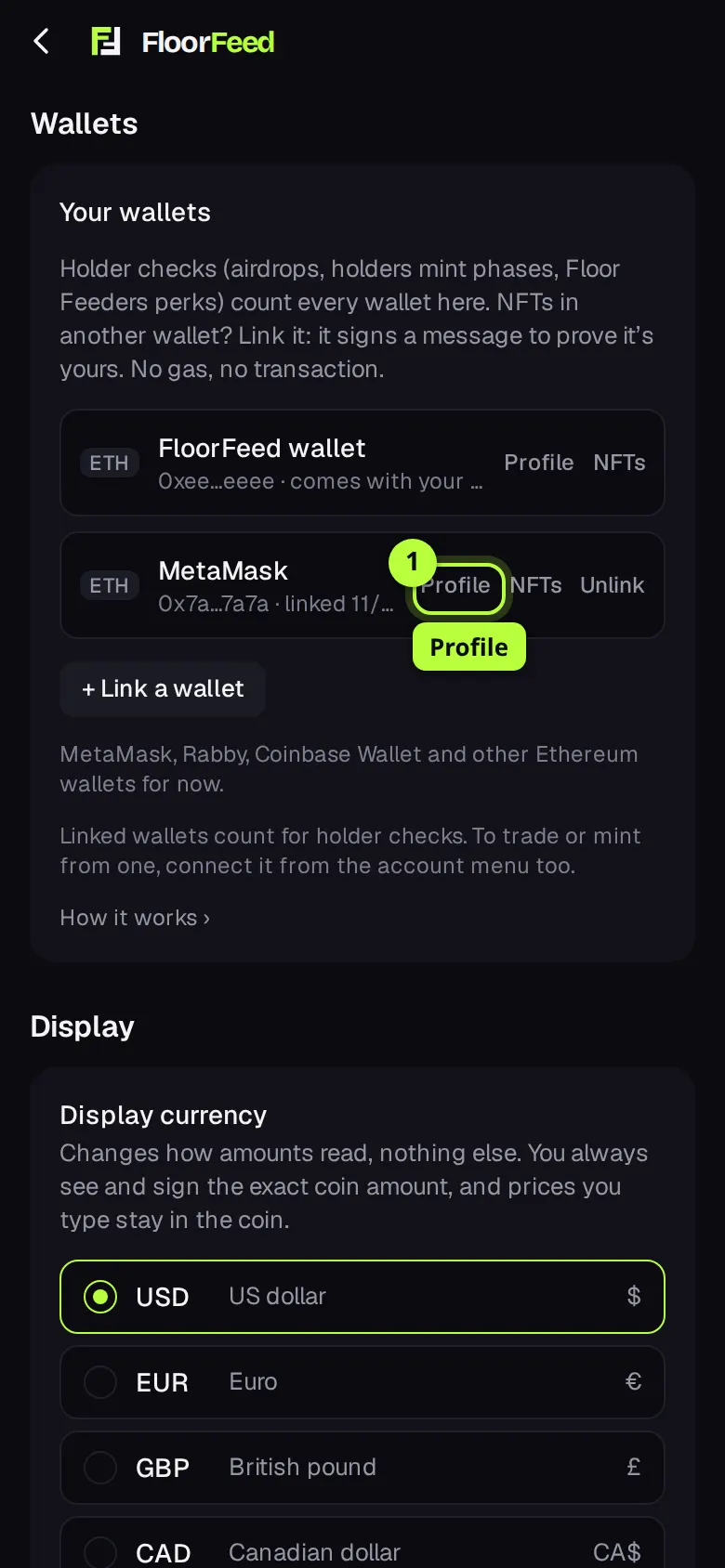
Settings → Your wallets: Profile beside each wallet on your account claims it or changes its claim.
Your own wallet's page: Share my record and Claim profile (Edit profile once claimed).
Leaders: tap a trader, then Trader card →. Claimed wallets have a lime tick beside their name.
Step by step
Open Settings → Your wallets
Open Settings and find Your wallets. Every wallet on your account is listed, with Profile beside it. A wallet you trade from elsewhere needs linking first: + Link a wallet, and the wallet signs a message to prove it's yours (no gas, no transaction). Tap Profile beside the wallet you want to claim.
Fill in your profile
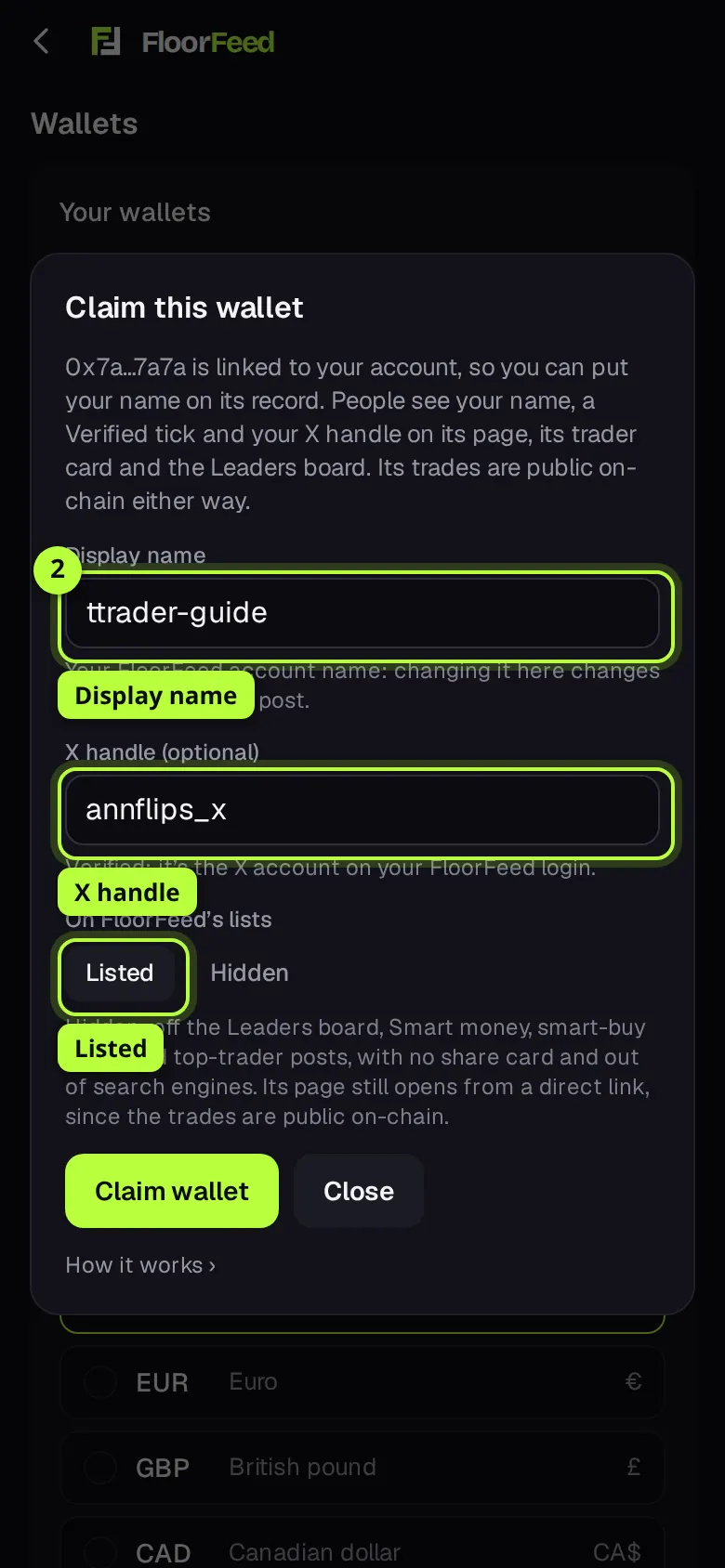
Claim this wallet opens. Display name is your FloorFeed account name. X handle is optional: the X account you sign in with is filled in for you and shows as verified; any other handle shows as not verified. Leave On FloorFeed's lists on Listed.
Tap Claim wallet
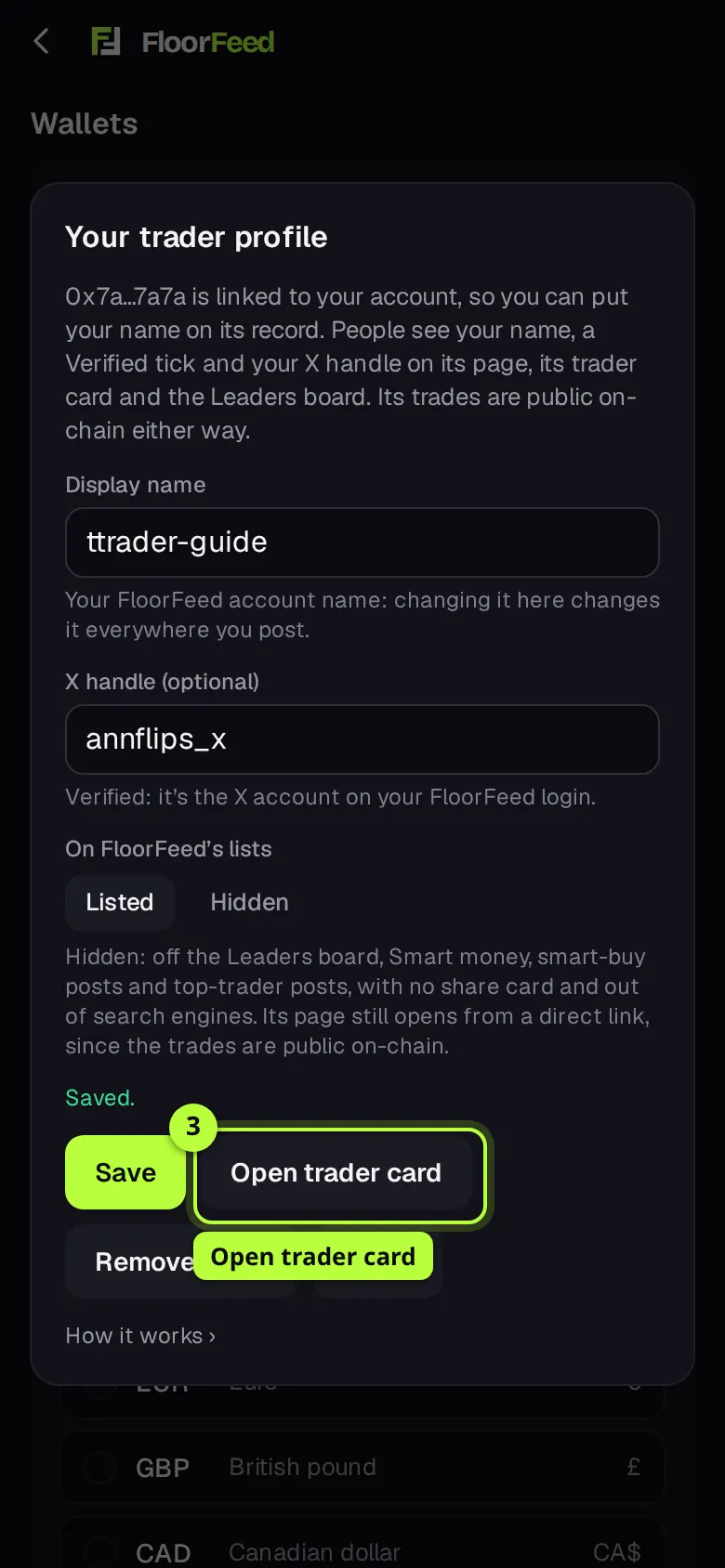
Tap Claim wallet. Saved. appears, with Open trader card. The wallet's page, its card and the Leaders board now show your name and the Verified tick.
Your trader card
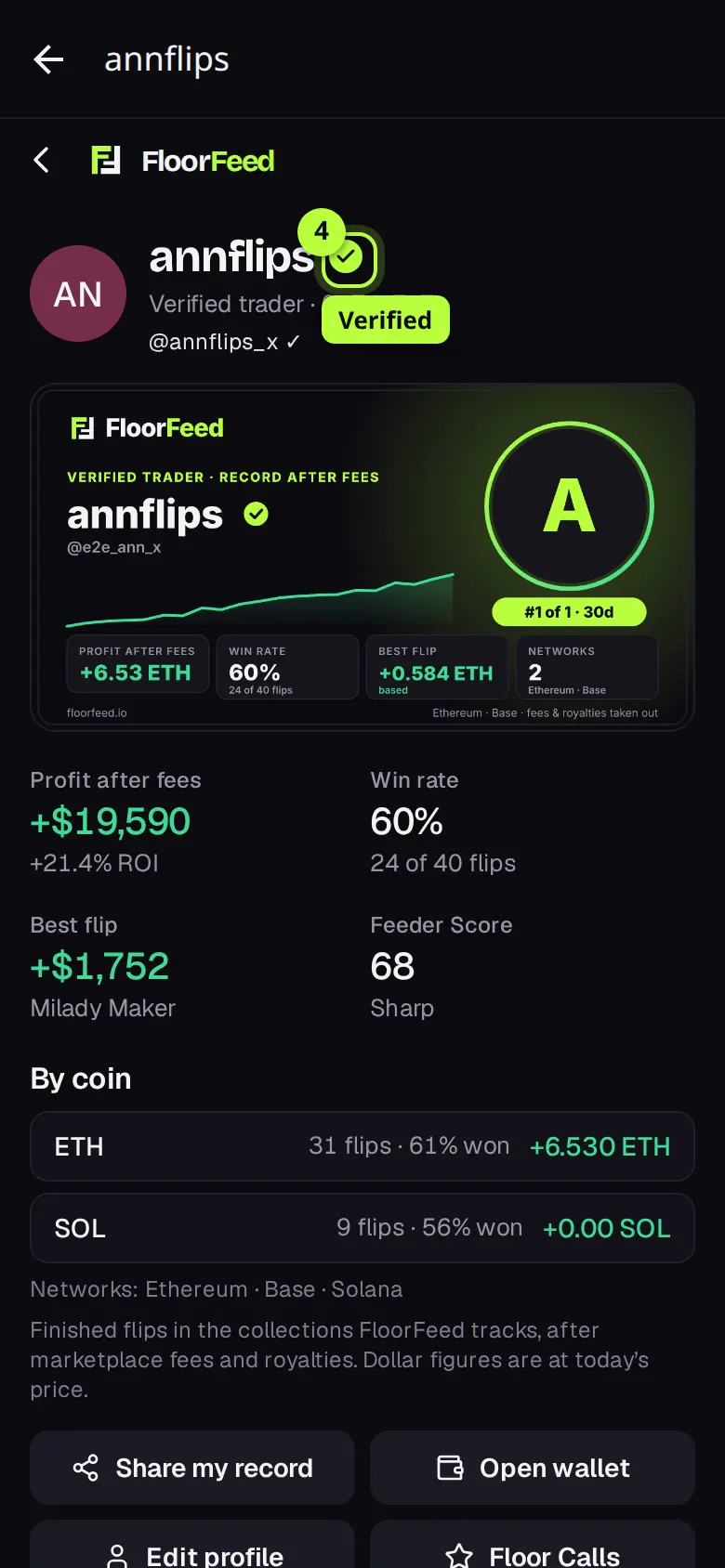
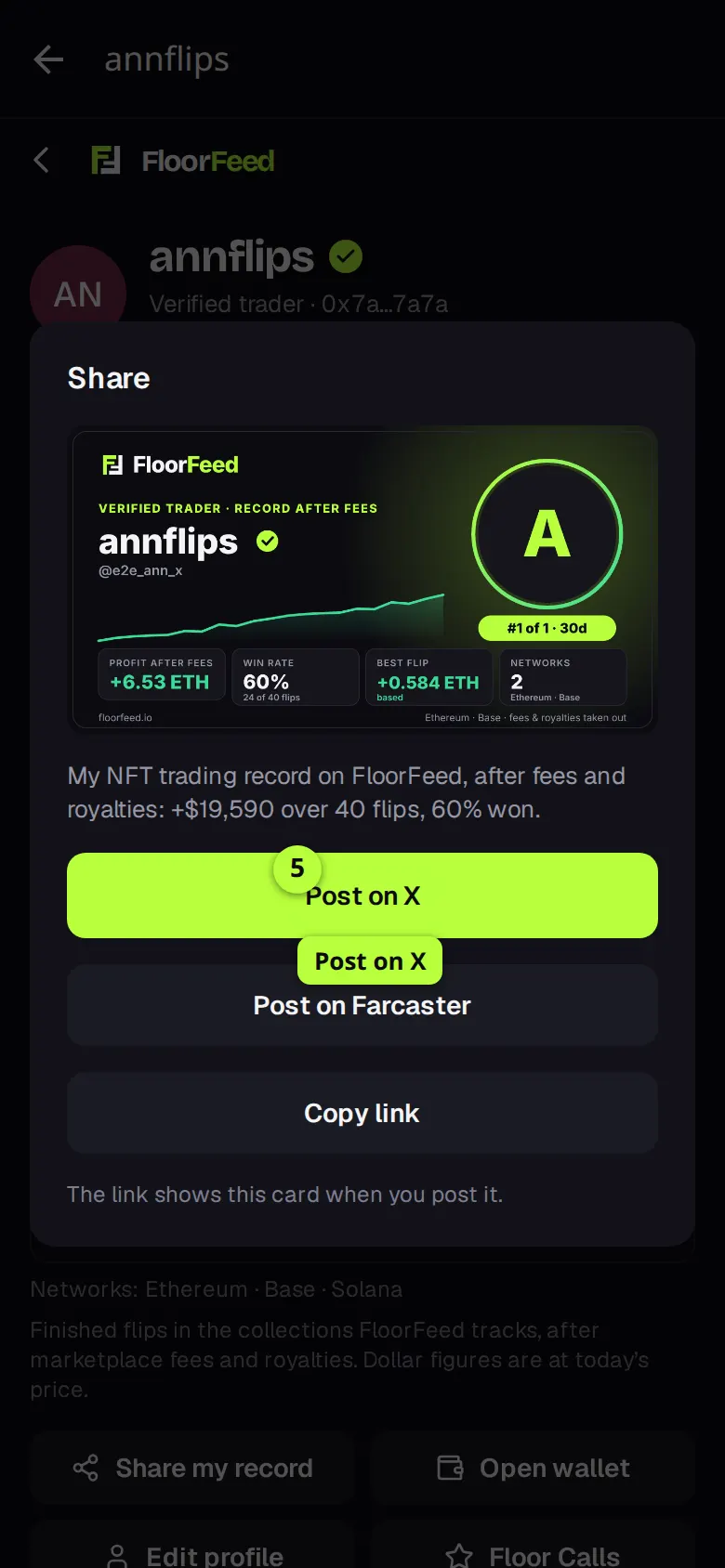
Open trader card (or Share my record's page) shows the card: your name with the tick, your X handle, the picture people see in a post, and the figures under it, with each coin on its own line under By coin.
Share my record
Tap Share my record, then Post on X. X opens with the text and the link, and the post shows the card. Copy link copies the link instead, and Post on Farcaster is there too.
Hide it, or change it later
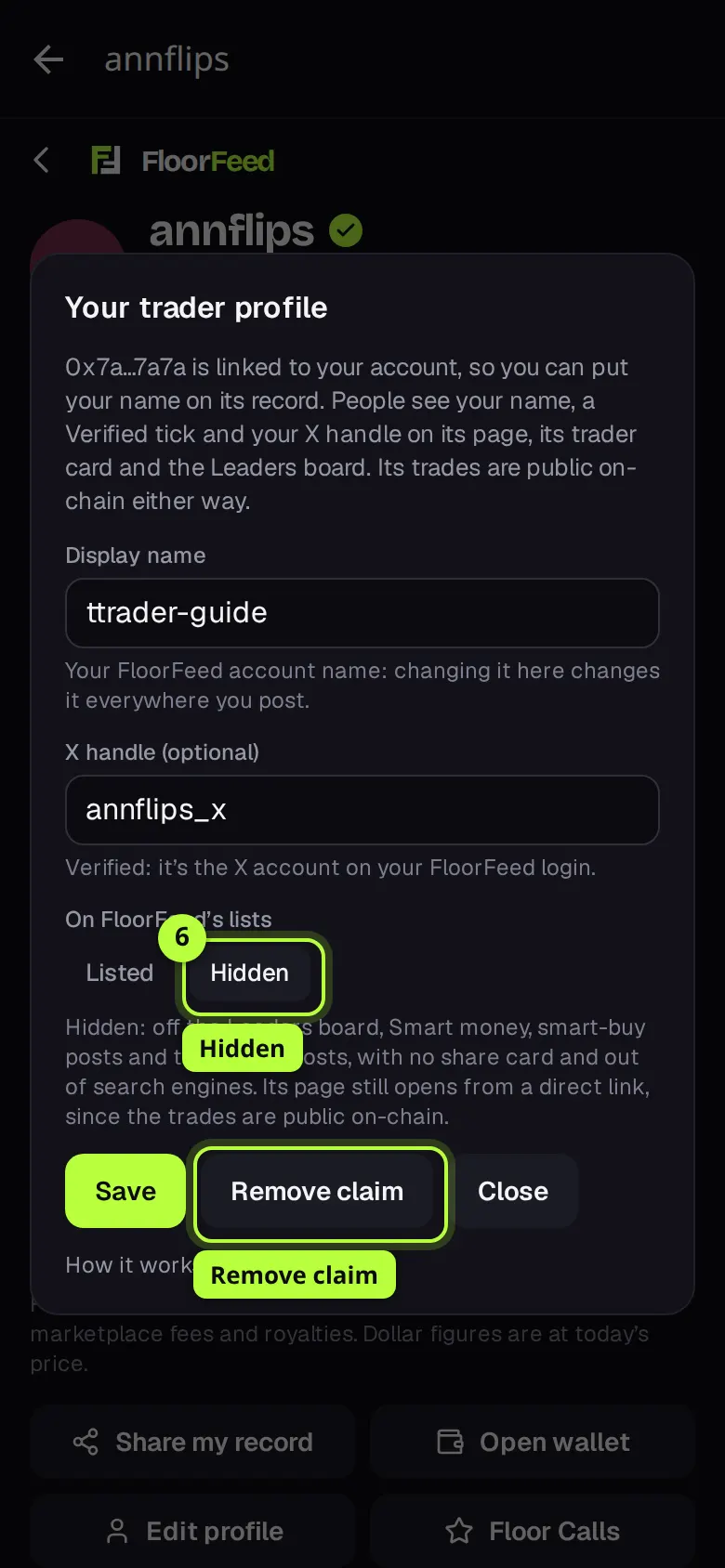
Tap Edit profile to change your name or X handle, or choose Hidden and tap Save to take the wallet off FloorFeed's lists. Remove claim takes your name and tick off the wallet.
Options
- The figures
- Finished flips (a sale matched to the wallet's last earlier buy of the same NFT) in the collections FloorFeed tracks, after marketplace fees and royalties. Each coin's total stays in that coin under By coin; the headline total is in dollars at today's price. A coin with no dollar price is left out of the dollar total, and the card says so. NFTs it still holds don't count.
- Verified tick
- The wallet is linked to the account that claimed it. If the wallet is unlinked, or another account links it, the name and tick come off at once.
- X handle
- Verified (a ✓ and a link) only when it's the X account you sign in to FloorFeed with. Any other handle shows as not verified, isn't a link and never goes on the card's picture.
- Display name
- Your FloorFeed account name, the one on your Floor Calls and posts: 3 to 20 letters, numbers, dots, dashes or underscores, and nobody else's. Changing it here changes it everywhere.
- Feeder Score
- Your Floor Calls score shows on a claimed wallet's card once you have 5 settled calls, with a Floor Calls button to your calls.
- Listed or Hidden
- Hidden takes the wallet off the Leaders board, Smart money, smart-buy and top-trader posts, the sitemap and search engines, and it has no trader card. Its trades are public on-chain, so its wallet page still opens from a direct link, without your name.
Fees and limits
- All networks
- Free. Linking a wallet is a signed message, not a transaction, and claiming or sharing costs nothing.
- Up to 20 claimed wallets per account, and 10 changes a minute.
- Solana wallets can be claimed once linked; linking outside Solana wallets needs Solana linking switched on for FloorFeed. Your FloorFeed Solana wallet is already on your account.
- Only flips in collections FloorFeed tracks count. A card's record refreshes at most every 10 minutes.
- A hide reaches every list within a minute. A link preview someone already posted can keep its old picture for a while.
Troubleshooting
- "That wallet isn't linked to your account."
- Link it first in Settings → Your wallets → + Link a wallet. If you just linked it, wait a few seconds and try again: FloorFeed reads your wallets from your sign-in provider.
- My X handle says not verified.
- Only the X account you sign in to FloorFeed with counts as verified. Type that one, or leave it as not verified.
- "That name is taken."
- Display names are one per account. Pick another; it changes your account name everywhere.
- My card's dollar total looks low.
- Coins without a dollar price are left out of the dollar total (the card says priced coins). Each coin's own total is under By coin.
- There's no Share my record on my wallet.
- It shows on wallets with at least one finished flip that aren't Hidden. Open the wallet from Settings → Your wallets → NFTs, or connect it, so FloorFeed knows it's yours.
Questions
- Can someone else claim my wallet?
- No. Only an account the wallet is linked to can claim it, and linking needs the wallet to sign. If a wallet moves to another account, the old claim stops counting at once.
- Does Hidden delete my trades?
- No. Trades are public on the blockchain. Hidden keeps FloorFeed from listing, ranking, posting or drawing a card for the wallet.
- Will FloorFeed post my name?
- Only on a wallet you claimed and left Listed. Unclaimed wallets show their address or ENS / .sol name only.
Related
- Wallet Roast: a share card from a wallet's real trades
- Your 2026 Wrapped
- If you'd copied a wallet
- Link your other wallets
- Feeder Score: how good your calls are
Checked against FloorFeed on 2026-11-18.