Guides › Launchpad and minting
The Mint tab
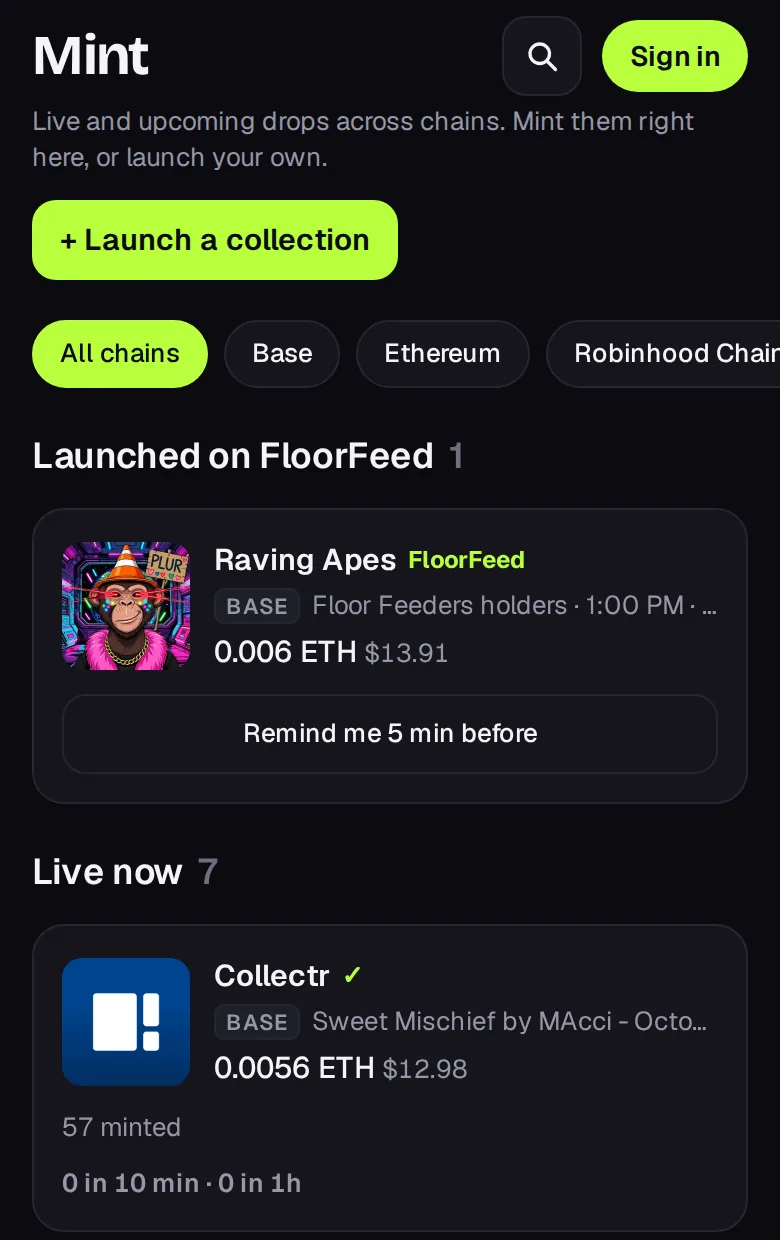
Minting means buying a brand-new NFT straight from the collection's contract, at the creator's price, before it trades anywhere. The Mint tab gathers what's minting across networks, so you can find a drop, check it and mint it without leaving FloorFeed.
- Launched on FloorFeed
- Collections creators launched here, at the top. They always show whatever the filters: live and upcoming first, then the ones that sold out (marked Sold out). A launch that ended without selling out drops off.
- Live now
- Drops minting right now, fastest first. Each card shows how much of the supply is minted, how fast it's going (mints in the last 10 minutes and the last hour, read from the chain every 2 minutes) and how many proven flippers have minted. Base drops lead.
- Upcoming
- The next stages, grouped by day, with their time and price.
- Ended recently
- What just sold out or closed. A sold-out collection is bought from holders on its collection page.
Filter by network and by price (free, under $10, paid). Verified only is on by default: it shows collections OpenSea has reviewed. Unverified drops can be copies of a real collection, and every Solana drop is unverified, since FloorFeed finds those on chain itself; they're one tap away under the list.
Tip: Tap Remind me on an upcoming stage and FloorFeed sends a notification 5 minutes before it opens. Allow notifications for FloorFeed in your browser, or the reminder can't reach you.
Drops come from OpenSea, and on Solana from Metaplex candy machines minting right now. A card opens the drop's own page, where the mint happens.