Guides › Portfolio
Add to wallet: see your NFT in MetaMask and other wallets
Your NFT is in your wallet but the app doesn't show it? Add to wallet switches your wallet to the NFT's network and asks it to show the NFT, or gives that wallet's steps, with the contract and token ID to copy.
Watch
What it is
When you win a Feeding Frenzy prize, buy, mint or send an NFT to another wallet of yours, it's in that wallet as soon as the network confirms it. But many wallet apps don't list a new NFT by themselves: MetaMask only finds some, others hide new ones as possible spam, and a wallet on another network shows nothing at all.
Add to wallet fixes that from FloorFeed. With a browser wallet such as MetaMask connected, one press switches it to the NFT's network (adding the network if your wallet doesn't know it yet) and asks it to show the NFT. Where a wallet can't do that, the See it in your wallet sheet gives that wallet's own steps, with the network, the contract address and the token ID to copy, and links to the NFT on OpenSea and the explorer.
It's never a signature or an approval. Your wallet shows a prompt to add a network or an NFT to its list; nothing is sent, nothing is spent, and nothing can move.
Where to find it
Portfolio, NFTs tab: the wallet button next to Send on every Ethereum-style NFT, or ⋯ → Add to my wallet app….
The Your NFTs panel on a computer: right-click an NFT (or tap ⋯) → Add to my wallet app….
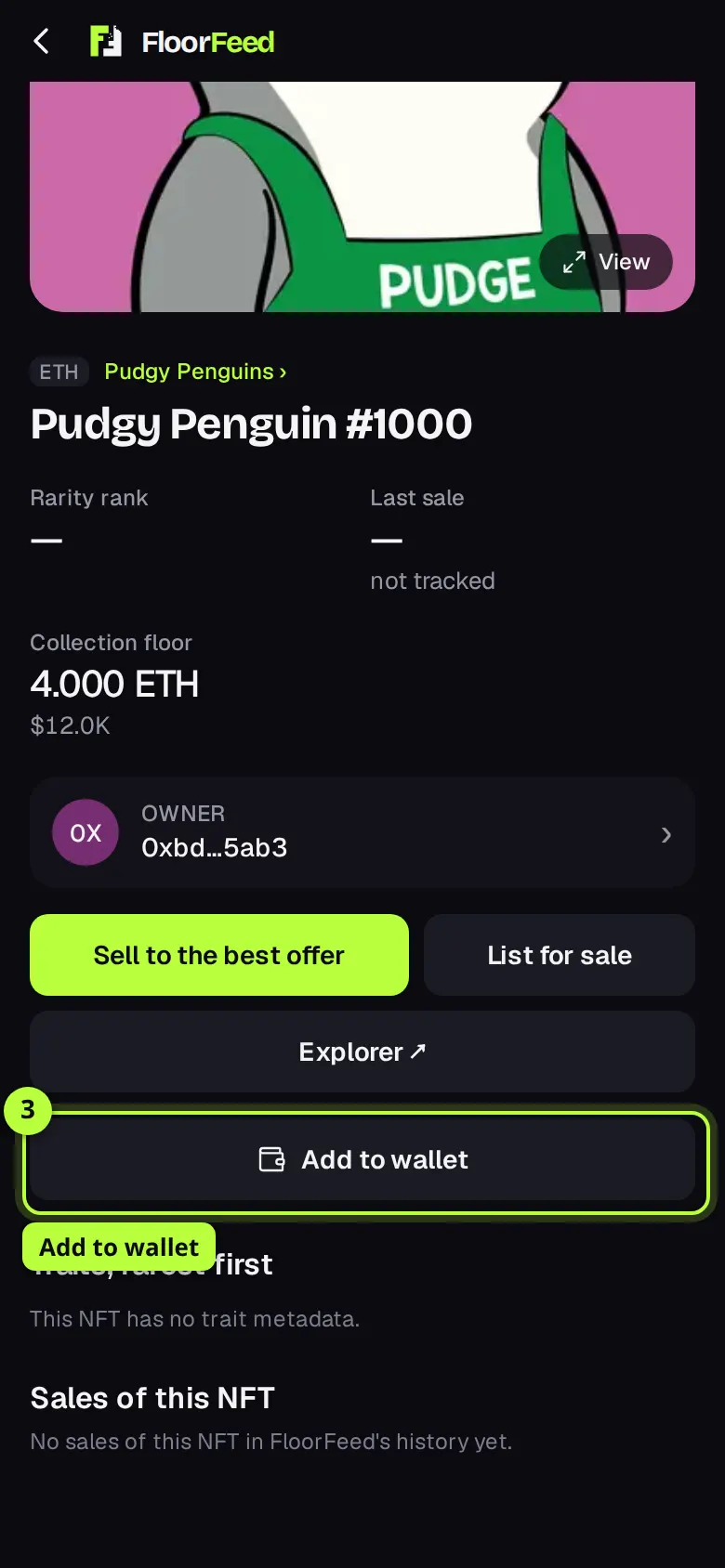
An NFT's own page, when one of your wallets holds it: Add to wallet, under the trade buttons.
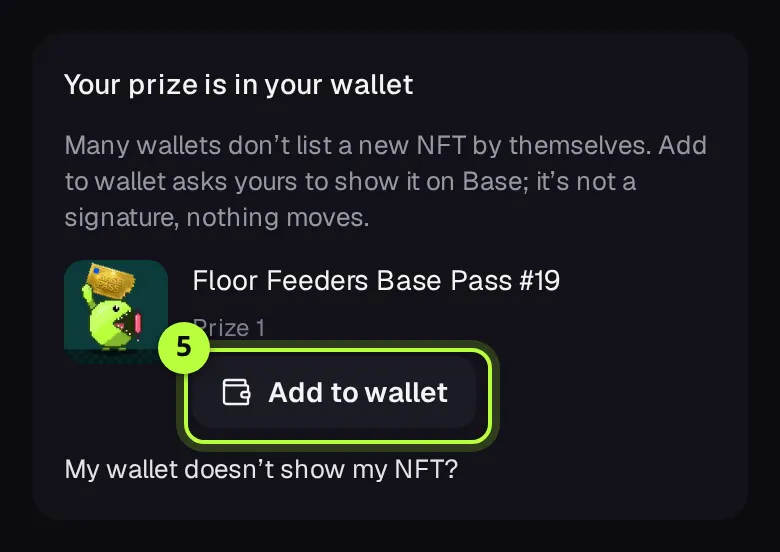
A Feeding Frenzy you won: the Your prize is in your wallet card, with Add to wallet on each NFT.
My wallet doesn't show my NFT? on the Frenzy prize cards and on an empty Portfolio, and Don't see it in the other wallet? in the Send sheet after a send.
Step by step
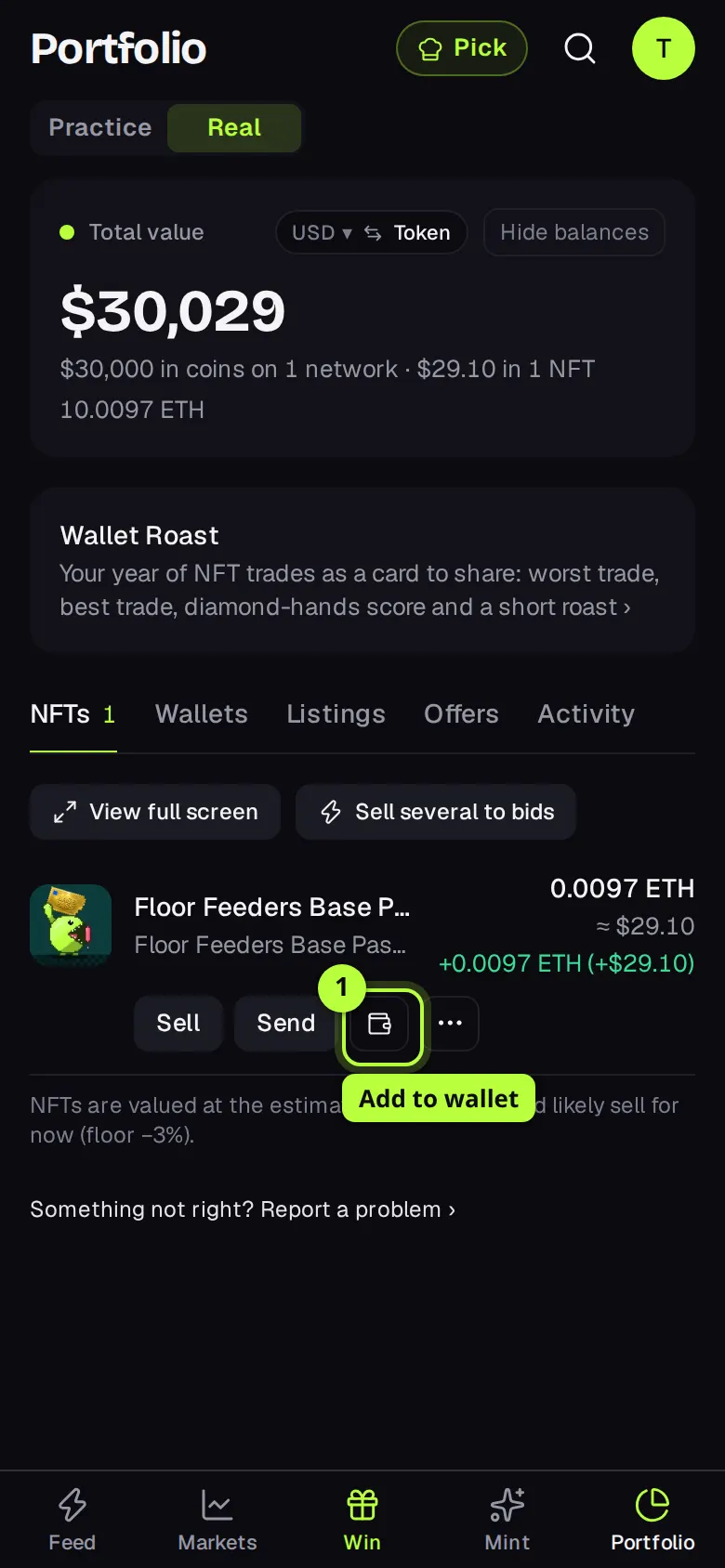
Press the wallet button
In Portfolio, NFTs tab, find the NFT and press the wallet button next to Send (or ⋯ → Add to my wallet app…). On the NFT's own page the button says Add to wallet.
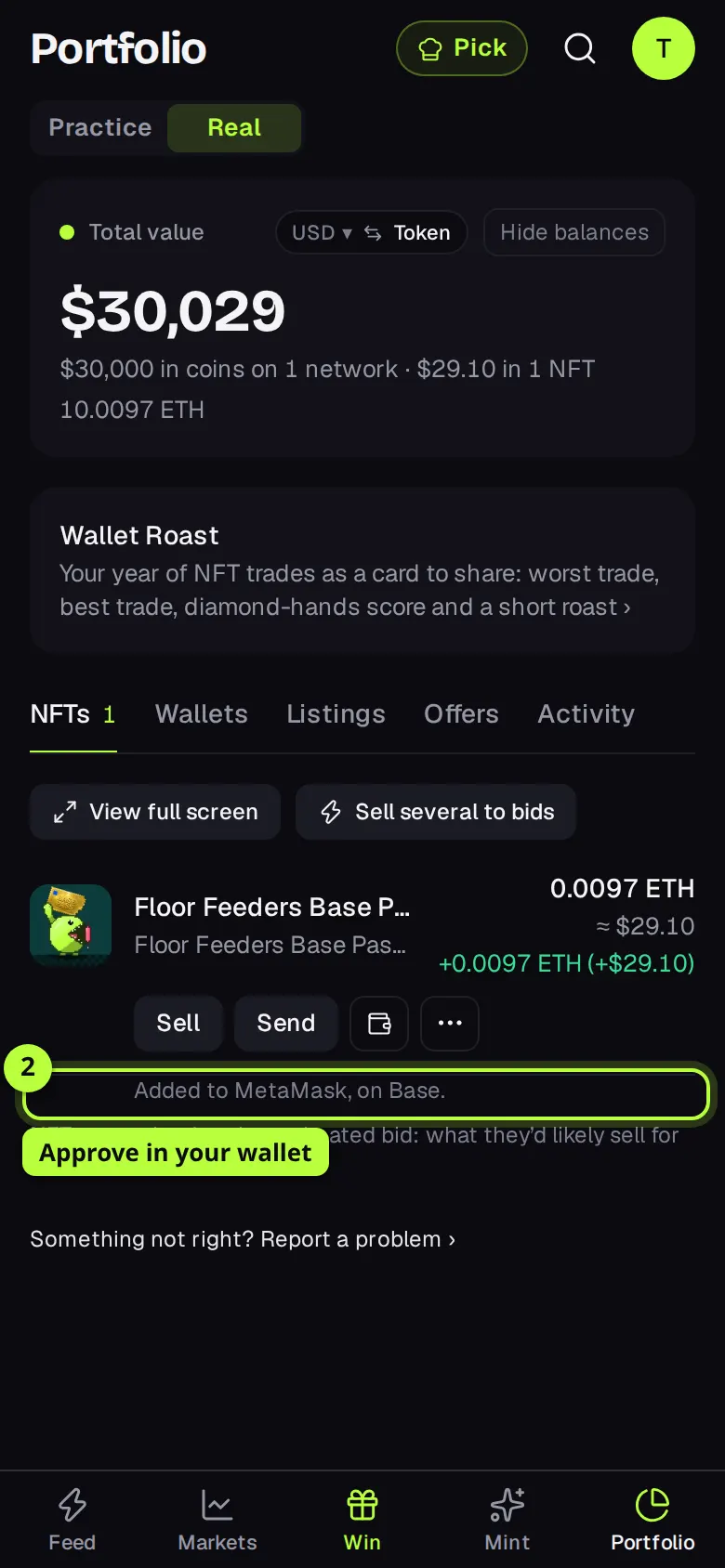
Approve the network and the NFT
Your wallet asks to switch to the NFT's network, or to add it first if it doesn't know it (FloorFeed only adds networks from its own list, with their official RPC). Then it asks to add the NFT. Approve both: the line under the NFT says Added to MetaMask, on Base (or It's already in MetaMask).
On the NFT's page
On an NFT you hold, Add to wallet is under the trade buttons and does the same.
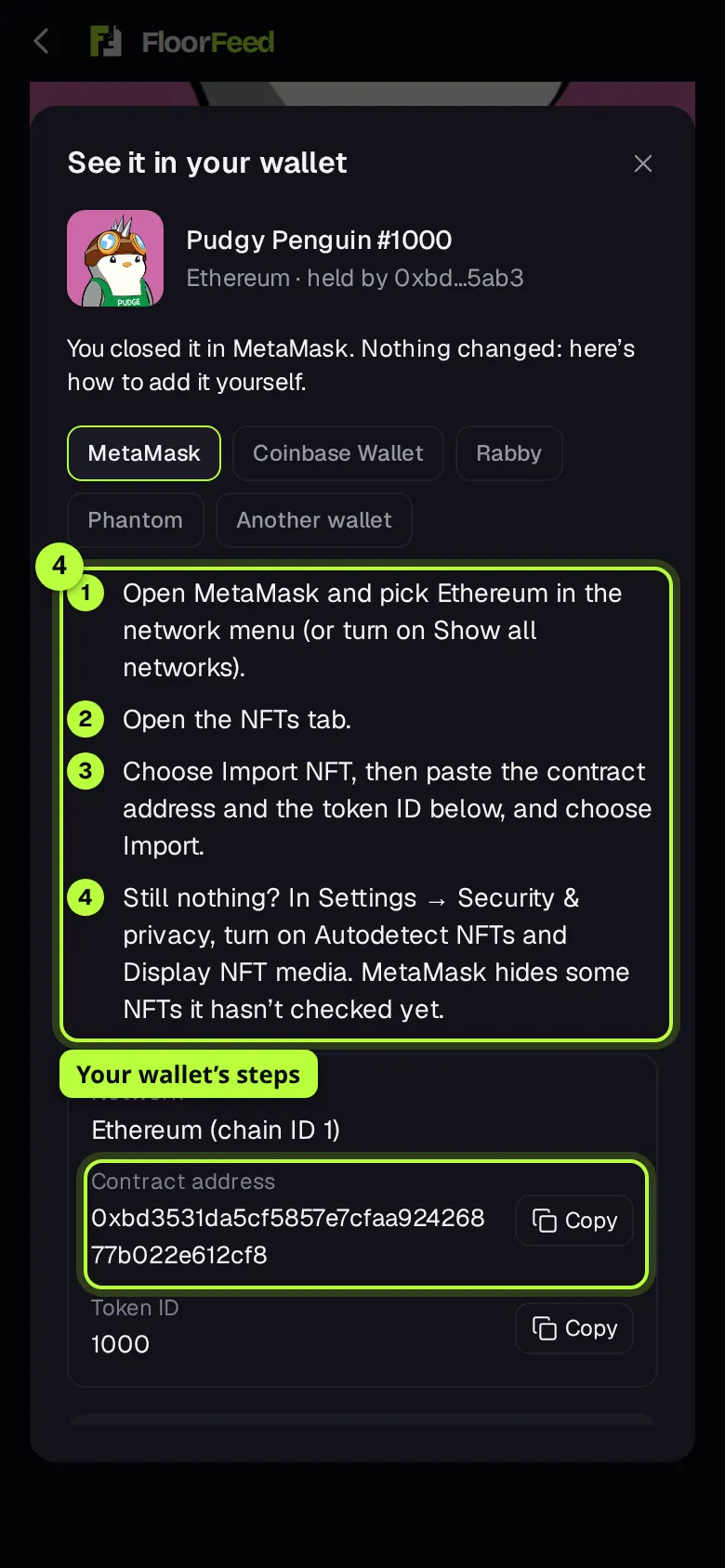
If your wallet can't add it
Coinbase Wallet, Rabby, Phantom, the FloorFeed wallet and some phone wallets can't add an NFT from a website, and if you said no the same happens: the See it in your wallet sheet opens. It says why, gives your wallet's steps (pick another wallet at the top to see its own), the network and chain ID, the Contract address and Token ID with Copy buttons, Switch my wallet to …, and View on OpenSea and the explorer.
After a Feeding Frenzy you won
Once your prize is delivered, the Frenzy's page shows Your prize is in your wallet, with Add to wallet on each NFT and My wallet doesn't show my NFT? under them.
Options
- MetaMask
- Adds the NFT in one press. By hand: pick the NFT's network, open NFTs, choose Import NFT and paste the contract address and token ID. If NFTs still don't show, turn on Autodetect NFTs and Display NFT media in Settings → Security & privacy.
- Coinbase Wallet
- Finds NFTs by itself on the networks it supports: Assets → NFTs, pull to refresh, and look under Hidden at the bottom of the list. It can't import one by hand.
- Rabby
- Finds NFTs by itself under NFT on the networks it supports; refresh the list. No import by hand.
- Phantom
- Collectibles tab, on the Ethereum-style networks it supports (Ethereum, Base, Polygon and a few more); check Hidden in Manage collectibles.
- Your FloorFeed wallet
- The wallet that comes with your account. Its NFTs show in Portfolio; MetaMask and other apps only show what their own address holds, so send it there (Portfolio → Send) to see it in them.
- Switch my wallet to …
- Only the network step: your wallet switches to the NFT's network (or adds it), so its NFT list shows that network.
Fees and limits
- All networks
- None. Adding a network or an NFT to your wallet's list is not a transaction: no network fee, no FloorFeed fee.
- Ethereum-style networks only (Base, Ethereum, Arbitrum, Polygon, Ronin, ApeChain, Abstract, Robinhood Chain and the rest FloorFeed shows). Solana wallets list their NFTs by themselves.
- Your wallet must be open on the account that holds the NFT. If it's on another, the sheet says which account holds it.
- Only the wallet you connected on FloorFeed is asked. In the iPhone and Android apps the sheet opens with the steps instead.
- A wallet decides what it shows: some never show NFTs on networks they don't support. OpenSea and the explorer always do.
Troubleshooting
- MetaMask says the NFT isn't owned by this account.
- MetaMask has another account open. Switch to the account that holds it (the sheet shows the address), then press Add to wallet again.
- MetaMask added it but shows a blank picture.
- Turn on Display NFT media in Settings → Security & privacy. Some art takes a while to load the first time.
- I approved, but the NFTs tab is empty.
- Check the network at the top of MetaMask is the NFT's network, or turn on Show all networks.
- Coinbase Wallet or Rabby still doesn't show it.
- Refresh, and look under Hidden or Spam. If the wallet doesn't show NFTs on that network, use View on OpenSea or the explorer link in the sheet: the NFT is there either way.
- I won a Frenzy prize and it's not in my wallet.
- If the Frenzy page still says FloorFeed sends it within a few minutes, it isn't delivered yet: wait, or press Take my prize now. Once it says Your prize is in your wallet, press Add to wallet.
Questions
- Is Add to wallet a signature?
- No. It asks your wallet to switch network and to add the NFT to its list (wallet_watchAsset). Nothing is signed, approved, sent or spent.
- Could a collection make my wallet add a fake network?
- No. The network your wallet is asked to add always comes from FloorFeed's own list, with its official name, chain ID, RPC and explorer, never from an NFT or a link.
- Why doesn't my wallet just show it?
- Wallets only list NFTs they've detected, and many filter new ones as possible spam. The NFT is on the network either way: OpenSea and the explorer show it.
Related
- The trade screen: waiting, done or didn't go through
- Buy and sweep the floor: by count or by budget
- Swap & continue: pay in any token you hold
Checked against FloorFeed on 2026-11-25.