Guides › Trading
Buy and sweep the floor: by count or by budget
Buy the cheapest NFT in a collection, or sweep up to 20 of the cheapest in one transaction: pick how many, or say how much to spend.
What it is
Buy floor buys the cheapest listing in a collection. A sweep buys several of the cheapest listings at once, in one transaction, so you sign once and pay gas once. On Ethereum and its networks (Base, Arbitrum, ApeChain and the rest) you can sweep up to 20 NFTs.
You can pick how many (By count) or how much to spend (By budget). By budget buys as many of the cheapest listings as fit in your budget, FloorFeed's fee included, and can skip anything over a top price each. Either way, FloorFeed reads the live listings, shows each NFT and its price, and checks the purchase against the chain before your wallet opens. You sign it in your own wallet.
On Solana, real buys are one NFT at a time for now. Sweeps there are practice only.
Where to find it
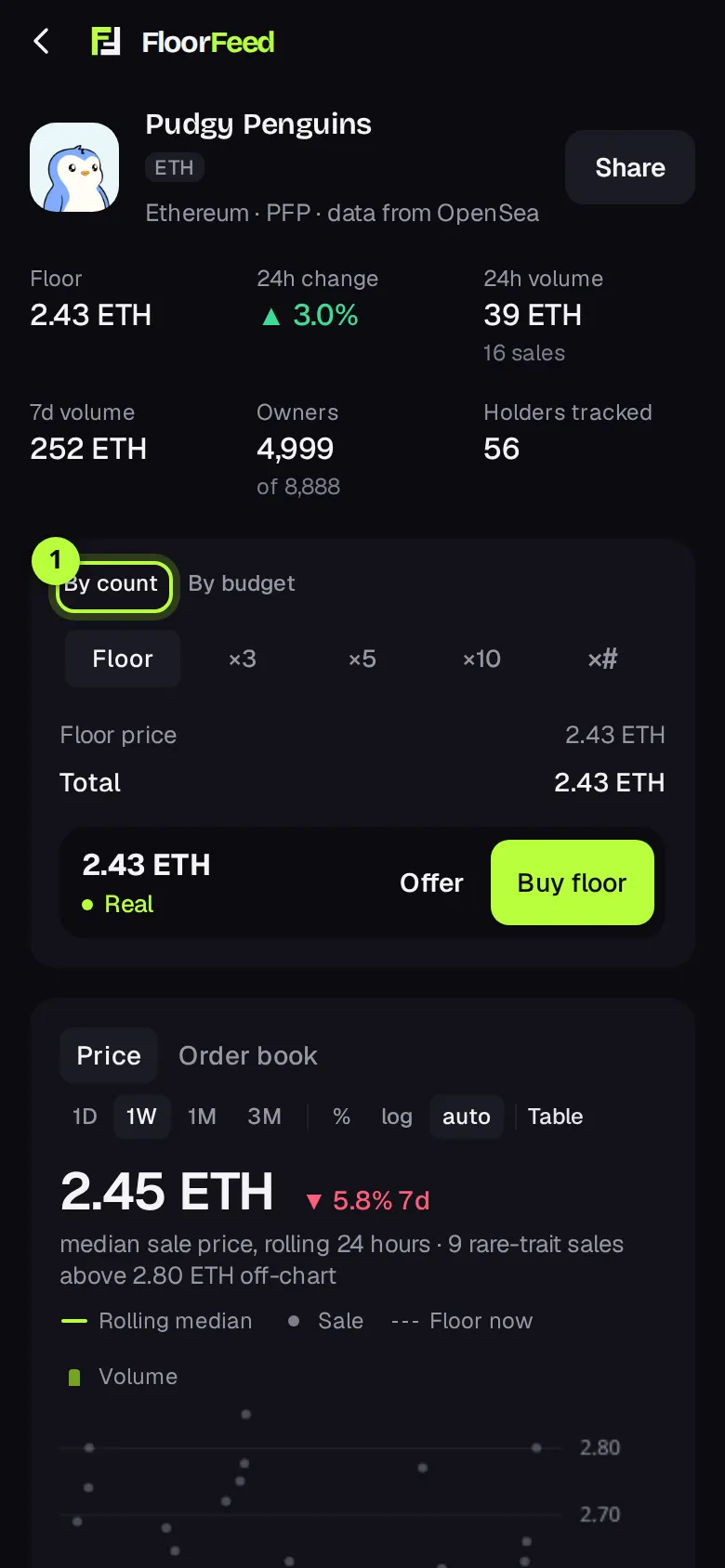
On a collection's page, in the trade box: on a computer it's the Trade panel at the top of the right column; on a phone it's right under the collection's name, above the chart. It has By count | By budget, the counts, the estimate and the Buy floor button.
Buy floor on a feed card, a leaderboard row or a collection tile opens the same buy sheet. On Ethereum and its networks the sheet has its own Floor, ×3, ×5, ×10 row, so you can sweep from there too. By budget is only on the collection page.
To buy one particular NFT, open it and press Buy. The sheet is titled Buy this NFT and buys that listing only.
Step by step
Open the trade box
Open the collection. In the trade box, By count is picked at first. Real or Practice shows next to the price on the buy button; real buys need Real.
Pick how many
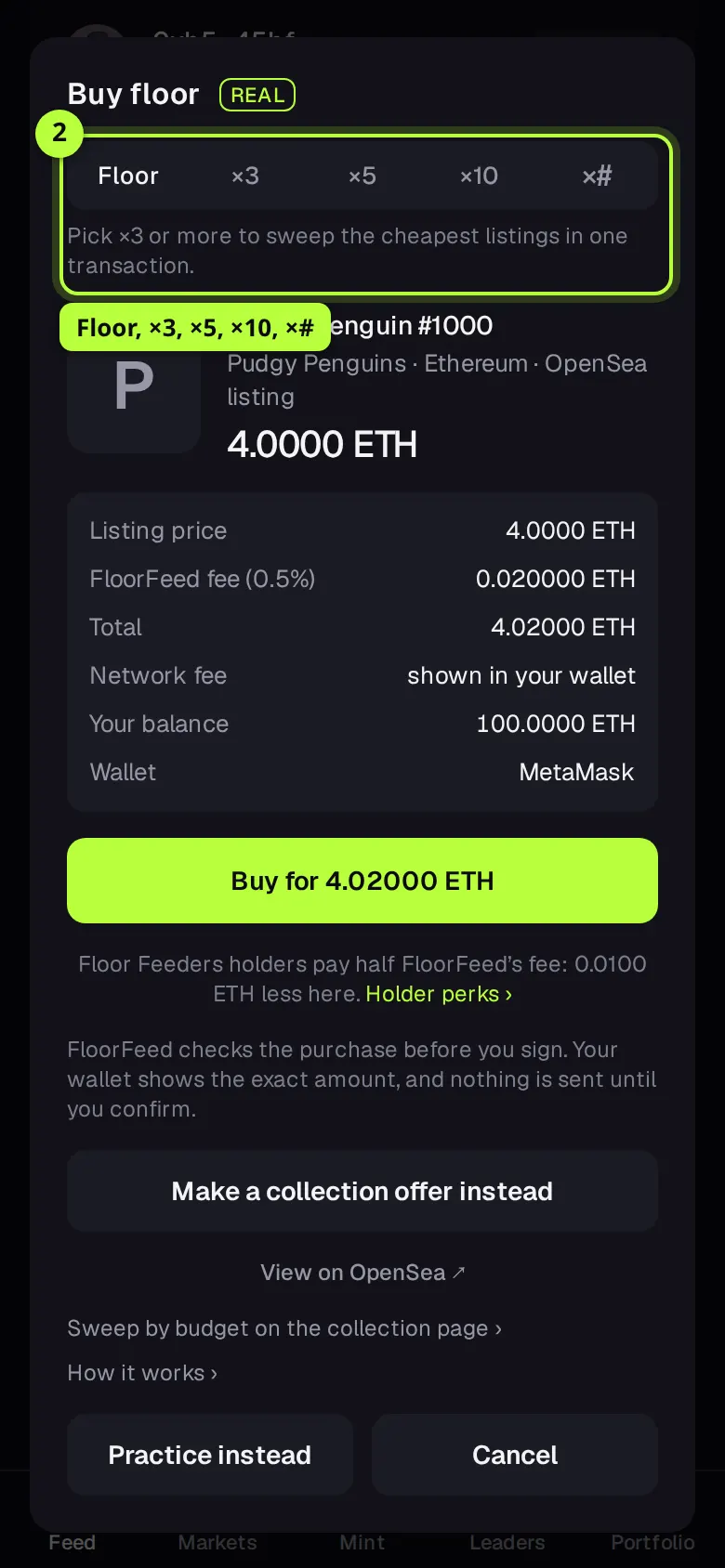
Tap Floor for one, or ×3, ×5 or ×10. For another amount, type it in the ×# box, up to 20.
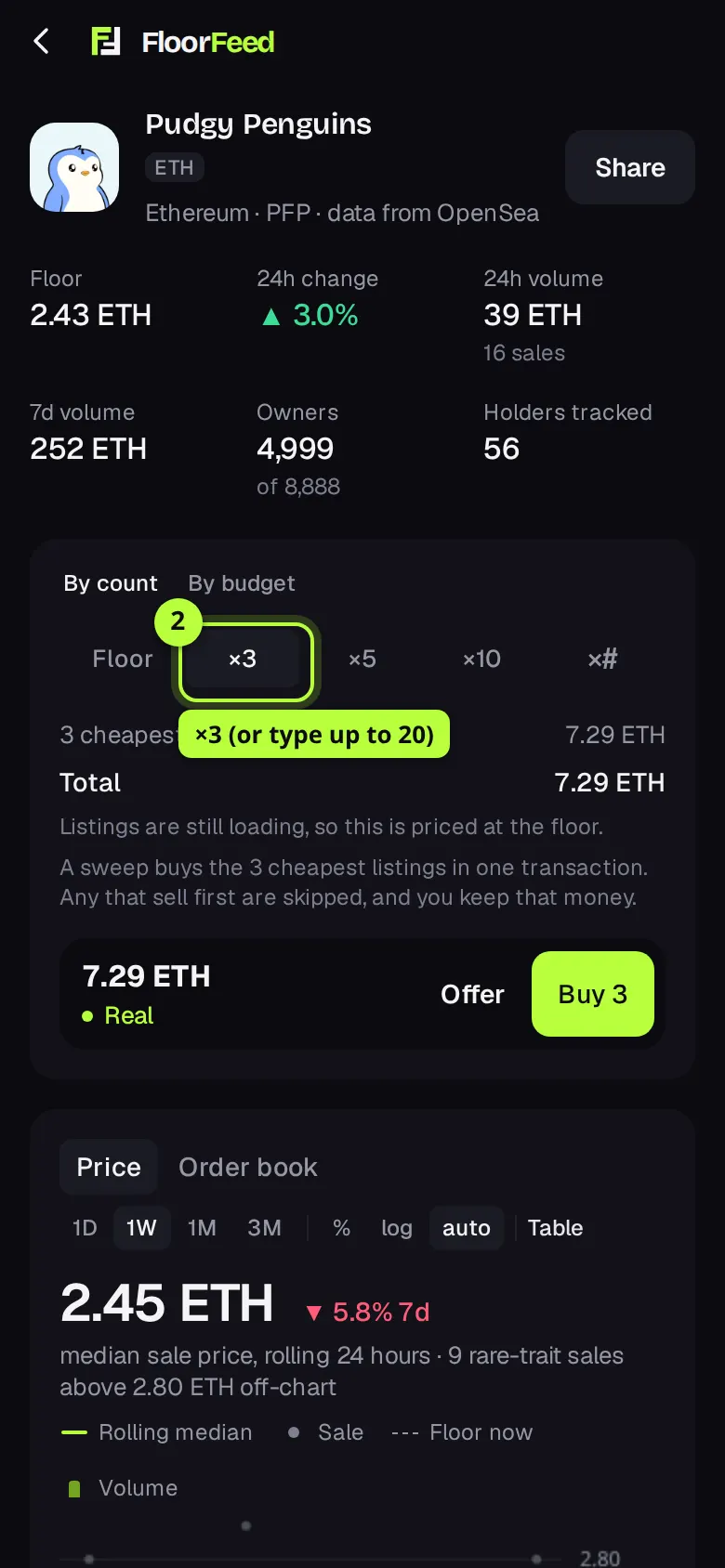
Tip: On a computer, keys 1 to 9 (and 0 for 10) pick the count and B opens the buy sheet. Nothing is signed by a key.
Check the estimate, then press Buy
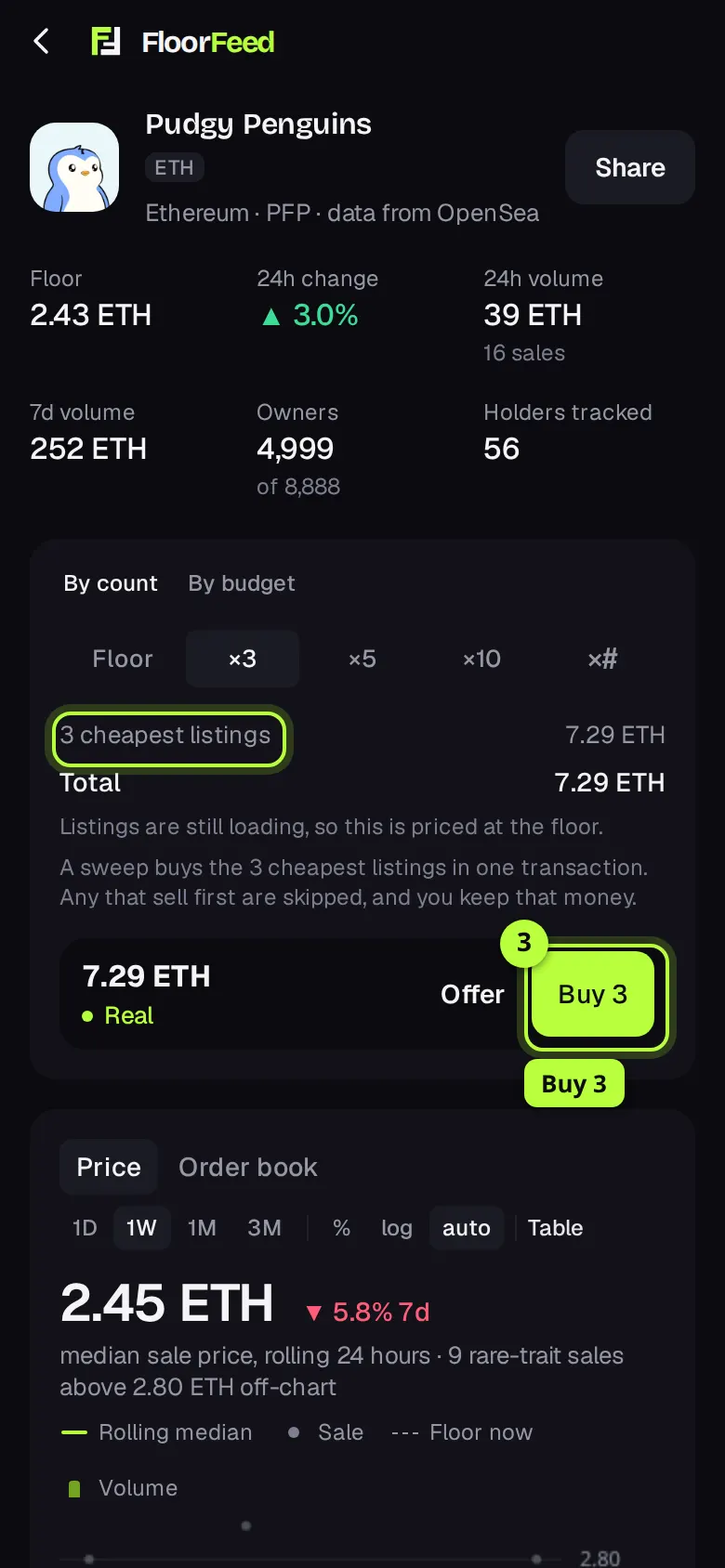
The lines under the counts show the 3 cheapest listings' price and the Total, from the listings FloorFeed has loaded. If fewer are loaded than you asked for, it says the rest are priced at the highest of them. Press Buy 3 (Buy floor for one).
Check the sweep in the sheet
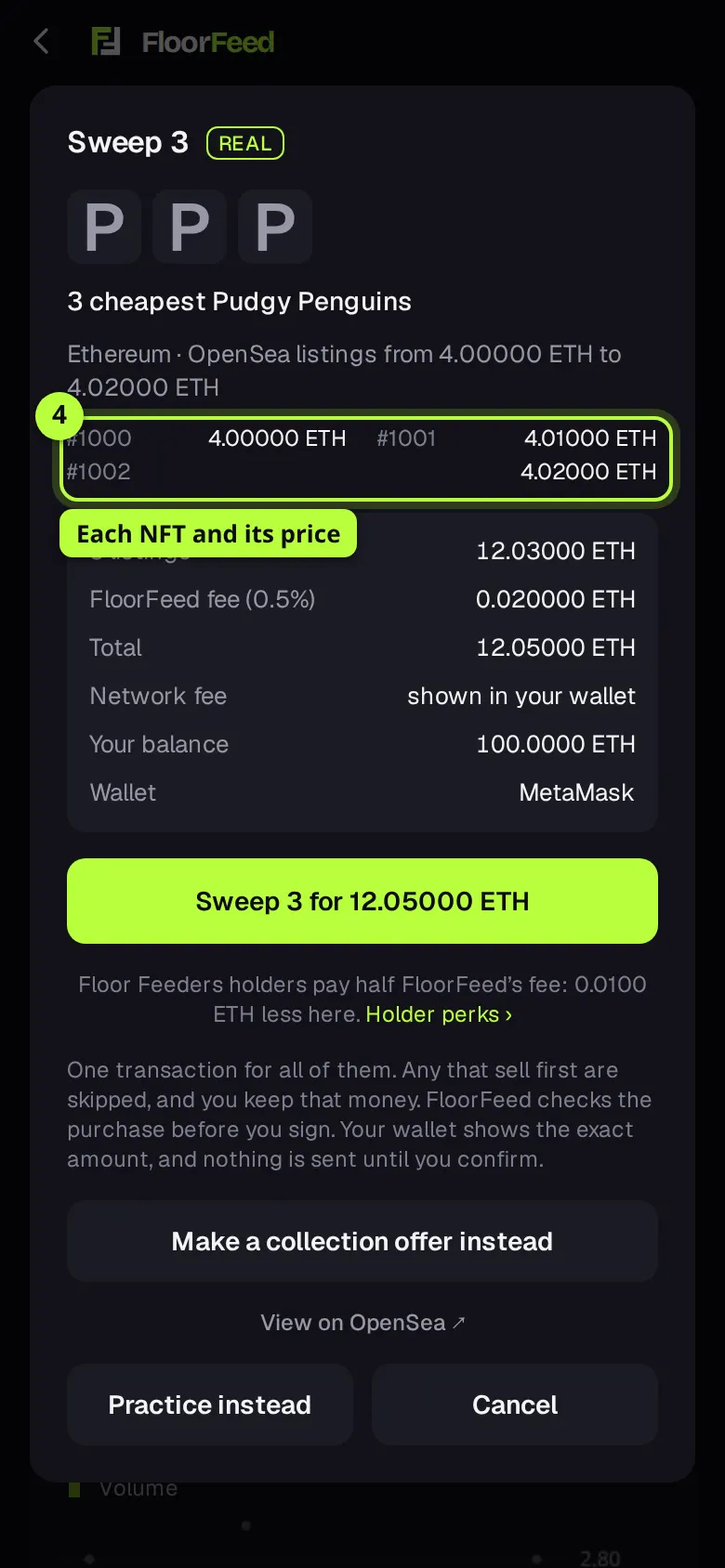
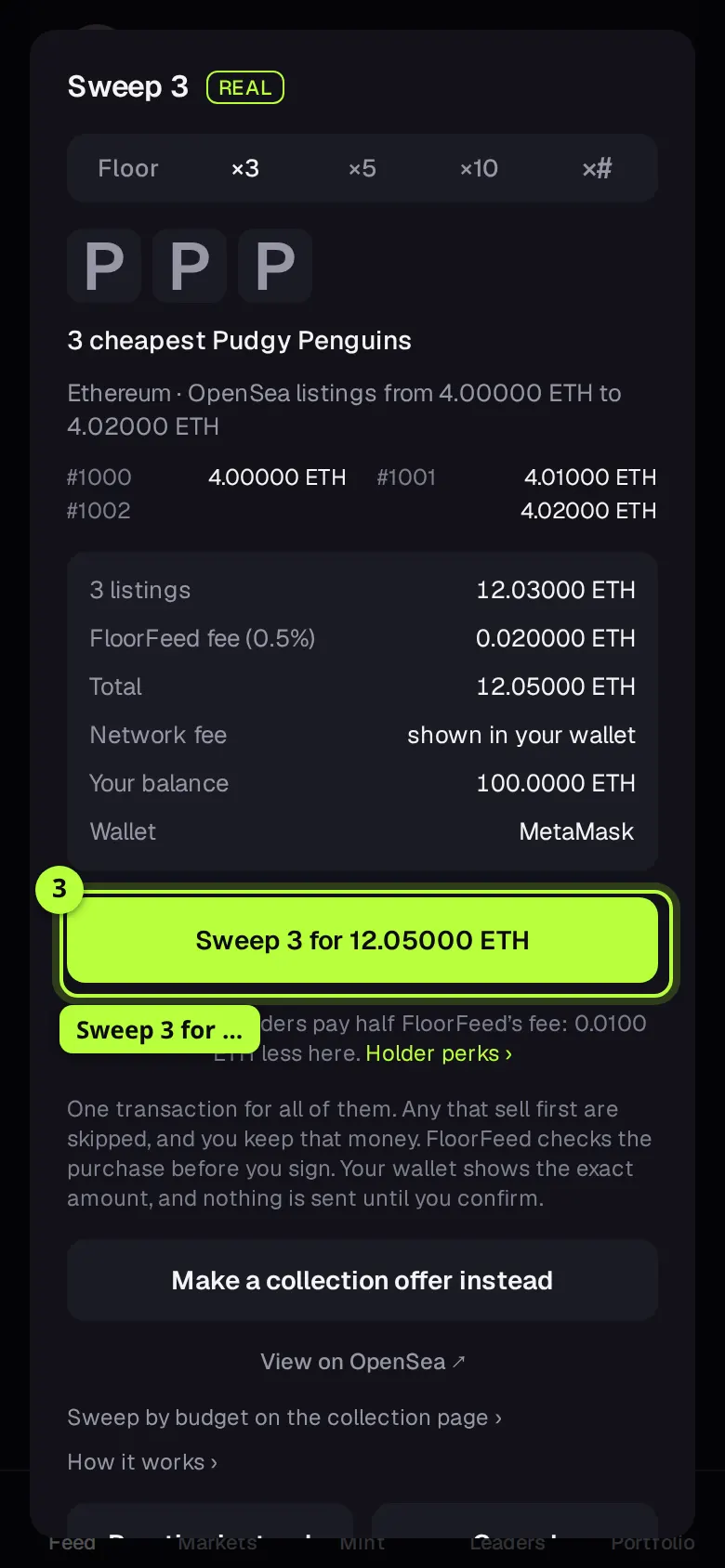
The sheet, titled Sweep 3, reads the live listings: up to 8 pictures, each NFT's number and price, then the listings' total, FloorFeed's fee, the Total, Network fee (shown in your wallet), Your balance and the wallet. If the cheapest listing moved since the card you tapped, it says so.
Sweep and sign
Press Sweep 3 for … (the total). FloorFeed builds the purchase and checks it against the chain, then your wallet opens with the exact amount. Confirm there. It's one transaction for all of them; any listing that sells first is skipped, and you keep that money.
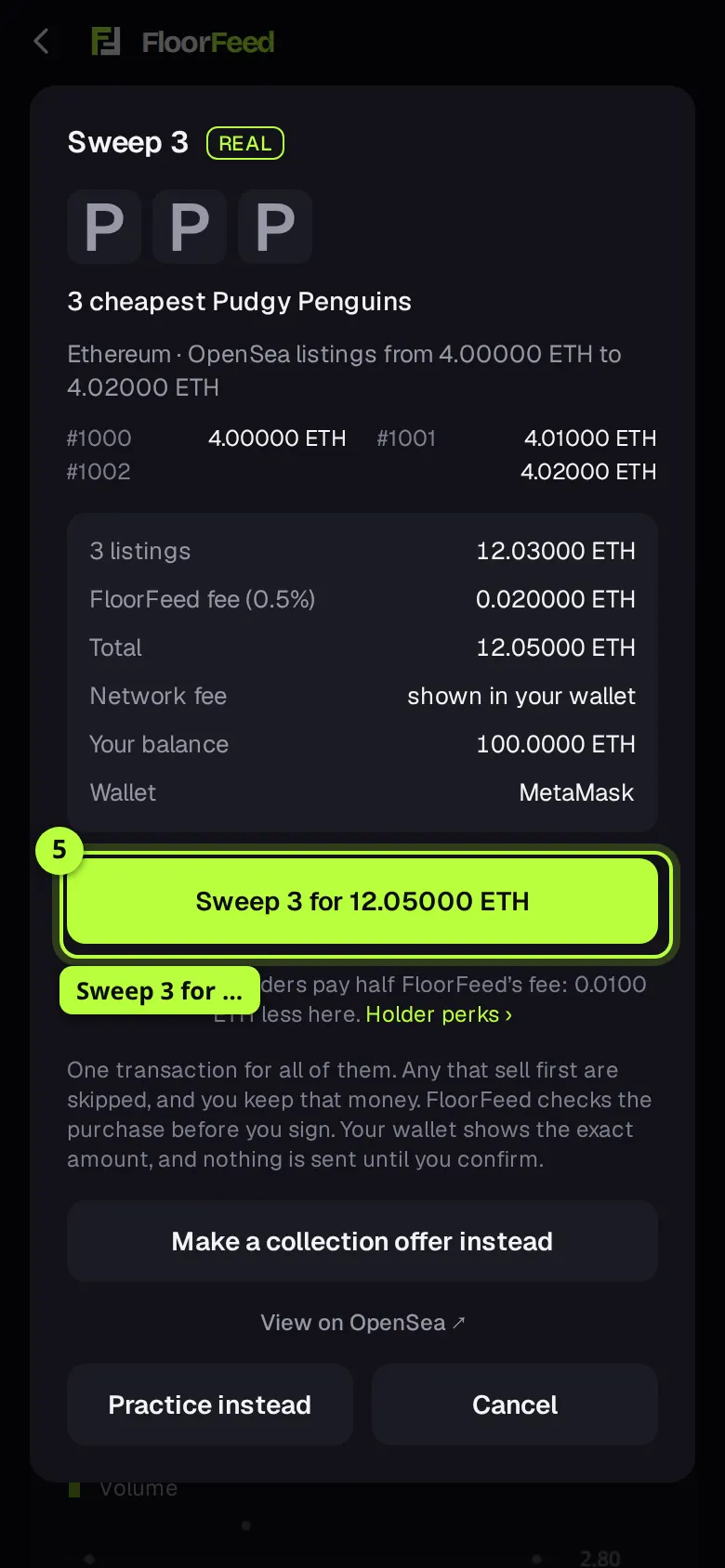
Tip: Practice instead, at the foot of the sheet, buys the same number with simulated money.
Or sweep by budget
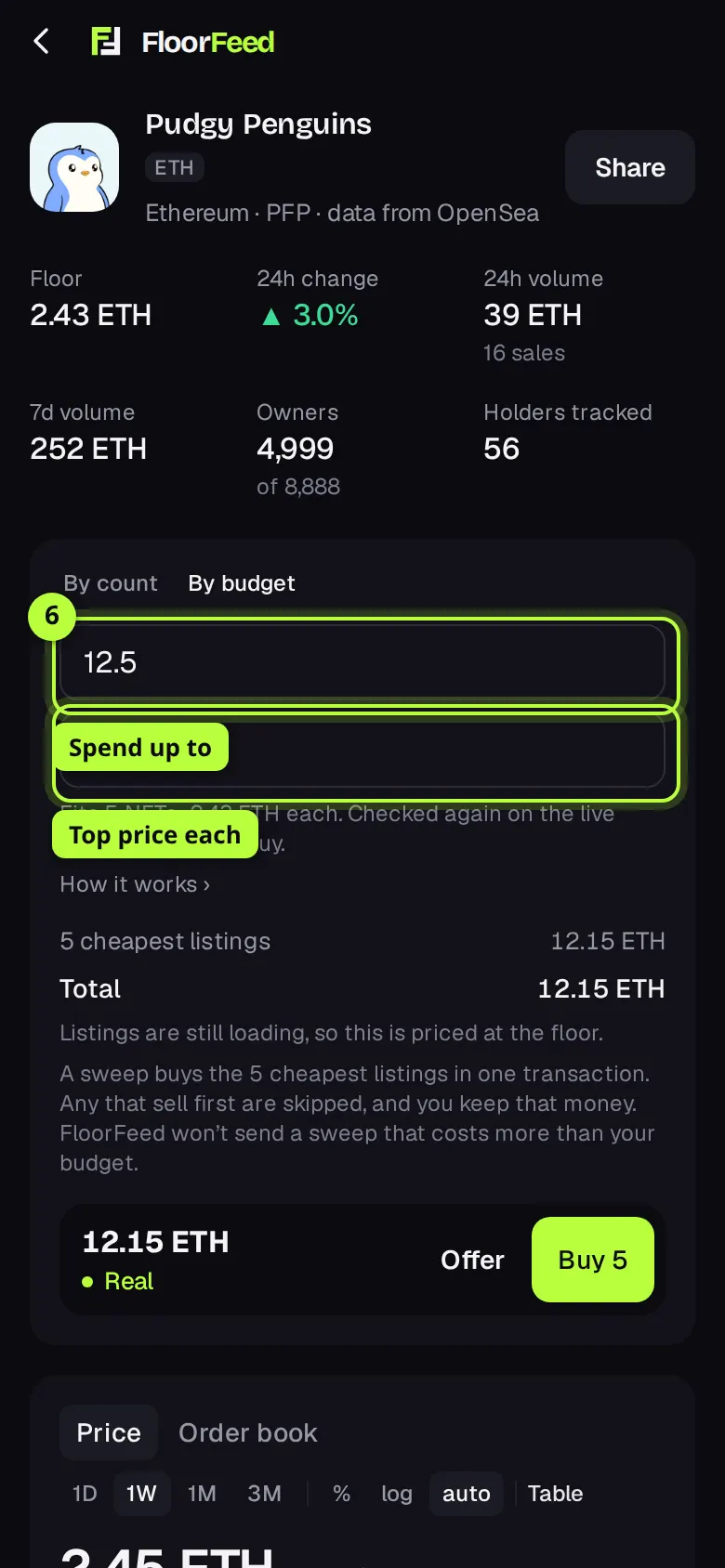
Tap By budget. Type Spend up to: the most you'll pay in all, FloorFeed's fee included. Optionally type a Top price each, so no listing over it is bought. Both are in the collection's coin.
See what fits
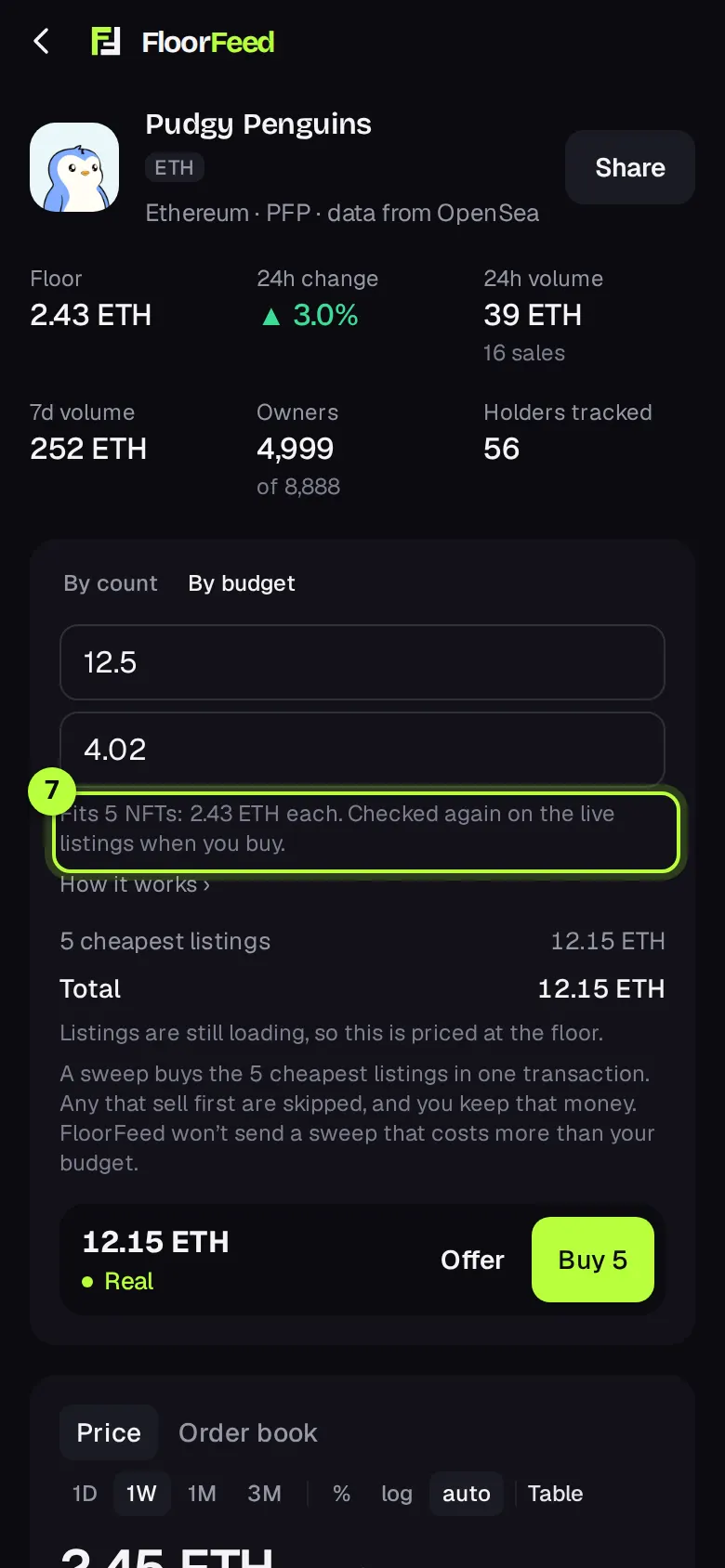
The line under the boxes says how many fit right now and their price range, for example "Fits 5 NFTs: 2.43 ETH each." It's worked out from the listings FloorFeed has loaded. If nothing fits, raise the budget or the top price. The button becomes Buy 5.
Check and sign the budget sweep
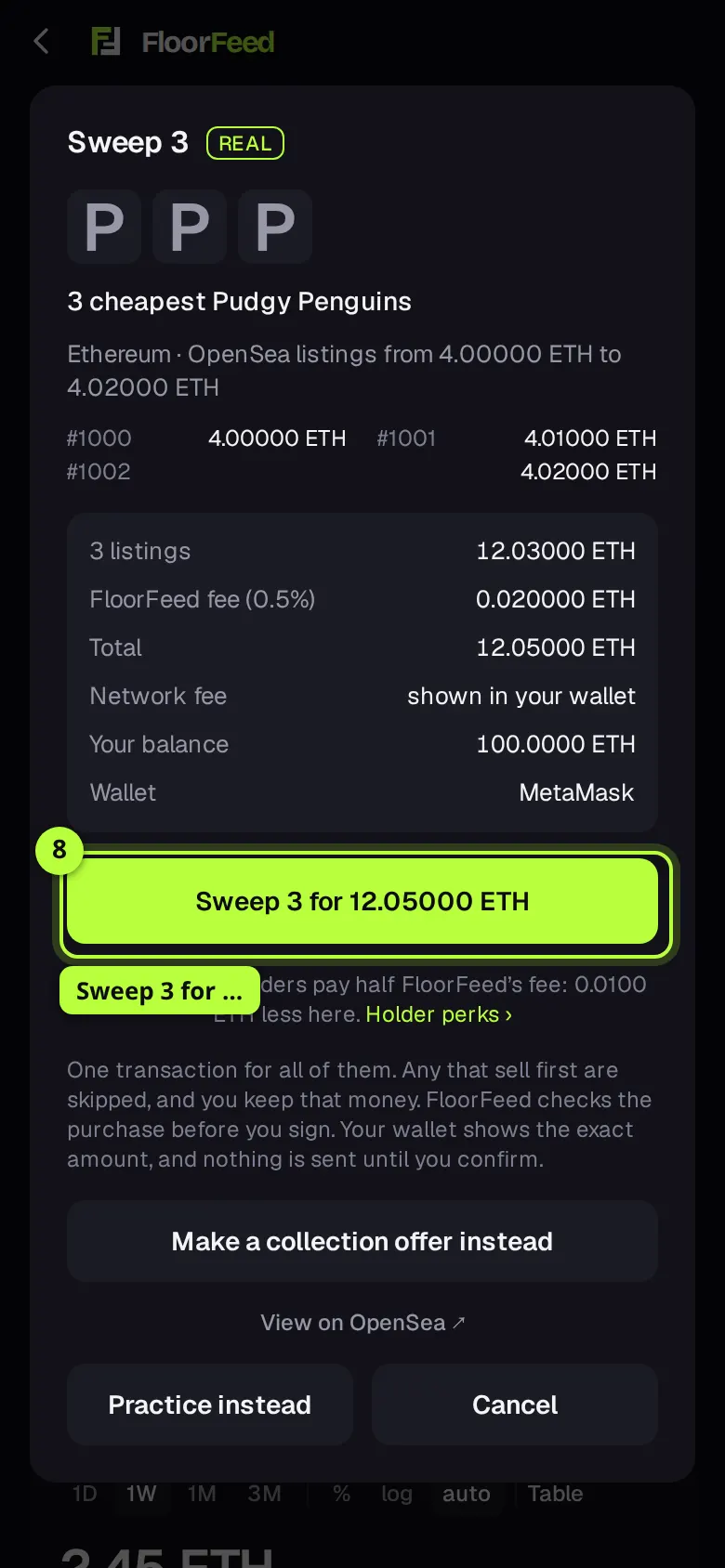
Press Buy 5. The sheet reads the live listings and picks the cheapest that fit, so the count can differ from the line's: here only 3 fit. Press Sweep 3 for … and confirm in your wallet. FloorFeed refuses to send a sweep that costs more than your budget.
From a feed card: the Buy floor sheet
Buy floor on a feed card, a leaderboard row or a collection tile opens the buy sheet straight away. On Ethereum and its networks it picks how many itself.
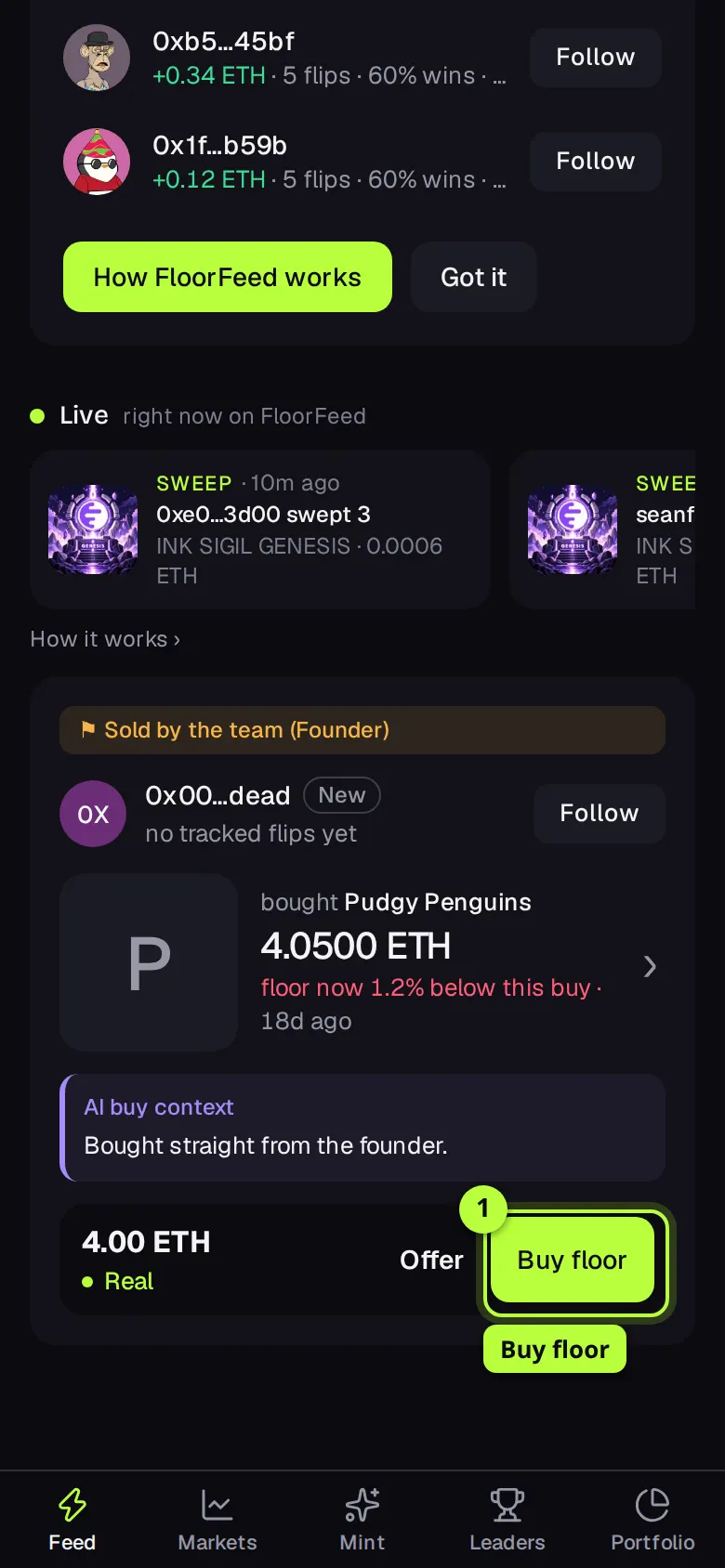
Press Buy floor
On the card, press Buy floor (Buy, on a narrow phone).
Pick how many in the sheet
The sheet starts on Floor and shows the cheapest listing with Buy for …. FloorFeed only reads more listings once you pick ×3, ×5, ×10 or type an amount up to 20.
Sweep and sign
The sheet turns into Sweep 3 with each NFT and its price. Press Sweep 3 for … and confirm in your wallet. FloorFeed won't send a sweep that costs more than the total you saw. To spend up to an amount instead, press Sweep by budget on the collection page ›.
Not enough on this network: pay from another
Each network has its own balance. If you're short where the NFT is, the sheet says how much more you need and where your coin is.
Pay in one signature
When another network can pay, the sheet shows Sweep 3 with ETH from Ethereum (or Buy with …, for one). One signature pays on that network, and the sweep completes where the NFT is, or you're refunded. The line under it says what you pay, the network and transfer fees, and about how long it takes. It carries the total you saw as its cap too. Or move ETH to Base first moves the money instead, then you buy. On networks with their own coin (HYPE, APE, RON, MON) Get … swaps into it on the way.
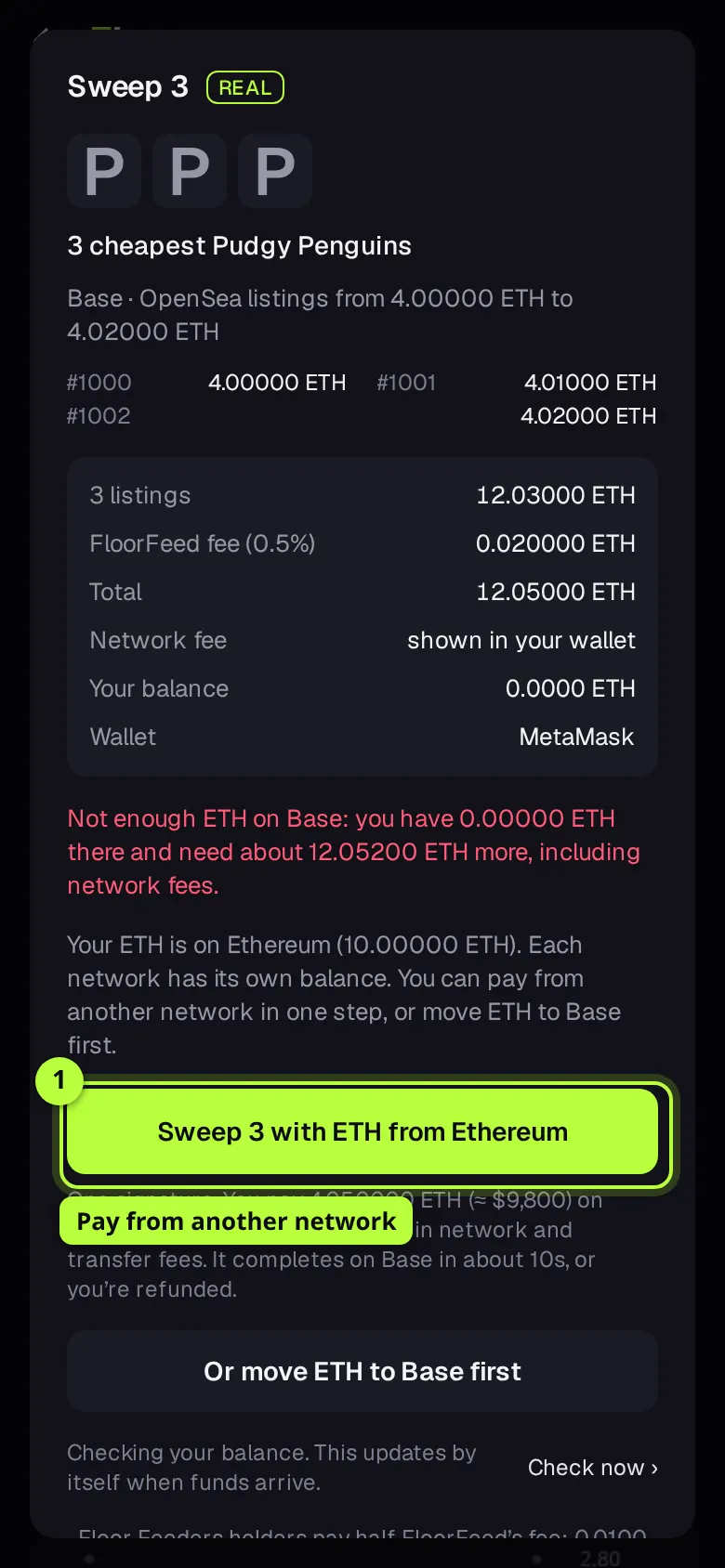
Tip: While you're short, the sheet checks your balance by itself, and the Sweep button comes back once the money lands.
Solana: one NFT at a time
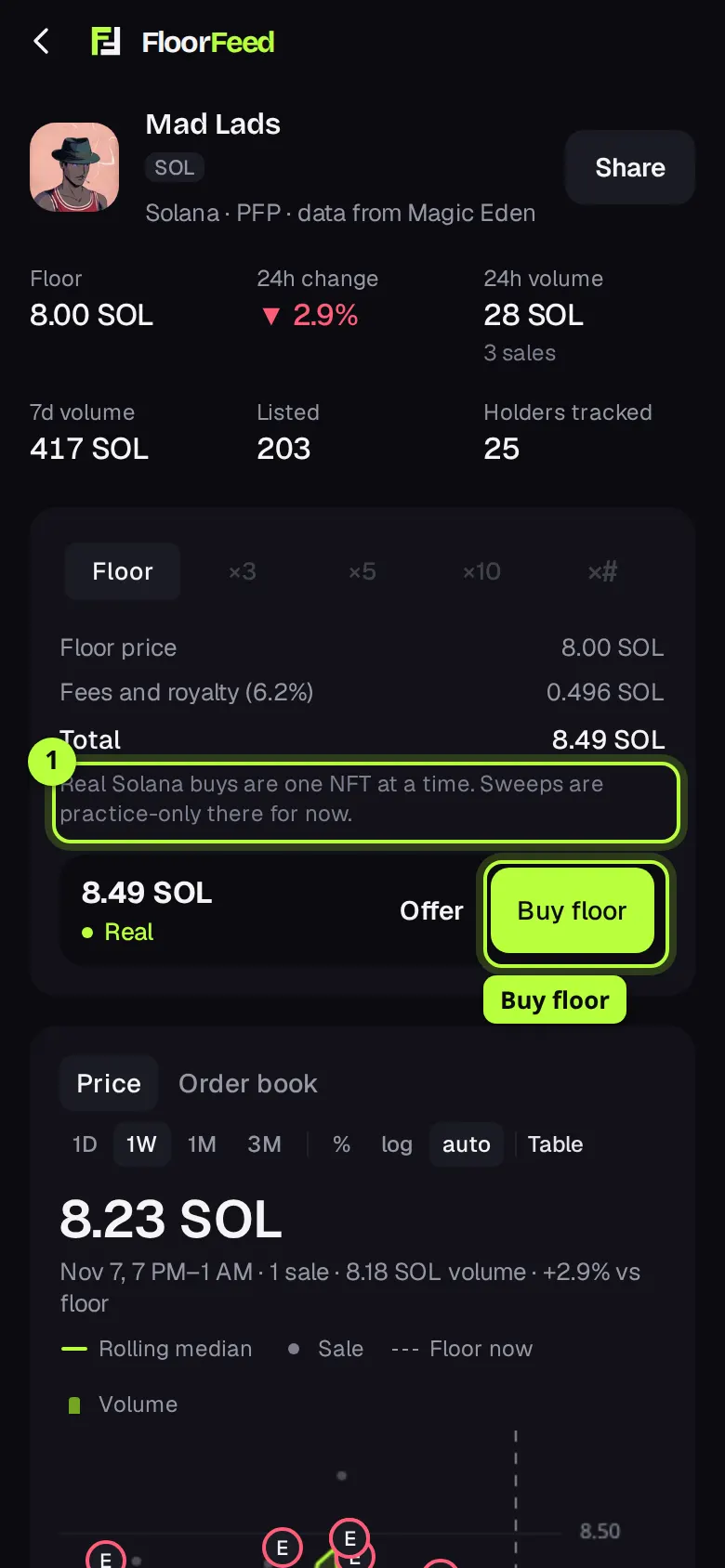
Real buys on Solana are one NFT at a time. The counts and By budget are off in Real; in Practice they work on Solana too.
Press Buy floor
On a Solana collection the counts are greyed out and the trade box says "Real Solana buys are one NFT at a time. Sweeps are practice-only there for now." Press Buy floor.
Buy now, or on Magic Eden
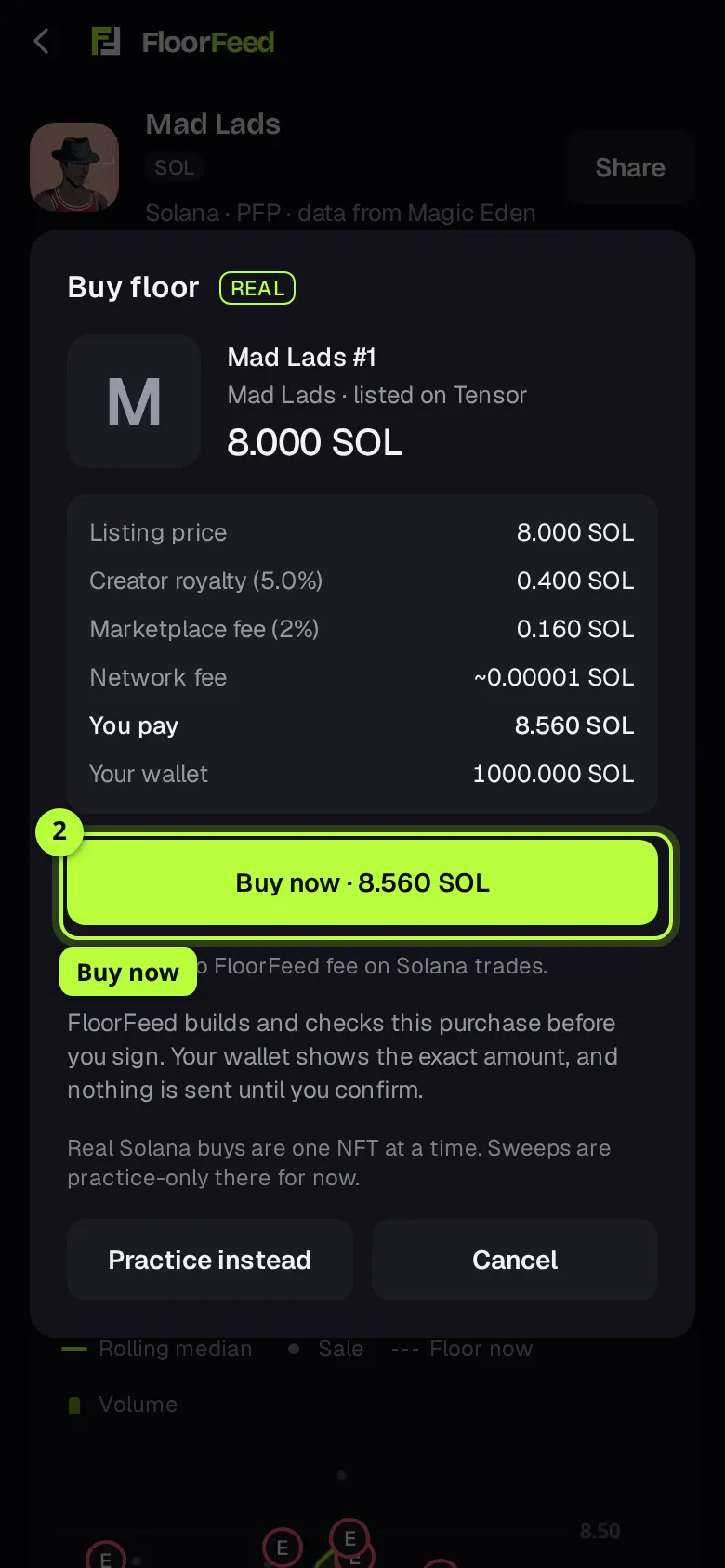
The sheet shows the cheapest Tensor listing FloorFeed can buy here, with its creator royalty, marketplace fee, network fee and You pay. Press Buy now · … and confirm in your wallet. If Magic Eden has a cheaper one, or there's no Tensor listing, Buy on Magic Eden ↗ finishes the purchase on Magic Eden's site. Short of SOL? Get … on Solana moves it from another network.
Options
- By count
- Floor, ×3, ×5, ×10, or a typed amount up to 20. On a feed card's sheet the same row is at the top.
- By budget
- Spend up to (fees included) and an optional Top price each. Buys as many of the cheapest listings as fit, up to 20. Collection page only, Ethereum and its networks.
- Real | Practice
- Shown on the buy button. Practice buys with simulated money at once, with no sheet; Practice instead on the sheet does the same. Switch modes from Your NFTs or Settings.
- Keys (computer)
- B opens the buy sheet, O makes an offer, 1 to 9 and 0 pick the count, T switches By count and By budget.
- Make a collection offer instead
- On the sheet: opens the offer sheet for the same collection, if you'd rather wait for a lower price.
Fees and limits
- Ethereum, Base and the other EVM networks
- Price, plus OpenSea's fee and the creator's royalty where the listing asks for one, plus network gas. FloorFeed adds 0.5% on top of the price. Every line is on the buy sheet before you sign.
- Solana
- Price, plus Tensor's 2% marketplace fee and the creator royalty, plus a small network fee in SOL, all on the sheet under You pay. FloorFeed adds no fee of its own on Solana. A Magic Eden listing adds its fee and royalty at checkout on Magic Eden's site.
- Holder perks
- Holder perks (Ethereum-style networks): a Floor Feeders Base Pass in the wallet you trade with waives FloorFeed's own fee on Base, and a Floor Feeder (Robinhood Chain) halves it on every network. The sheet shows "Waived" or "half off" when one applies. Marketplace fees, royalties and gas are never waived.
- By budget
- Your budget covers the listings' prices and FloorFeed's fee. FloorFeed adds 0.5% on top of the price. Gas is on top of the budget.
- Paying from another network
- Network and transfer fees for the move, shown under the button before you sign. FloorFeed's fee on moving money between networks is 0.5%, on top of Relay's.
- Up to 20 NFTs per sweep, picked from the 50 cheapest OpenSea listings. Ethereum and its networks only.
- Only listings priced in the network's own coin (ETH, HYPE, RON, APE, MON) are bought, because wrapped coins (WETH and the like) need an extra approval. A collection listed only in a token (USDG on Robinhood Chain) is bought with that token, after a one-time approval.
- If fewer are listed than you asked for, the sheet says so and buys what's there.
- A sweep never costs more than the total you saw, or your budget: FloorFeed refuses to build it, before your wallet is asked.
- On Solana, real buys are one NFT at a time; sweeps are practice only there.
- The trade box's estimate uses the listings FloorFeed has loaded. The sheet always reads the live ones.
Troubleshooting
- The sheet says it now costs more than I agreed to.
- Listings sold between the quote and your press, and the next ones cost more. Nothing was sent. Close the sheet and open it again for the current price.
- It bought fewer than I asked for.
- Some listings sold first. They're skipped, and you keep that money. The confirmation says how many were skipped.
- By budget says "Nothing listed fits that yet."
- The cheapest listing (plus FloorFeed's fee) is over your budget, or over your top price each. Raise one of them.
- It says I don't have enough, but I have ETH.
- It's on another network. Use the button that pays from there in one signature, or move it first. Each network has its own balance.
- There's no count row on the sheet.
- The sheet hides it when there's nothing to buy here, for one particular NFT, on Solana, and for a request from an AI connector, which buys one NFT only.
Questions
- Is a sweep one transaction?
- Yes, on Ethereum and its networks: one signature and one gas fee for all of them.
- Why 20?
- Each listing is a separate OpenSea fill, and 20 already takes 15 to 30 seconds to prepare.
- Can I sweep on Solana?
- In Practice, yes. For real, one NFT at a time for now.
- Where do I see what I bought?
- The confirmation shows the NFTs' own art. Then Activity follows the transaction, and they show in Portfolio and Your NFTs once it confirms.
Related
- The order book and the Price | Order book switch
- Making offers: on a collection, a trait or one NFT
- Feed it: sell many NFTs into their best bids
- Sweep parties: sweep a floor together
- Trading from the keyboard
- Holder perks at the button
- Connect Claude, ChatGPT or another AI app to FloorFeed
Checked against FloorFeed on 2026-11-08.