Guides › Trading
Tezos NFTs on FloorFeed
The week's busiest Tezos collections on objkt.com: floors, sales, listings and charts, any tz1 wallet's NFTs, and buying, listing and offers on objkt.com from FloorFeed with your own Tezos wallet.
Watch
What it is
Tezos is a network with a long-running art scene, mostly traded on objkt.com. FloorFeed follows it like its other networks: each tracked collection's floor, sales, listings, owners and price chart, Tezos sales in the Feed, and Tezos traders' flips after fees.
With a Tezos wallet linked (Temple, Kukai, Umami or any Beacon wallet), you can also buy, list, cancel, make offers and sell into offers on objkt.com's marketplace from FloorFeed. It's non-custodial: FloorFeed prepares each operation and checks it on Tezos first, and your own wallet shows it and signs it. FloorFeed never holds your keys, XTZ or NFTs.
Where to find it
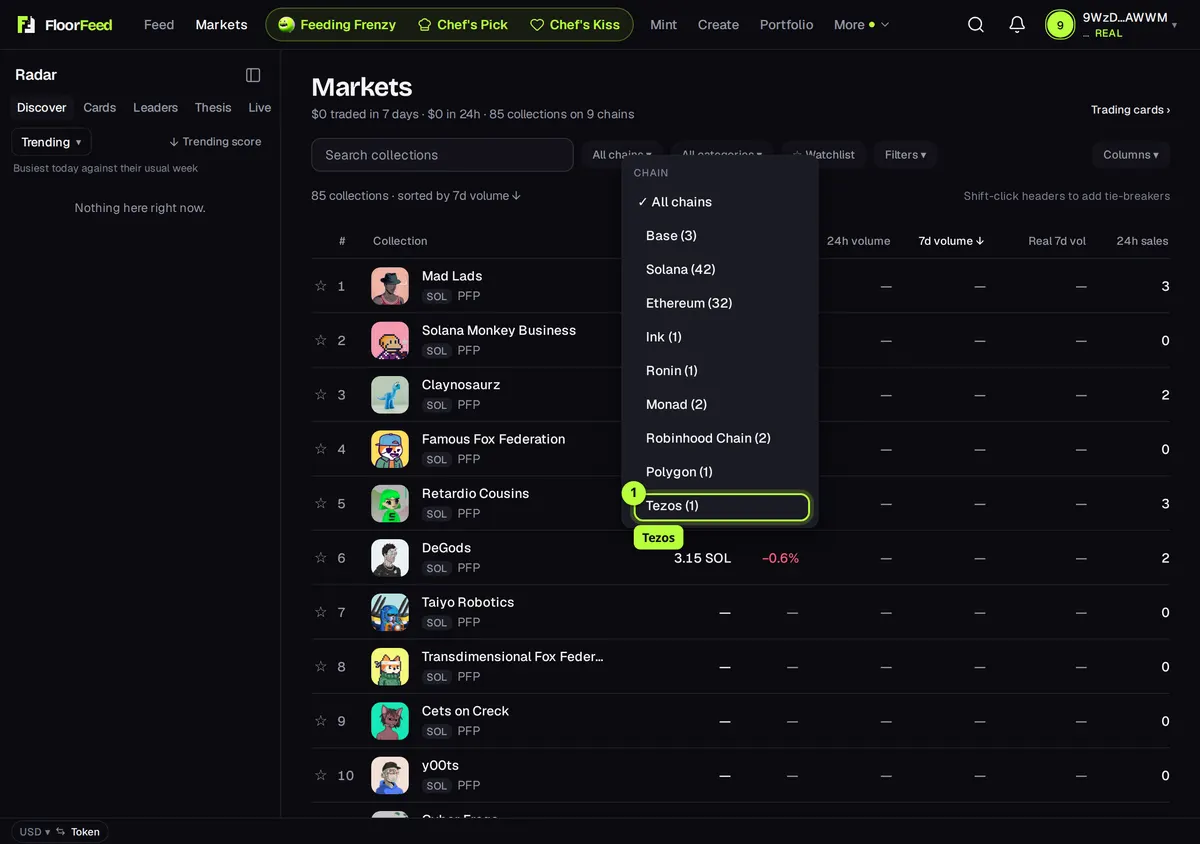
Markets: pick Tezos under All chains (the Tezos chip on a phone) for only Tezos collections, or Tezos in Where the volume is (under Show all). Search finds them by name too.
A Tezos collection's page: the Trade box (Buy floor, Make an offer on the collection…). An NFT's page: Buy now, Make an offer, and for your own NFT List for sale…, Edit listing…, Cancel listing and Sell to best offer.
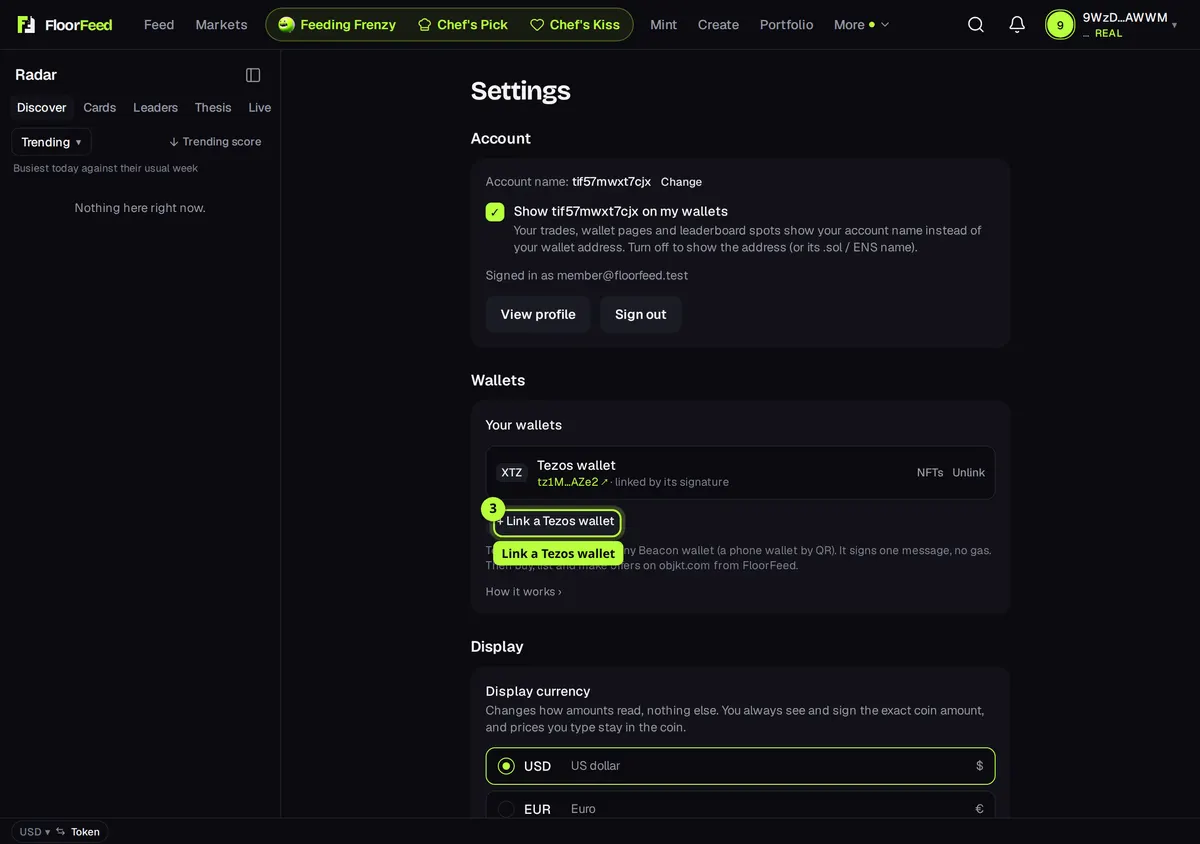
Settings → Your wallets: + Link a Tezos wallet.
Portfolio: your linked Tezos wallets' NFTs on the NFTs tab, and your open objkt.com listings and offers on the Listings and Offers tabs.
A wallet page: paste a tz1 address into search. The Feed: Filters → Tezos.
Step by step
Pick Tezos on Markets
Open Markets and pick Tezos: under All chains on a computer, among the chain chips on a phone. The list shows the tracked Tezos collections with their floor, 24-hour and 7-day changes and volume, in XTZ with the dollar value beside it.
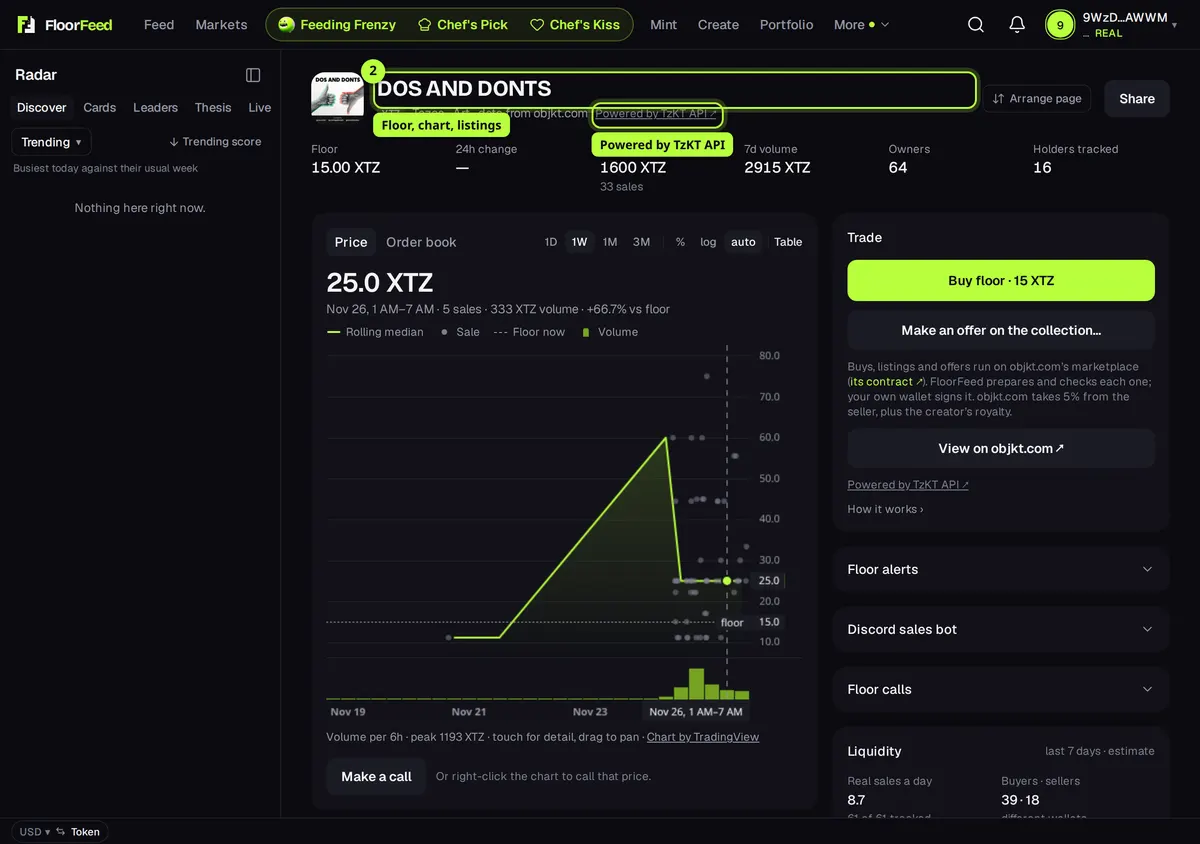
Open a collection
Its page has the floor, listed count, owners and volume, the price chart of its sales, its cheapest listings and recent sales. The line under its name says where the figures come from, with the Powered by TzKT API link.
Link your Tezos wallet
In Settings → Your wallets, press + Link a Tezos wallet (the trade sheet has a Link a Tezos wallet button too). Pick your wallet in the window that opens, or scan its QR code with a phone wallet, then approve the message it shows: it names floorfeed.io, the wallet and your account. It's a signature, not a transaction: no gas, nothing approved.
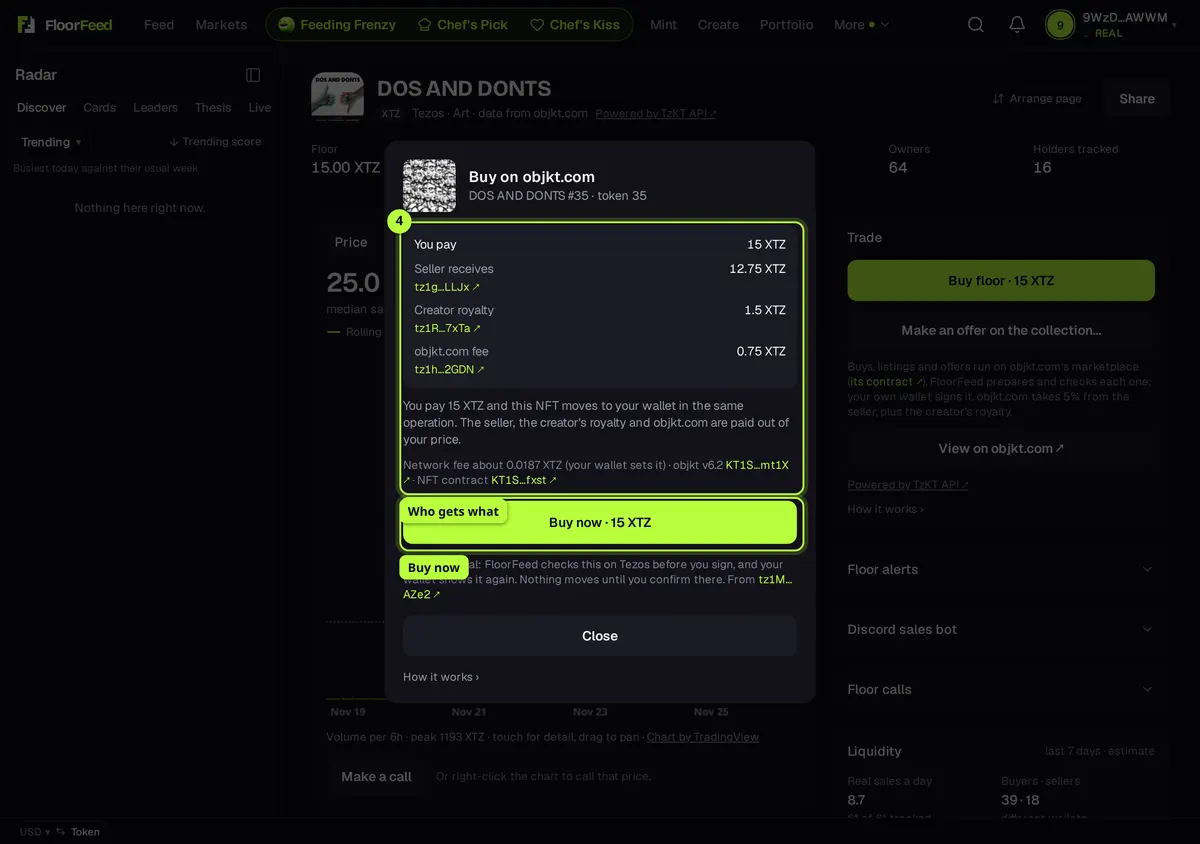
Buy floor or Buy now
In a Tezos collection's Trade box, press Buy floor; on an NFT's page, press Buy now. The sheet shows what you pay and where it goes (the seller, the creator's royalty, objkt.com's fee, and FloorFeed's referral share when there is one), read off a simulation of the real operation, with the network fee and links to the marketplace contract and the NFT contract on TzKT. Press Buy now · price, then confirm in your wallet.
List your NFT for sale
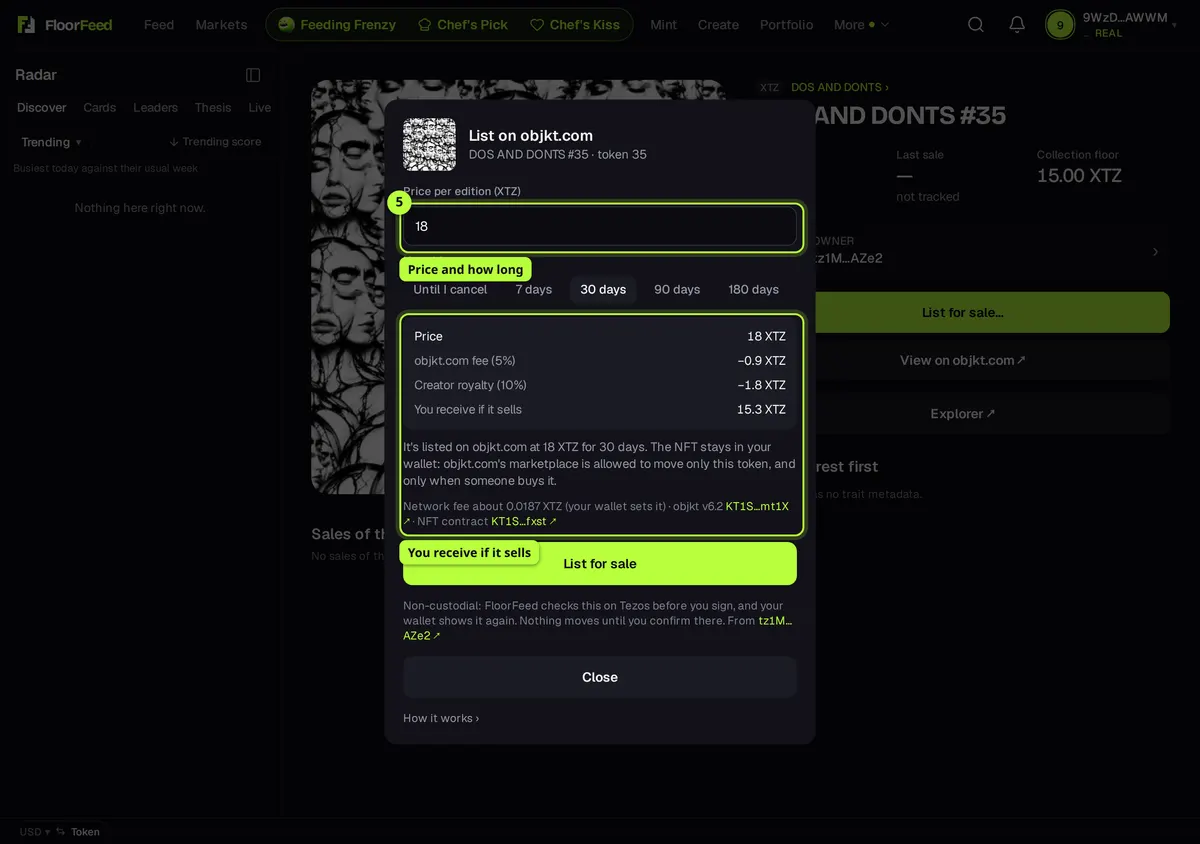
Open your NFT (from Portfolio's Tezos NFTs, or its page) and press List for sale…. Type a price in XTZ and pick how long (Until I cancel, 7, 30, 90 or 180 days). The sheet shows objkt.com's 5%, the creator's royalty and what you receive if it sells. Press List for sale and confirm in your wallet. Later, Edit listing… changes the price in one operation, and Cancel listing takes it down.
Make an offer
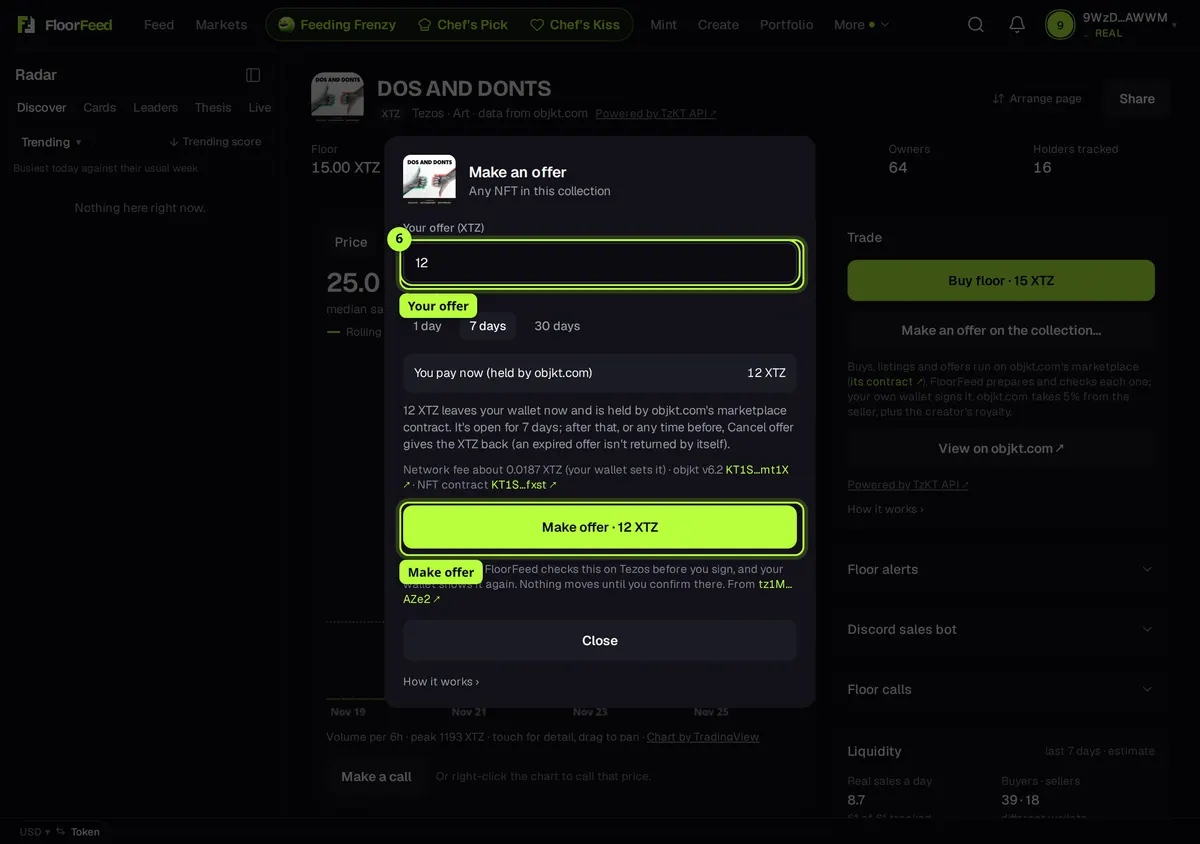
On an NFT, press Make an offer; in a collection's Trade box, Make an offer on the collection… (any NFT of it). Type the amount and pick how long it stays open (1, 7 or 30 days), then confirm in your wallet. The XTZ is held by objkt.com's marketplace contract until the owner accepts or you cancel.
Your listings and offers
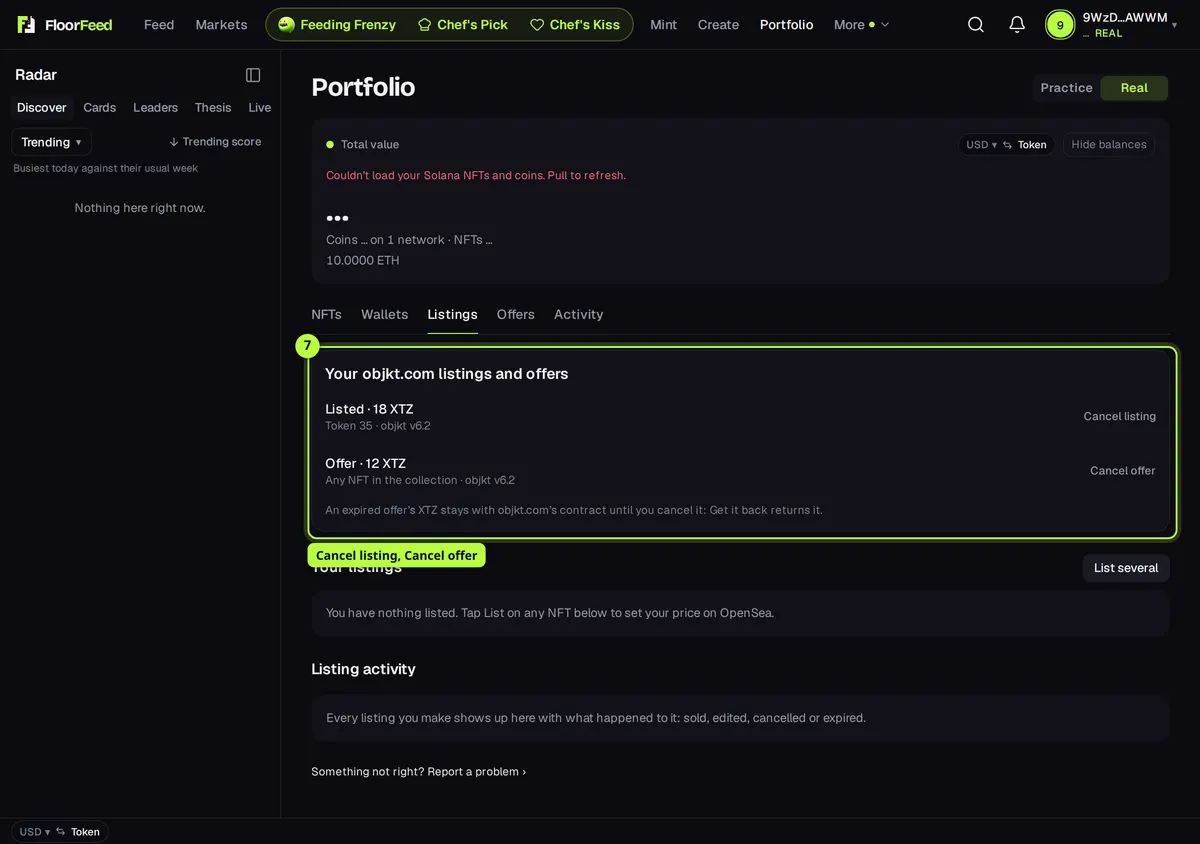
Portfolio's Listings and Offers tabs list your linked wallets' open objkt.com listings and offers, each with Cancel listing or Cancel offer. An offer that ran out still holds its XTZ: press Get it back.
Look up a tz1 wallet
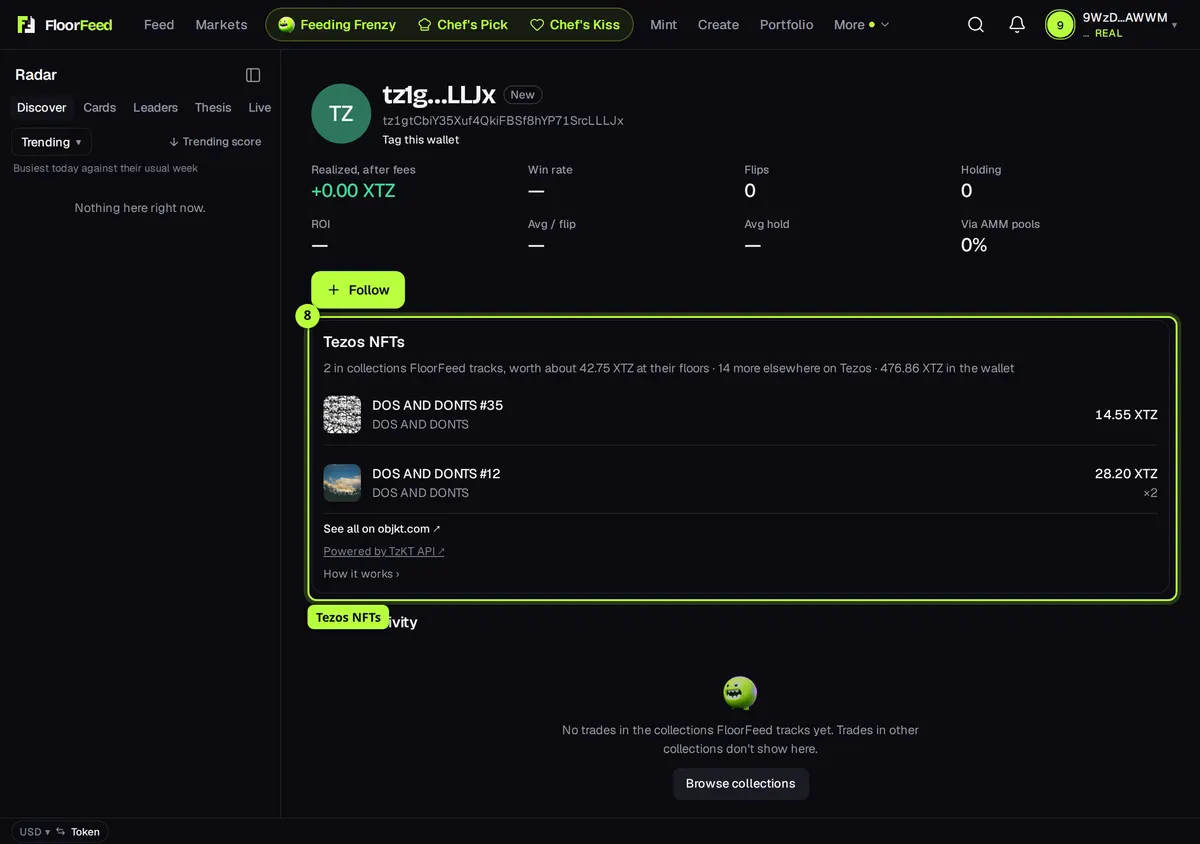
Paste a tz1 address into search and open it. The page has the wallet's flips in the Tezos collections FloorFeed tracks and a Tezos NFTs list: the ones in tracked collections valued at their floors, how many others it holds, and its XTZ. Press Follow to see its trades in the Feed. See all on objkt.com opens the rest.
Options
- Which wallets
- tz1, tz2 and tz3 wallets through Beacon: Temple (browser extension or app), Kukai, Umami, Plenty and other Beacon wallets, or a phone wallet by QR code. A wallet can be linked to one FloorFeed account at a time; linking it again from another account moves it.
- Which marketplaces
- objkt.com's current marketplace (KT1SwbTq…mt1X) for new listings and offers; buys and cancels also work on objkt's three older marketplaces where listings still live. Each one was checked on chain as made by objkt.com's own issuing account.
- What FloorFeed checks
- Every operation goes only to objkt.com's marketplace or the NFT's own contract, never sends more XTZ than the sheet shows, and lets objkt.com move only that one token. It's simulated on a Tezos node before your wallet sees it; if it would fail, the sheet says why and nothing is sent. Pressing Confirm builds it again fresh, and if the price or a payout changed in between, you see the new numbers first.
- Approvals
- objkt.com's listings don't take your NFT: listing lets objkt.com's marketplace move that one token when someone buys it. Cancel listing removes that permission when no other listing of it needs it; Sell to best offer adds it and removes it again in the same operation.
- Royalties
- A listing pays the royalty in the work's own metadata. Without one, FloorFeed uses the royalty objkt.com set on its earlier listings, but only when it goes to the work's creator; otherwise it won't list it and points you to objkt.com. Before you accept an offer, any payout to a wallet that isn't the creator or objkt.com is flagged.
- Listing far under the floor
- A price under half the floor shows a warning and needs I meant this price ticked before List for sale works.
- Which collections
- The 60 busiest by a week of objkt.com sales, refreshed daily, each with at least 5 sales to 3 different buyers. Shared contracts that hold many artists' works (hic et nunc, open editions, fxhash) aren't listed as collections; their NFTs still show in a wallet's Tezos NFTs, and you can trade them from their NFT page.
- The floor
- The cheapest live listing in tez on objkt.com whose seller still holds the NFT, read every 10 minutes. Listings priced in other tokens aren't counted.
- Where the data comes from
- Tezos' public blockchain, read through TzKT's free API (Powered by TzKT API, linked under each Tezos panel), and a public Tezos node for the simulations.
Fees and limits
- Tezos (objkt.com)
- FloorFeed adds no fee. The buyer pays the listed price; the seller pays objkt.com's fee (5% on its current marketplace, 2.5% on the oldest) and the creator's royalty out of it. objkt.com pays a referrer on buys it brings in (40% of objkt's own fee, or the referral bonus the seller chose): when FloorFeed is the referrer, the buy sheet shows the amount, and your price is the same. Network fees are about 0.001 to 0.06 XTZ; your wallet sets the exact fee. An offer's XTZ is held by objkt.com's contract, not spent, until it's accepted or cancelled.
- On floorfeed.io in a browser only: not in the App Store or Google Play app yet.
- One NFT at a time: no sweeps, no practice trades on Tezos.
- XTZ only: listings and offers in other tokens, and English auctions, are on objkt.com.
- An expired offer isn't returned by itself: cancel it (Get it back) to have the XTZ back.
- Tezos isn't in Feeding Frenzy, sales bots or the launchpad.
Troubleshooting
- Link a Tezos wallet does nothing.
- Allow pop-ups for floorfeed.io, or pick your wallet in the window that opened behind. With Temple, unlock the extension first. On a phone, scan the QR code with Kukai, Temple or Umami.
- It says this wallet isn't linked to my account.
- Your wallet is on another account than the one you linked. Switch account in the wallet, or link that one too in Settings → Your wallets.
- It says the listing is gone, stale or the price changed.
- Someone bought it first, the seller cancelled or no longer holds the NFT, or changed the price. Nothing was sent; reload for the next listing.
- It says not enough XTZ.
- The sheet shows what the wallet has and what it needs. Add XTZ from an exchange (most list it) and try again; keep a little extra for the network fee.
- It won't list my NFT because of its royalty.
- FloorFeed couldn't find a royalty that goes to the work's creator. List it on objkt.com, which reads royalties from its own records.
- The floor here differs from objkt.com's.
- FloorFeed reads the floor every 10 minutes and skips listings whose seller no longer holds the NFT, and listings in other tokens. objkt.com may show a newer or a token-priced listing.
Questions
- Does FloorFeed hold my Tezos?
- No. Linking is a signed message, and every trade is an operation your own wallet signs. FloorFeed builds and checks them but can't send anything from your wallet.
- Is buying here more expensive than on objkt.com?
- No: the same listing, the same price, on objkt.com's own marketplace contract. FloorFeed adds no fee.
- Why does listing ask for an approval?
- objkt.com's listings leave the NFT in your wallet, so objkt.com's marketplace needs permission to move that one token when it sells. Cancel listing takes it back.
Related
- The order book and the Price | Order book switch
- Smart money is buying: what proven traders bought today
- Trader cards: share your record after fees and claim your wallet
Checked against FloorFeed on 2026-11-26.