Guides › Alerts
Smart-money alerts: an hourly digest, top traders' buys, and Copy
Follow wallets without a flood: one digest an hour (or every trade), alerts when a Top flipper buys or 3+ top traders pile into one collection, a Copy button on every buy, and delivery to Discord.
Watch
What it is
Smart-money alerts tell you what the traders who actually make money are buying, in a form you can keep up with. The wallets you follow come as one digest an hour instead of an alert for every trade, and two rules watch every top trader on FloorFeed: one when a Top flipper (or Proven wallet) buys, one when several of them buy the same collection within an hour.
Top traders are ranked the same way as on the leaderboard: profit after marketplace fees and royalties, with wash trades and market-maker wallets left out. Every buy in an alert has Copy, which opens the same collection's buy for you to check and sign in your own wallet. FloorFeed never trades for you.
Where to find it
Alerts, the bell at the top (on a phone, the bell in the header). The Smart-money alerts card is at the top of the page; tap Settings to open it.
You need to be signed in. Follow wallets with Follow on a trader's page, on the leaderboard, or from a card in the feed.
Step by step
Open Alerts
Tap the bell. Your alerts are listed newest first: hourly digests, clusters, top traders' buys, offers on your NFTs and floor alerts.
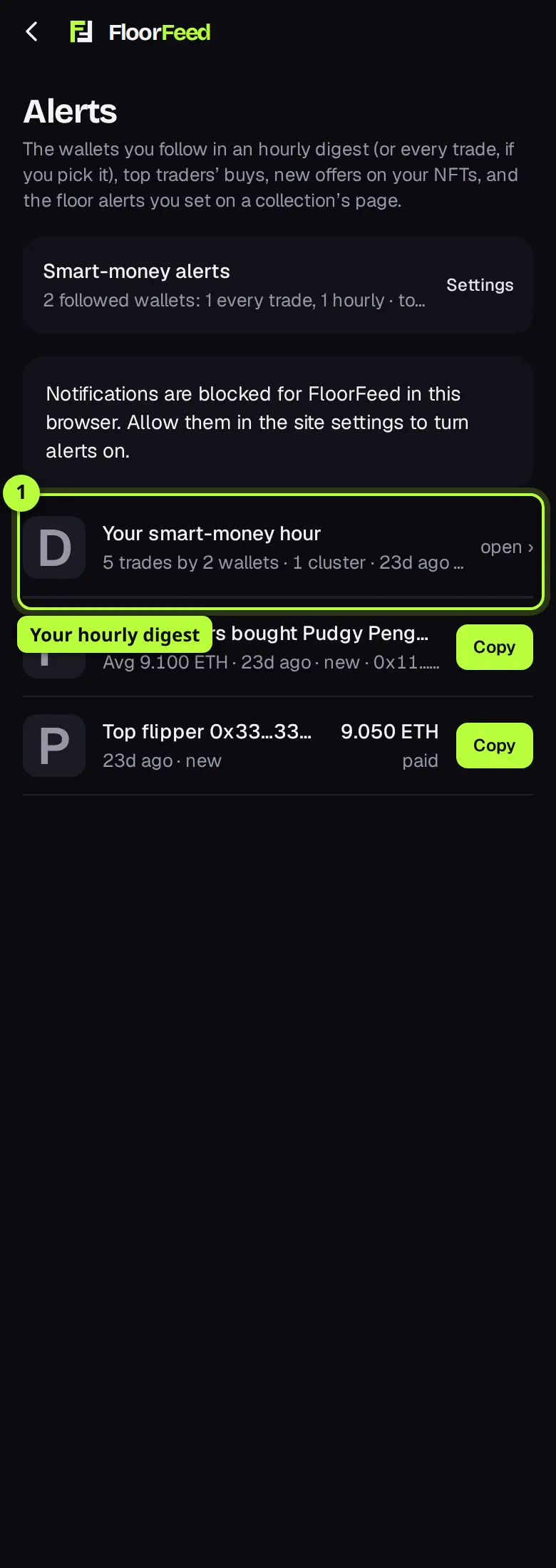
Open a digest
Your smart-money hour sums up an hour: how many trades by how many wallets, and any collection several top traders bought. Tap it to see its lines; each opens the NFT or the collection.
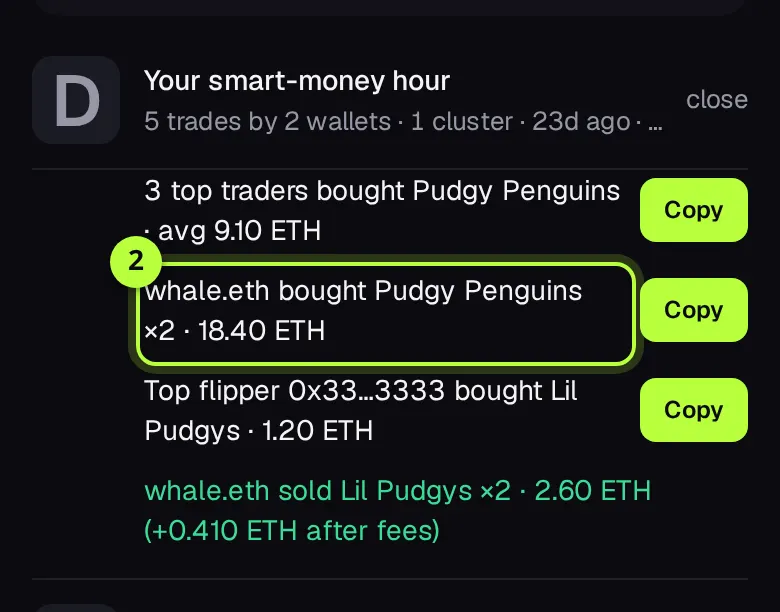
Copy a buy
Tap Copy on any buy (in a digest line, a cluster or a top trader's buy). The collection opens with the buy ready: in Real mode the buy sheet opens for you to check the price and sign; in Practice mode it buys the floor with practice money.
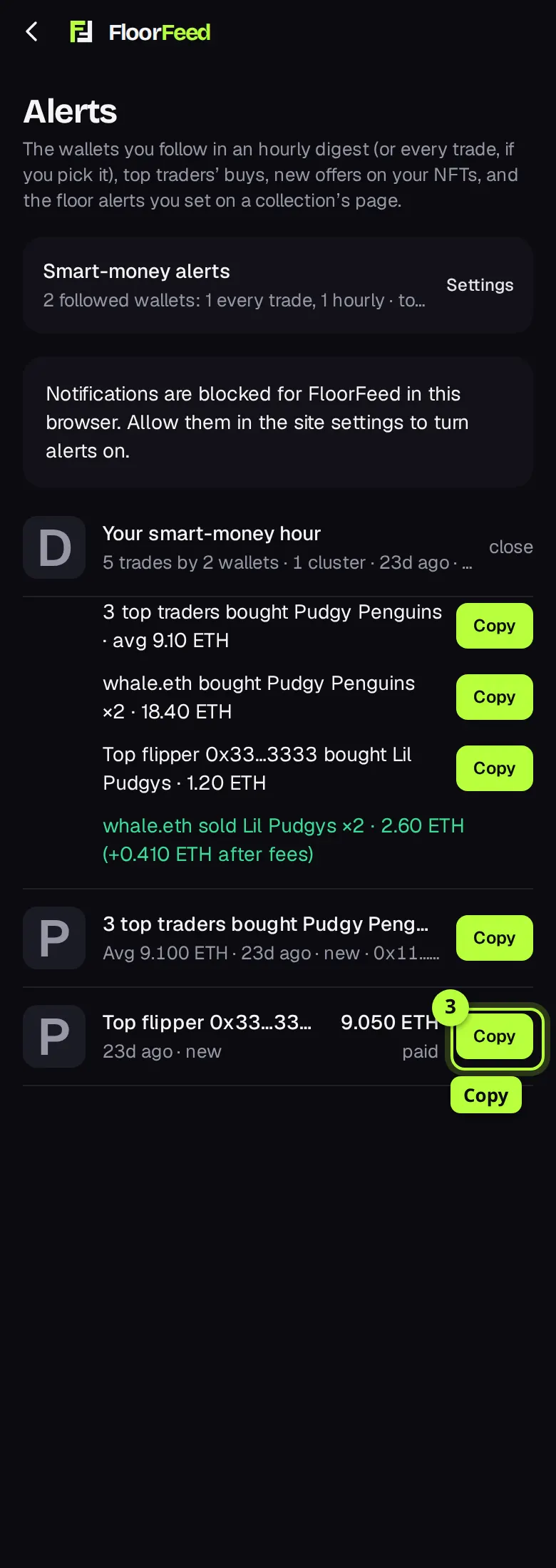
Open the settings
Tap Settings on the Smart-money alerts card. Under Wallets you follow, pick Hourly or Every trade for each wallet, or All hourly / All every trade for every one at once.
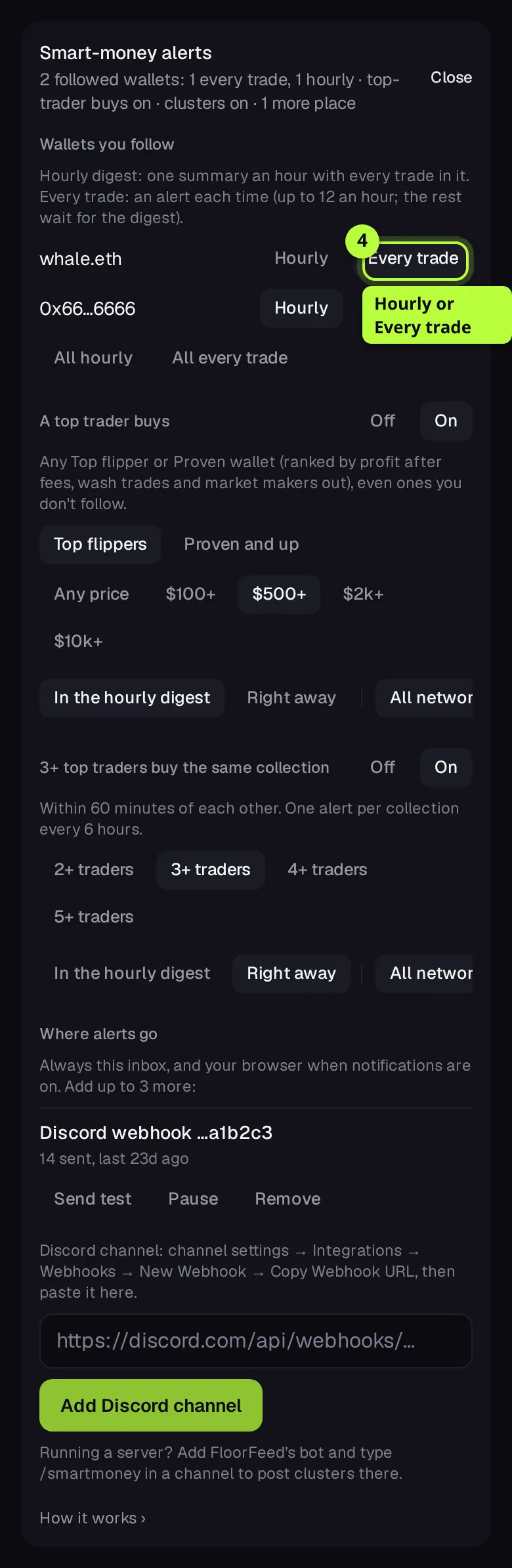
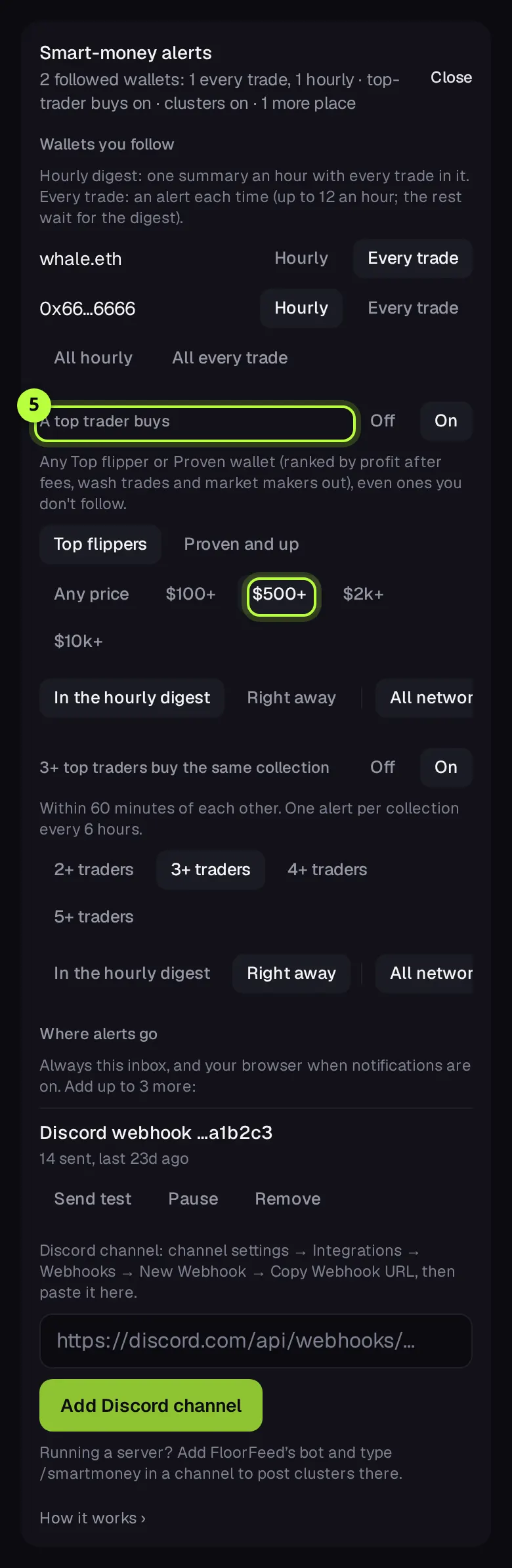
Turn on top traders' buys
Under A top trader buys, tap On. Pick Top flippers or Proven and up, and a price to start from: Any price, $100+, $500+, $2k+ or $10k+. Then In the hourly digest or Right away, and All networks or one network.
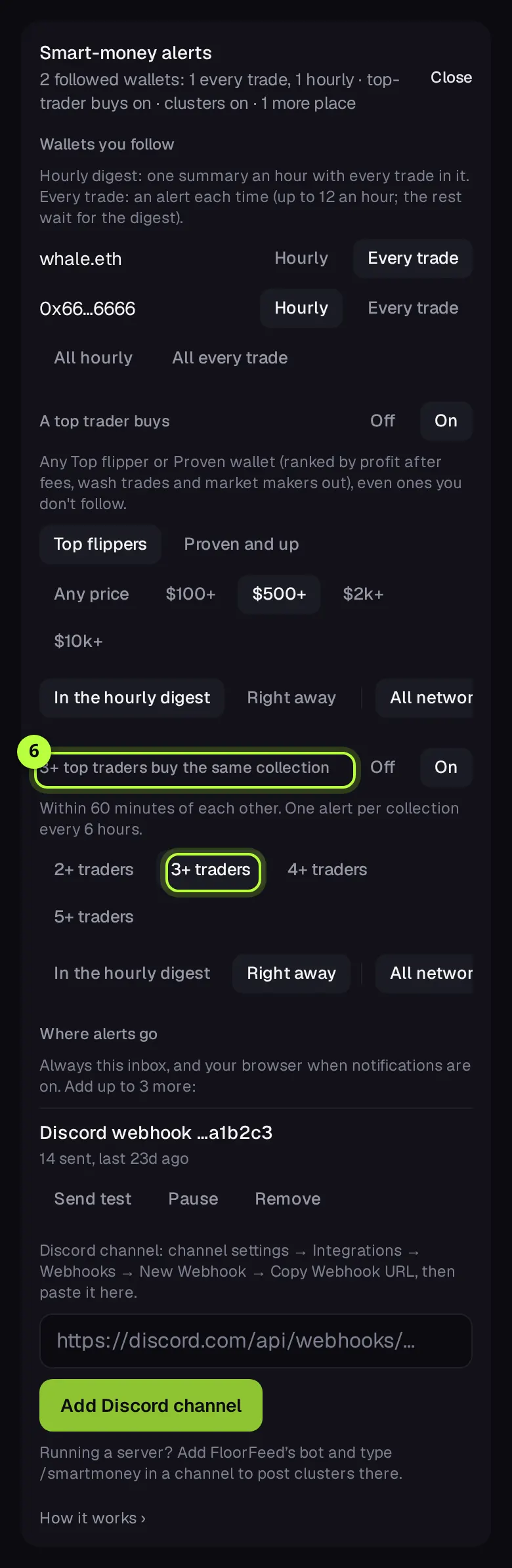
Turn on clusters
Under 3+ top traders buy the same collection, tap On and pick 2+, 3+, 4+ or 5+ traders. It starts on Right away, since it's rare.
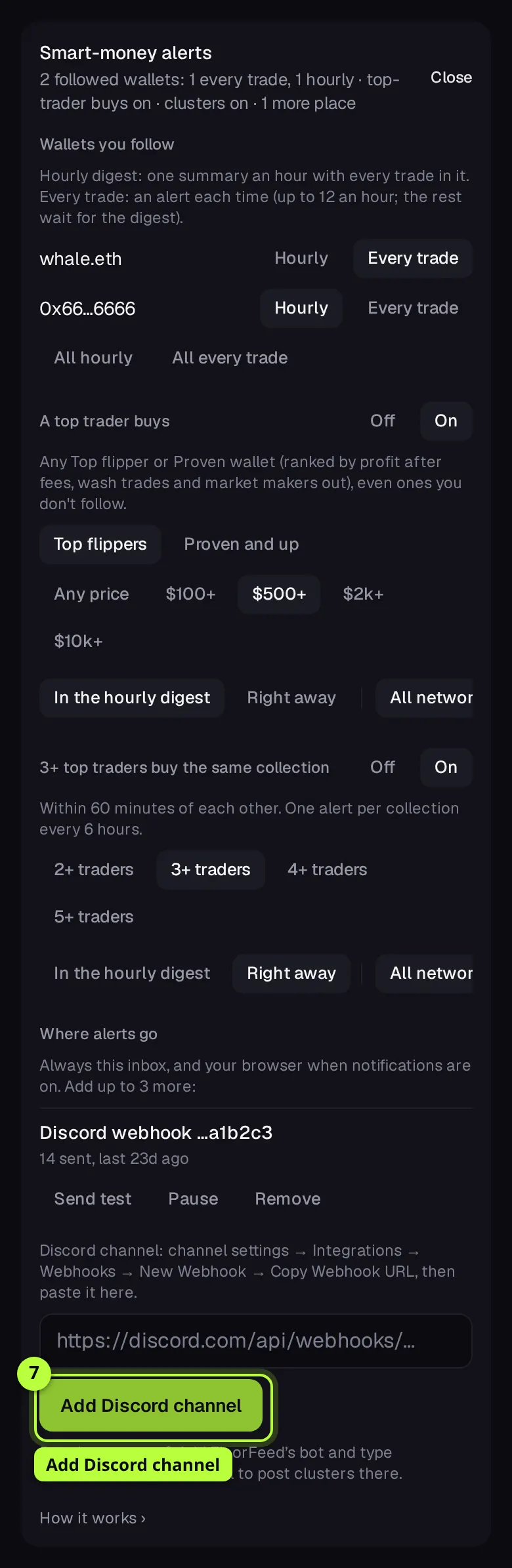
Send them to Discord
Under Where alerts go, paste a Discord channel's webhook link (channel settings → Integrations → Webhooks → New Webhook → Copy Webhook URL) and tap Add Discord channel. Then Send test.
A Discord server: /smartmoney
For a community: FloorFeed's bot posts clusters in a channel of your server. Nobody needs a FloorFeed account.
Add the bot
Add FloorFeed's bot to your server (any collection's Sales bot row → Add the FloorFeed bot to a server). It only asks to see channels, send messages and embed links.
Run /smartmoney
In the channel, type /smartmoney. Options: traders (2–10, default 3) and network. It needs Manage Server. From then on, it posts there each time that many top traders buy the same collection within an hour, with Open and Copy this buy buttons.
Stop or move it
/smartmoney stop:True in the channel stops it. A server has one smart-money channel: running /smartmoney in another channel moves it there.
Options
- Hourly | Every trade
- Per followed wallet. Hourly (the default) puts its trades in the hour's digest; Every trade alerts each one, up to 12 alerts an hour in all, after which the rest wait for the digest.
- Top flippers | Proven and up
- Who counts for A top trader buys: Top flipper wallets only (15+ flips, mostly winners, in profit), or Proven wallets too (5+ flips).
- Price
- A top trader buys: Any price, $100+, $500+, $2k+ or $10k+, in dollars at the time of the buy. A buy with no dollar price known isn't counted against a price.
- 2+ to 5+ traders
- Clusters: how many different top wallets must buy one collection within 60 minutes. One alert per collection every 6 hours.
- In the hourly digest | Right away
- For each rule: wait for the digest, or alert at once.
- All networks | one network
- For each rule: every network FloorFeed tracks, or just one.
- Send test | Pause | Resume | Remove
- For each place alerts go.
Fees and limits
- Alerts
- Free, on every network.
- Copy
- Opening the buy is free. If you buy, the usual buy fees apply, shown on the buy sheet before you sign.
- Up to 3 places besides the inbox and browser notifications.
- Every trade alerts at most 12 times an hour; the rest go in the next digest.
- A top trader buys keeps up to 60 buys an hour for the digest; more are left out.
- At most 5 alerts go to a Discord or Telegram place at once, so a burst never floods a channel; everything is still in your inbox.
- Trades older than 2 hours when FloorFeed first sees them (catch-ups) never alert.
- Traders show as their on-chain name (ENS or .sol) or a short address, nothing else.
- Telegram is coming: Connect Telegram appears once it's switched on.
Troubleshooting
- I don't get an alert for every trade any more.
- Since Nov 18 a follow starts as Hourly. Open Settings and pick Every trade for that wallet.
- My Discord channel says Paused.
- Discord said the webhook no longer exists, or FloorFeed's bot lost its permissions. Add a new webhook (or fix the bot's permissions and run /smartmoney again), then Resume.
- Send to my Discord DMs isn't there.
- It shows once your Discord is linked in Settings. FloorFeed's bot can only DM you if you share a server with it and allow DMs from server members.
- Copy opened the collection but didn't buy.
- In Real mode, Copy opens the buy sheet so you can check the price first; nothing is bought until you sign. The floor may have moved since the trader bought.
Questions
- Does Copy buy the same NFT?
- No. It buys from the same collection at today's floor (Real mode: you see the price and sign). The trader's NFT is usually sold already.
- Can FloorFeed trade for me automatically?
- No. Every buy is signed by you in your own wallet. FloorFeed never holds your keys or your NFTs.
- Who counts as a top trader?
- The Proven and Top flipper wallets of the feed and leaderboard: enough flips, mostly winners and in profit after fees, with wash trades and market makers left out.
Related
- Buy and sweep the floor: by count or by budget
- Making offers: on a collection, a trait or one NFT
- The order book and the Price | Order book switch
- The trade screen: waiting, done or didn't go through
Checked against FloorFeed on 2026-11-18.