Guides › Floor League
Floor League: fantasy NFT markets
A free fantasy game on NFT collections: make a team, join a league, draft 7 collections, set a lineup and a captain each week, and score from what their markets really do.
What it is
Floor League works like fantasy football, with NFT collections as the players. Your league drafts a roster of 7 collections each: 3 blue chips (BLUE), 3 small caps (SMALL) and 1 FLEX (either). Each week you start 5 of them: a Captain, two Blue chips and two Small caps. They score points from what their markets really did that week: real sales, buyers, volume against their normal, floor moves and Breakouts days.
You play head to head against another team in your league each week, for 4 weeks, then the top 4 play a playoff week. Nothing is bought or sold. Entry is free, and Floor League is for adults 18 and over.
Where to find it
Floor League has its own site: fantasy.floorfeed.io. On floorfeed.io, open your account menu and tap Floor League. You sign in with the same FloorFeed account.
Your league's page has four tabs: My Team, Matchup, Collections and League. On a phone they're in a bar at the bottom; on a computer, across the top. From the Floor League home, tap Open your league or a tab's name under Your league.
Step by step
Make your team
On the Floor League home, type a team name (3 to 32 letters). If you hold a Floor Feeders, Raving Apes, Jack's Crew or Base Pass NFT, pick it under Manager card: it becomes your team's face. Tick I'm 18 or older, then tap Make a team.
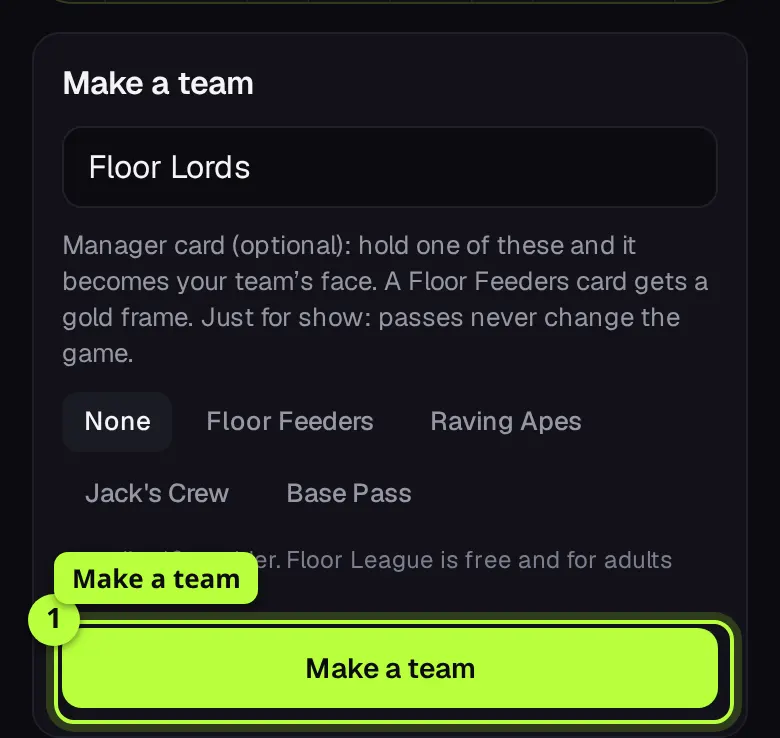
Tip: A manager card is just for show. It never changes the game.
Join a league
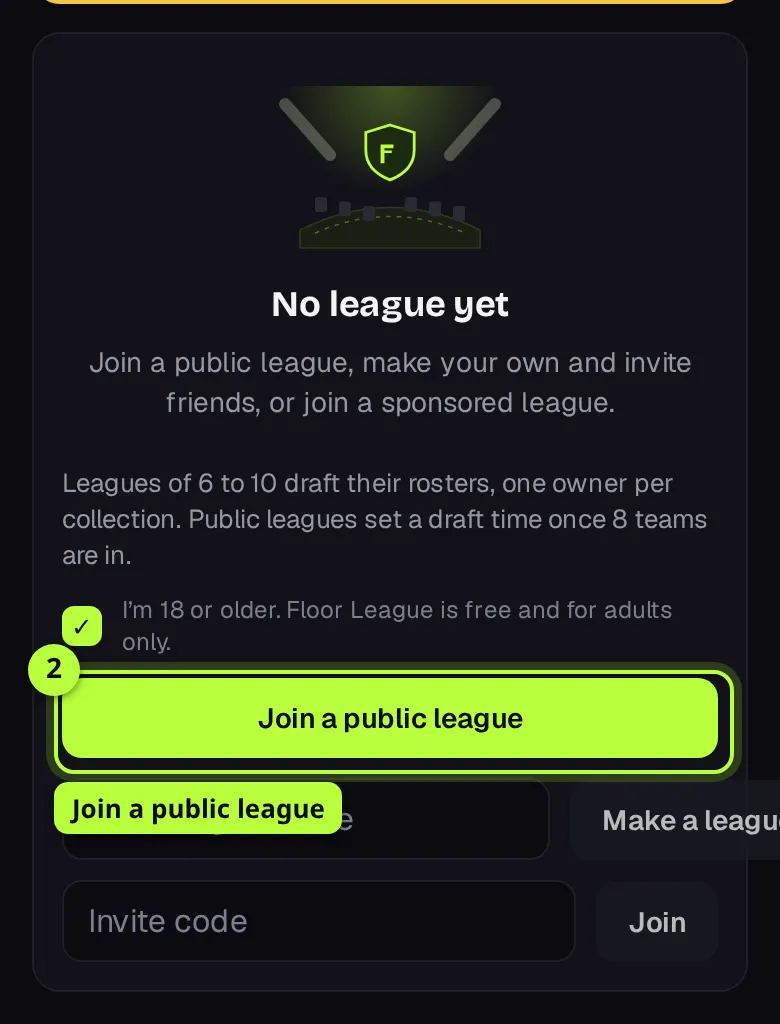
Tick I'm 18 or older again, then pick one: Join a public league (it sets a draft time once 8 teams are in), type a name and tap Make a league to play with friends, or type an Invite code and tap Join. An invite link (fantasy.floorfeed.io/join/…) opens a page with Join the league on it. Sponsored leagues for holders of a collection are listed under SPONSORED LEAGUES (HOLDERS ONLY).
Fill your queue before the draft
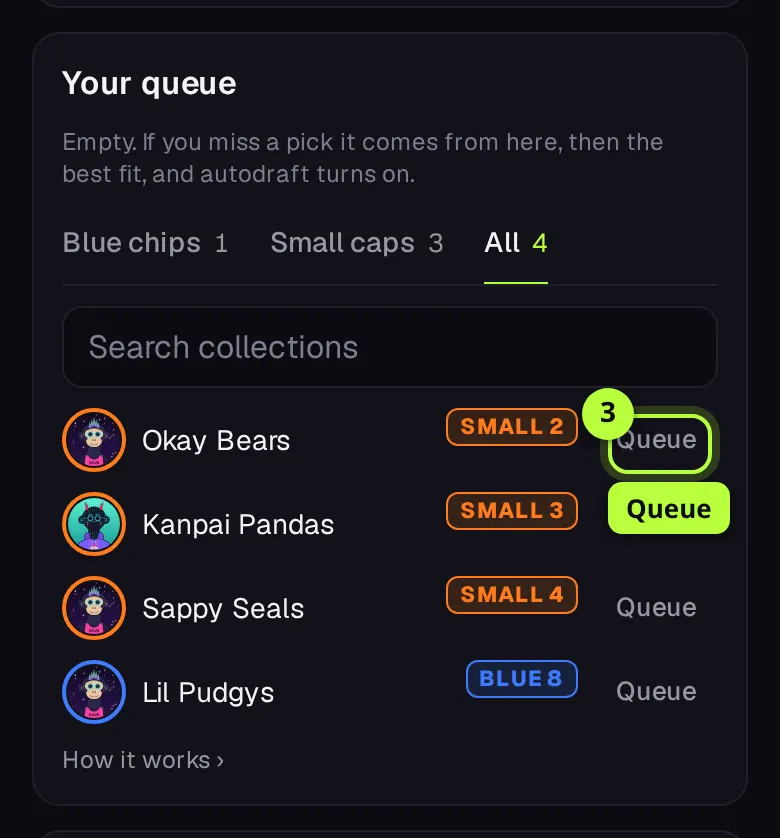
Your league's page shows how many teams are in and when it drafts. Under Your queue, pick Blue chips, Small caps or All, and tap Queue on the collections you want, in order. If you miss a pick, it's made from your queue first. If you made the league, the Your draft card sets the pick clock (30 sec, 60 sec, 90 sec or the slow draft) and the Draft time: tap Save draft.
Draft on your turn
When the draft starts, the page turns into the draft room. It says who's ON THE CLOCK, what YOU NEED, and BLUE, SMALL and FLEX spots filled so far. The list opens on Can draft: only collections that fit a spot you still have. When it says You're up, tap Draft on the one you want. It's a snake draft of 7 rounds, and each collection belongs to one team in the league.
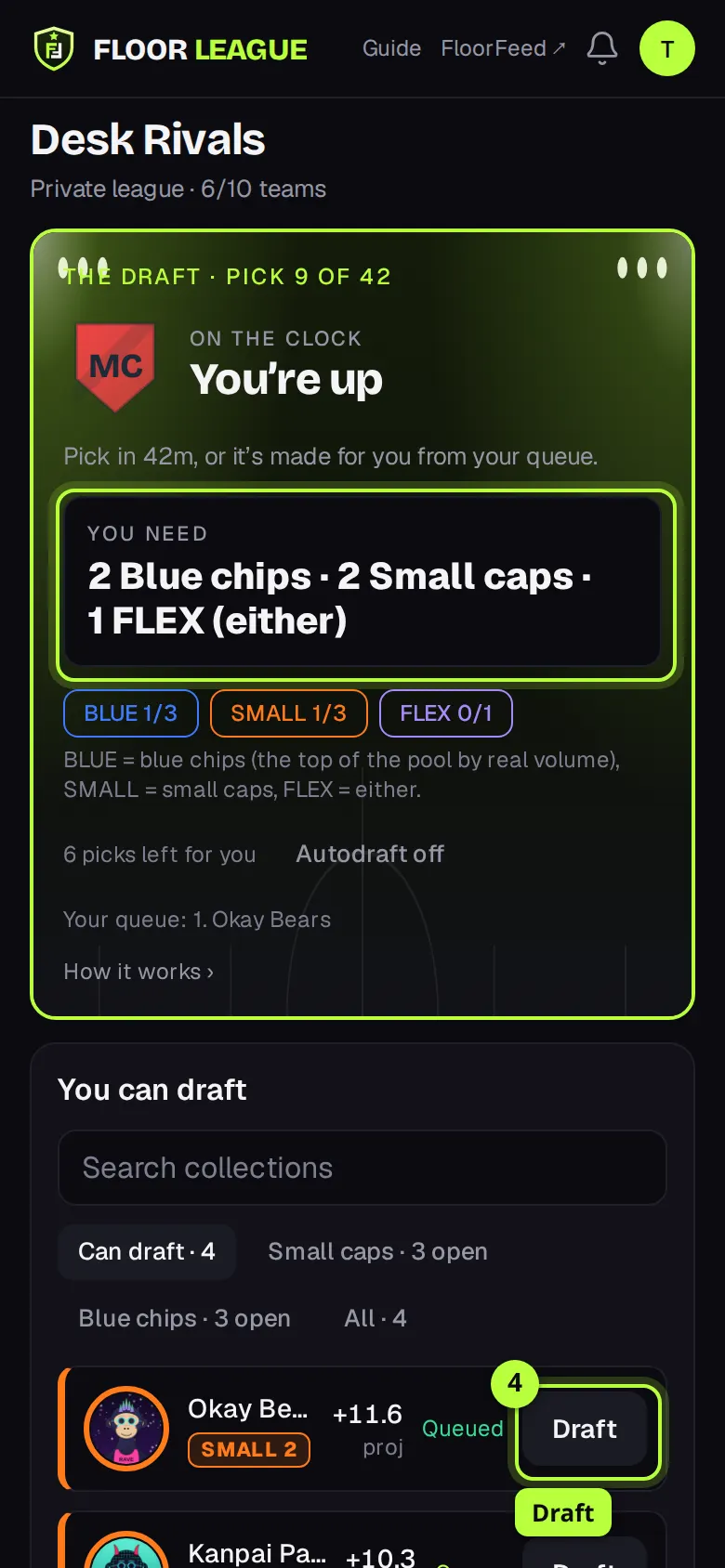
Tip: Tap a collection's name for its card: its points week by week, floor and how often it's drafted.
Set your lineup
After the draft, open My Team. The Week lineup card has five slots: CAPTAIN (x2), two BLUE CHIP (x1) and two SMALL CAP (x1.5). Tap a slot to pick from your roster, or tap Best projected lineup to fill it by projection. The number at the top right is the lineup's projected total. Tap Save lineup. The rest of your roster is the bench.
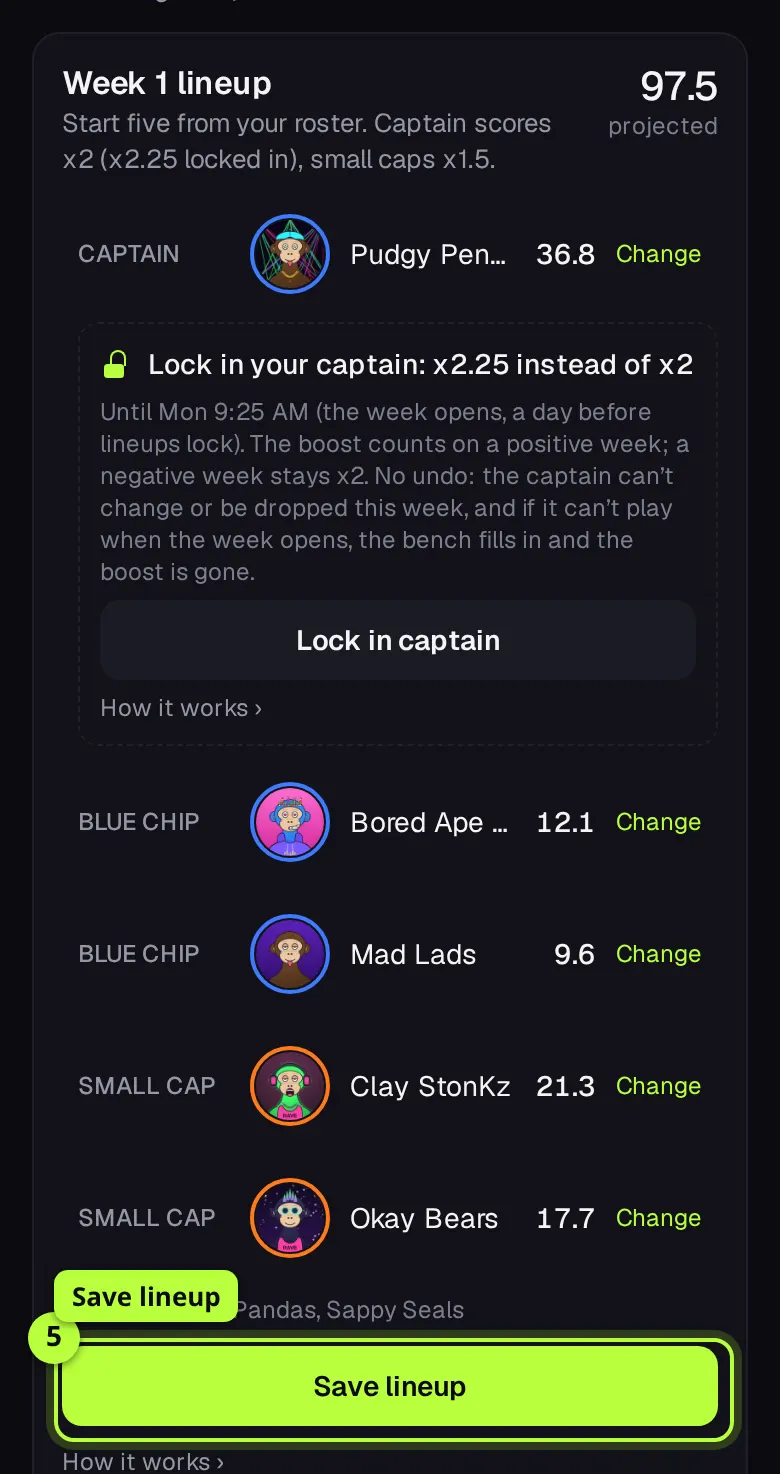
Tip: Lineups lock on Tuesday at 00:00 UTC. If you don't change it, last week's lineup carries over.
Lock in your captain (optional)
Under the Captain row, tap Lock in captain (or Save lineup and lock in captain if you changed something), then Yes, lock in <name>. A locked-in captain scores x2.25 instead of x2 on a good week. A bad week still counts x2. There's no undo: that captain can't change or be dropped that week.
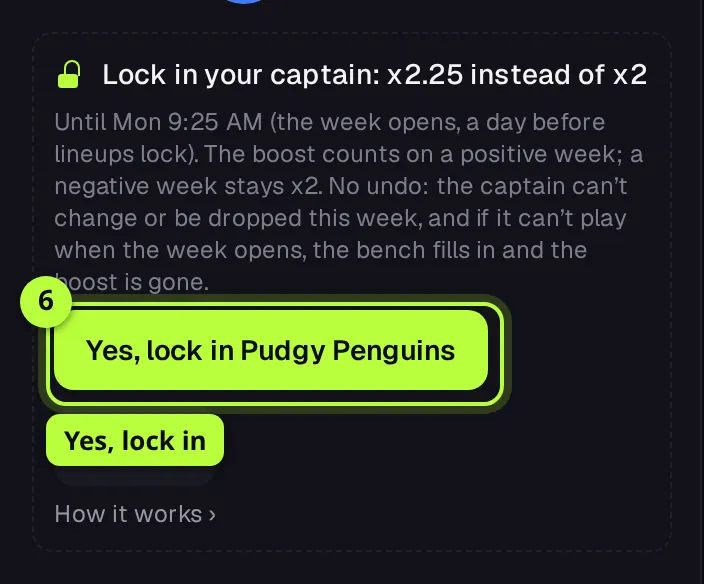
Tip: Lock-in closes when the week opens, Monday 00:00 UTC, a day before lineups lock.
Watch your week score
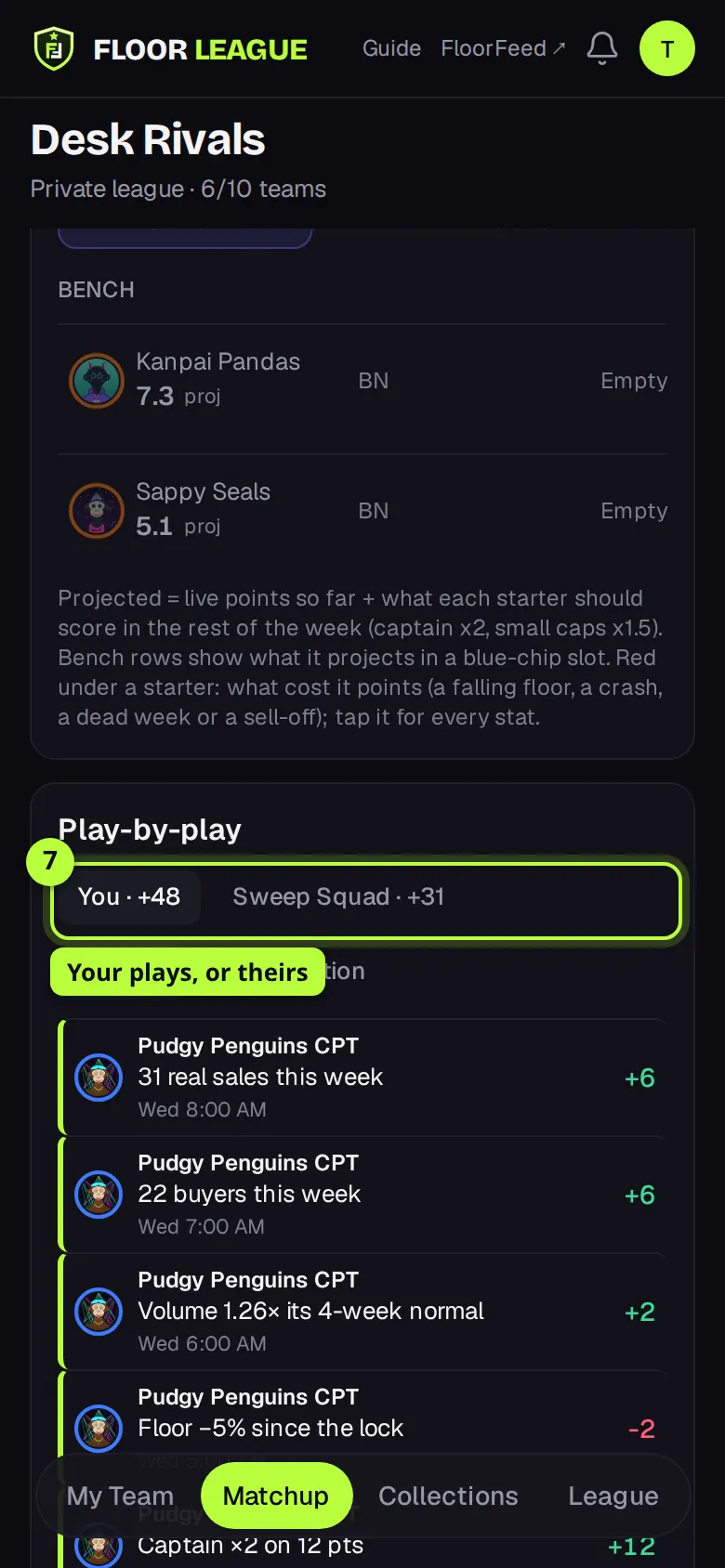
After Tuesday's lock, My Team shows Week N live with each starter's points so far and what made them, and points off in red. The Matchup tab puts your team next to your opponent's, slot by slot, with each side's projection and chance to win. Under it, Play-by-play lists every scoring move, newest first; tap By collection to group them, or your opponent's name to see their plays.
Read the recap and share it
When a week ends (Monday 00:00 UTC), the WEEK N RECAP card is at the top of My Team and Matchup: your result, every game, the top scorer, the best pick and the biggest upset. Tap Share this week › to make a card with your result, then Post on X or Copy link.
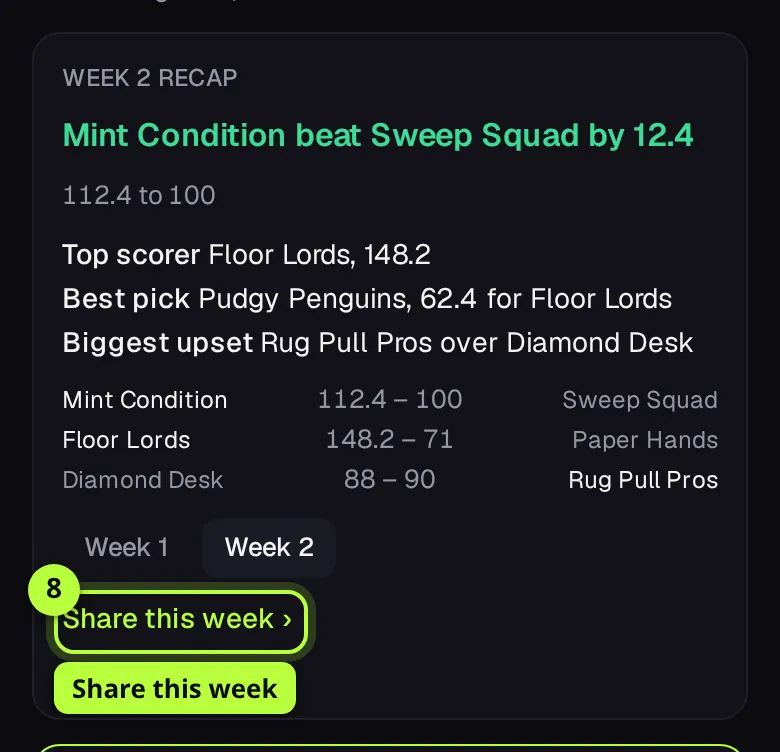
Tip: Nothing is posted for you. Only Share makes a link at all.
Options
- This week's swap
- After the lock you get one swap a week: a bench pick takes a lineup slot of its tier (not the Captain). It scores from the next hour.
- Add & drop
- Once a week, in Collections, tap Add on a free agent and pick who to drop. Between Monday 00:00 UTC and the lock it happens at once. After the lock it's a waiver claim (Make the claim) that runs when the next week opens, worst record first.
- Autodraft
- In the draft room, the Autodraft chip makes your picks from your queue, then by need. A missed pick turns it on; tap it again to pick yourself.
- Team photo
- On My Team, tap Add photo (or Change) on your team card to use an NFT from your linked wallets, your FloorFeed avatar, or the default crest.
- Floor Calls
- A Floor Call on one of your lineup's collections adds 6 points on a hit and takes 2 on a miss or a withdrawn call. Your first 3 a week count.
- Alerts
- The bell at the top of fantasy.floorfeed.io. Tap Turn on notifications for your pick, your draft, the lineup lock, waivers and results, and switch kinds off under What to send.
- Streaks
- My Team's Streaks card counts the weeks in a row you set your own lineup, and your current run of wins or losses. They add no points.
- Trophies and Founding Manager
- Win a week or the season and you earn a soulbound trophy on Base. Be in a league before Season 1 starts and you earn the Founding Manager badge. Both are free to claim: you sign nothing and pay nothing.
Fees and limits
- All networks
- Free. There's no entry fee, nothing to buy, and nothing to sign. Trophies and the Founding Manager badge are sent to your wallet for free.
- Which collections play
- Collections on every network FloorFeed tracks, Solana included. You never trade them in the game: Market on FloorFeed ↗ on a collection's card opens its market page, where the usual trading fees apply.
- Leagues have 6 to 10 teams. A public league sets its draft time once it has 8. One team per account per season, and you can make one league a season.
- A roster is 7 collections: 3 BLUE, 3 SMALL and 1 FLEX. Each week 5 start: Captain x2, two Blue chips x1, two Small caps x1.5.
- The season is 4 weeks head to head, then a playoff week for the top 4. Season 1 starts Monday, November 23. Joining a league closes when week 3's lineups lock.
- Weeks run Monday 00:00 UTC to Monday 00:00 UTC. Lineups lock Tuesday 00:00 UTC. One swap after the lock and one add/drop a week.
- Pick clocks: 30, 60 or 90 seconds for a live draft, or an hour a pick for the slow draft. Public leagues use 90 seconds. Your queue holds up to 50 collections.
- A collection can play when it had a floor read in the last 6 hours, at least 10 sales in 7 days, a floor of $5 or more and a week of history. The top 50 by real volume are blue chips.
- You must be 18 or older.
Troubleshooting
- The buttons are greyed out.
- Tick I'm 18 or older first. Make a team and Make a league also need a name of at least 3 letters, and Join needs an invite code of at least 6.
- It says "Season 1 is closed to new teams."
- Teams and leagues close when week 3's lineups lock. Season 2 opens after the playoffs.
- My league hasn't drafted yet.
- A league needs at least 6 teams to draft. Its page says when it drafts and, if it can't yet, why. A private league's owner can tap Start draft once it has 6.
- My pick was made for me.
- Your clock ran out. The pick came from your queue, or the best fit for your open spots, and Autodraft is now on. Tap the Autodraft chip to turn it off.
- A collection in the draft list is greyed out.
- It doesn't fit a spot you still have. The row says why, for example Can't draft: your BLUE spots and FLEX are full.
- One of my starters scored 0.
- Either it couldn't play that week (the bench filled in), or a wallet linked to your account bought or sold it during the week. Fair play makes that pick score 0 for you.
Questions
- Does it cost anything?
- No. Floor League is free, and nothing in it is bought, sold or signed.
- Do I need to hold the collections I draft?
- No. You draft the collection, not an NFT. Your score comes from its market.
- Can other managers see my lineup?
- Not until it locks on Tuesday. Before that they see only your projected total.
- Does a pass NFT help me win?
- No. A manager card and its badges are for show. They never change the game.
Related
- How scoring works
- Play-by-play: how each point was scored
- How projections work
- Live drafts
- Your draft queue
- Captain lock-in
- Collection cards
- Weekly recap and share card
- Alerts
- Streaks
- Season trophies
- The Founding Manager badge
Checked against FloorFeed on 2026-11-08.